
Telegram anonymous admin is a group admin right called Remain Anonymous that makes your messages appear under the group’s name and photo and removes you from the member list, so regular members cannot tell who is moderating. To turn it on, open the group, tap its name, tap Edit, then Administrators, choose the admin, switch on Remain Anonymous, and tap Done. It hides you only from regular members: the owner, other admins, and Telegram can still see you, a custom admin title can still reveal you, and bots will not recognize your commands until you switch it off.
What Telegram Anonymous Admin Actually Does
Telegram added this feature in 2020, alongside search filters and channel comments. In its announcement on the official Telegram blog, the team said anonymous admins are hidden in the member list and that their messages are “signed with the group name, similar to channel posts.” The same post framed the feature as a safety tool for people who organize protests, which tells you the original goal: protect moderators from being singled out by the people they moderate.
In practice, three things change when Remain Anonymous is on:
- Your messages show the group’s name and profile photo instead of yours.
- Regular members no longer see you in the member list.
- The group itself becomes your public voice, much like a channel.
That last point matters more than it sounds. Members stop seeing a person and start seeing an institution, which is exactly why some communities love the feature and others distrust it.
While turning on anonymity removes you specifically from the public view you might want to take privacy a step further. If you run a sensitive community you can actually hide Telegram group members entirely so no outside observers can scrape your user base or see who is participating.
Another common question is whether this feature applies to your past activity or forwarded texts. Anonymity is not retroactive. Any messages you sent before turning on the switch will still display your real name and profile picture permanently. You will need to manually delete those older messages if you want a clean slate. However once the feature is active your privacy is fully protected even outside the group. If a regular member forwards your anonymous announcement to another chat or to their saved messages the forwarded header only displays the group name. It does not contain any hidden links to your personal profile ensuring your identity remains entirely secure.
Who Can Still See You
“Hidden from members” does not mean hidden from everyone, and this is where most people get surprised. Here is who can still tell it’s you.
| Who is looking | Can they tell it’s you? |
|---|---|
| Regular members | No. They see the group name and photo, and you have no entry in the member list |
| Other admins | Yes. Anonymous admins stay visible to other admins |
| The group owner | Yes. The owner appointed you in the first place |
| Telegram | Yes. It is still your normal account |
| Bots | They see a placeholder sender, not you |
A reply in Telegram’s public bug tracker confirms the member list behavior: anonymous admins do not show up there except to other admins. So if your group has only one or two admins, anonymity protects you less than you might expect. Members can often guess who is moderating just from the pattern of who is active.
How to Turn On Telegram Anonymous Admin
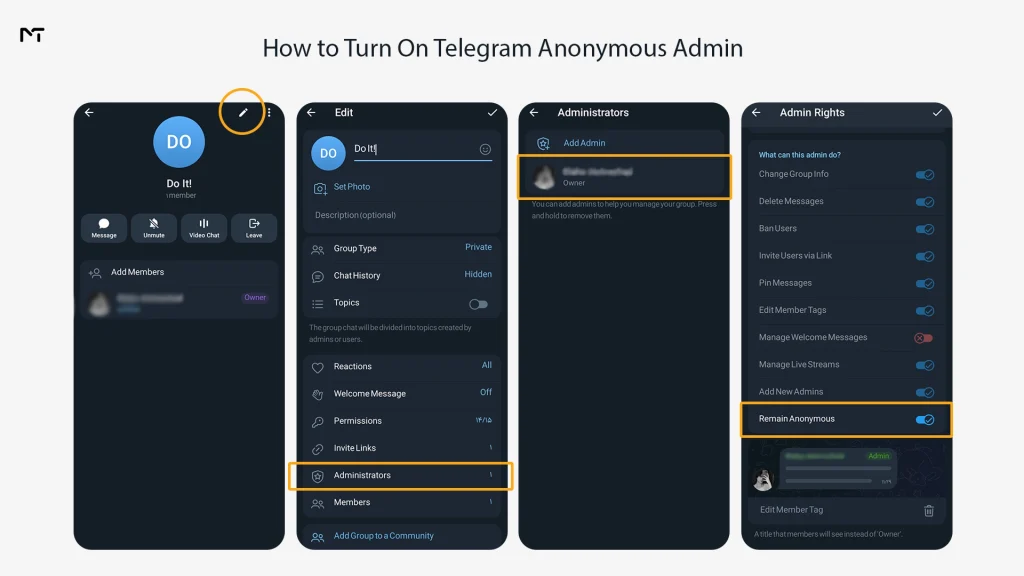
The setting lives inside admin rights, so the steps depend on whether you own the group or were appointed by someone else. The labels differ slightly between Android, iOS, and Telegram Desktop, but the path is the same: group settings, Administrators, the admin, then the Remain Anonymous switch.
If You Own the Group
- Open the group and tap its name at the top.
- Tap Edit (the pencil icon on mobile).
- Tap Administrators.
- Tap your own name, or the admin you want to hide.
- Turn on Remain Anonymous.
- Tap Done to save.
Send a short test message afterward. If you have a spare account, look at the group from it. That is the only reliable way to see exactly what members see.
If You Are an Admin but Not the Owner
Anonymity is part of your admin rights, so it is set from the Administrators screen and not from your own profile. If you open your admin settings and the switch is missing, ask the person who manages admins in your group to turn it on for you. Also make sure your Telegram app is up to date, since older versions can hide newer admin options.
How to Turn Off Remain Anonymous
Turning it off takes the same path in reverse: open the group, tap its name, then Edit, then Administrators, choose the admin, and switch Remain Anonymous off. Tap Done.
You will need to do this more often than you expect. If you want to speak as yourself for a moment, add a bot, or react to a message, the cleanest approach is to switch it off, do the thing, and switch it back on. Telegram treats reacting as something an anonymous admin is not supposed to do, so do not expect reactions to work while the switch is on.
Why Bots Ignore Your Commands When You Are Anonymous
This is the problem that sends most admins searching, and it is rarely explained well. Bots do not see you when you are anonymous. They see a placeholder.
According to Telegram’s Bot API documentation, messages from anonymous group admins reach bots as sent by the user @GroupAnonymousBot, with the ID 1087968824, instead of your account. A moderation bot checks whether the sender is an admin, finds a placeholder that is not, and quietly ignores your command. Nothing is broken. The bot is just doing what it was built to do.
Here is how to fix it:
- Turn off Remain Anonymous for the admin account you use to give bot commands.
- If the bot was added while you were anonymous, remove it and add it again after anonymity is off.
- Give the bot the admin rights it needs, such as deleting messages or restricting users.
- Run your command and confirm it works.
- Turn anonymity back on only if you are fine with commands failing again.
If you need to add Telegram bots to groups while using this feature remember that the initial setup must happen from a visible account. This is critically important when you decide to use a Telegram bot for anti spam protection in your group or rely on automated Telegram CAPTCHA verification bots because these security tools require verified admin permissions to function correctly.
Some bots add a verification step where you tap a button to prove you are an admin. Others do not, so test the specific bot you rely on rather than assuming.
What Still Gives You Away
Even with the switch on, a few things can reveal who you are. Most of them are small, and all of them are easy to avoid once you know about them.
Custom admin titles. If you have a custom title, it still appears next to your anonymous messages. Telegram’s team has said this is intentional, because it lets members tell several anonymous admins apart. The catch is obvious: if every admin has a unique title, the title is basically a name tag. Ask the owner to remove titles from anonymous admins, or give everyone the same one, such as Moderator.
Direct messages. Anonymity applies inside the group. If you message a member privately about a moderation decision, they see your normal account.
Live voice chats. Participating in live audio sessions requires extra attention. When you join a voice or video call in your group Telegram will ask how you want to appear. You must manually select the group profile instead of your personal account before entering the room. Forgetting this step will instantly broadcast your real identity to everyone listening and completely break the anonymity you maintained in the text chat.
Small admin teams. With one admin, members will work out who it is. Anonymity works best when there are several moderators.
Writing style and timing. People notice who answers at what hour and how they phrase things. If you care about staying hidden, keep that in mind.
To see what other admins can see, post one moderation action and then check the Recent Actions log from a second admin account. Do this once and you will know exactly how visible you are.
Anonymous Admin vs Sign Messages vs Channel Posts
People mix these up constantly, because all three involve a name appearing or not appearing next to a message. They are different features in different places. The confusion usually stems from not fully understanding the core Telegram group vs channel differences since groups are built for two way conversation while channels function as one way broadcasting tools.
| Feature | Where it works | What members see | Best for |
|---|---|---|---|
| Remain Anonymous | Groups | The group’s name and photo | Moderators who do not want to be personally targeted |
| Default channel posts | Channels | The channel’s name | Brands and broadcasts |
| Sign Messages | Channels | The admin’s name, with no link to their profile | Showing which team member wrote a post |
So can you be an anonymous admin in a channel? You already are. According to Telegram’s channels FAQ, channel posts are signed with the channel’s name and not yours, and the owner can optionally turn on admin signatures that show only the admin’s name with no link to the profile. In a channel, the setting you care about is Sign Messages, and you want it off.
Should You Use Telegram Anonymous Admin? Trust and Moderation Tips
It depends on what problem you are solving. Anonymity is useful when moderators get harassed, when arguments in the group turn personal, or when you run a large community with a rotating team. It is a poor fit when members need to know who is accountable, or when you are the only person running the group.
“According to recent community management case studies groups that implement anonymous moderation see up to a sixty percent decrease in direct harassment toward staff members. However these same groups require much clearer public guidelines to maintain user engagement since members often prefer interacting with real humans over a faceless institution.”
Aaron Mills Digital Community Architect
The real risk is anonymous power without any process behind it. Members who cannot see who is deleting posts will start to wonder, and that suspicion hurts a community more than any single moderation call. Anonymity is just one layer of community management. If arguments frequently get out of hand combining a hidden admin profile with Telegram slow mode gives people time to cool off before replying. For larger communities facing coordinated attacks you will eventually need to implement advanced Telegram group moderation techniques to handle complex issues without relying solely on manual deletions.
A few habits keep it healthy:
- Pin a rules message that says moderators act under the group’s name and explains how to appeal a decision.
- Keep the owner or a lead admin visible for announcements, so the group still has a human face.
- Keep a written list of who holds admin rights outside Telegram, so accountability does not depend on the switch.
- Limit anonymity to the moderators who face real pushback, and review the list now and then.
- Set roles early if your community is growing fast, because untangling admin rights later is much harder than assigning them cleanly at the start.
If you manage a business or paid community, think about it from the member’s side. People pay more readily for a group that feels well run and transparent about its rules than one that feels controlled by invisible hands.
FAQ
Can members see who the anonymous admin is?
No. Regular members see the group’s name and photo, and an anonymous admin does not appear in the member list. The owner and other admins can still see who holds admin rights.
Does a custom title reveal an anonymous admin?
It can. Custom titles still show on anonymous messages so people can tell anonymous admins apart. If each admin has a different title, the title can point to one person. Remove it or use one shared title.
Can I be an anonymous admin in a channel?
Channel posts already appear under the channel’s name by default. If you do not want your name shown, make sure Sign Messages is turned off in the channel settings.
Why can’t my bot see me as an admin?
Because anonymous admin messages reach bots from @GroupAnonymousBot instead of your account. Turn off Remain Anonymous, add the bot again if needed, and run your commands.
How do I turn off anonymous admin?
Open the group, tap its name, tap Edit, choose Administrators, select the admin, switch off Remain Anonymous, and tap Done.
Does my Telegram Premium status reveal my identity?
No. Your premium badge custom colors or animated emoji statuses will not show up on messages sent while remaining anonymous. The system completely masks your personal account features and only displays the default group identity.
Final Thoughts on Telegram Anonymous Admin
Telegram anonymous admin is a moderation tool, not a disguise. It keeps your name off messages and out of the member list, which helps when moderating gets personal, but it does not hide you from the owner, other admins, or Telegram, and it breaks most bot commands until you turn it off. Set it up for the people who need it, remove custom titles, test with a second account, and give members a clear way to understand who is accountable.
Thanks for reading, and I hope this saved you a few trial and error rounds. If you are building or growing a Telegram community and want help with the setup, message @membertelsupport.














Leave a Reply