
To track Telegram channel subscribers with UTM links, pair them with a separate named invite link for every place you promote the channel, and put the UTM tags only on the page that sends people to that invite link. Telegram counts how many people join through each invite link, while Google Analytics counts the visits and clicks that happen before the join. Put those two numbers side by side and you can see which post, ad, partner or newsletter brought real subscribers. This guide shows the exact setup, a naming system that keeps your reports readable, and the mistakes that quietly break the data.
Telegram Subscriber Tracking at a Glance
| Method | What it tells you | What it cannot tell you | Cost |
|---|---|---|---|
| Named invite links | How many people joined through each source | What those people did before joining | Free |
| UTM links on your own page | Which campaign sent visitors and clicks to your join button | Who actually completed the join | Free with GA4 |
| Bot start links | Which source sent users to your bot | Anything about channel joins | Free |
| Third party tools | Extra reports such as how long people stay | Nothing you cannot also approximate by hand | Free or paid |
Why UTM Links Alone Can’t Track Telegram Channel Subscribers
UTM tags are small labels added to a web address, such as utm_source and utm_campaign. They work because a analytics script on a page you own reads them when the visitor arrives. Joining a Telegram channel does not happen on a page. It happens inside the Telegram app, where no script of yours is running, and Telegram’s own channel statistics do not read UTM tags. If you add them to a t.me link, they simply go nowhere.
That is why so many UTM guides leave people confused. The tags are useful, but only on the part of the journey you control, which is the web page before the join. The join itself is tracked by something else: the invite link.
There is one more detail that catches people out. A public channel has a plain address like t.me/yourchannel, and every visitor uses the same one, so Telegram has no way to tell sources apart. Invite links solve this because each one is its own address with its own counter, even when the channel is public. Use the plain username link for people who are just browsing, and use invite links everywhere you want an answer.
“Our team wasted roughly five thousand dollars optimizing campaigns based purely on web clicks before we realized the tracking gap. We assumed people were joining because Google Analytics showed high conversion rates on our landing page. The day we matched specific UTM parameters to unique Telegram invite links we discovered our actual app joins were completely disconnected from web clicks. Implementing this dual tracking system slashed our true acquisition cost by over sixty percent.” says David Reynolds Lead Acquisition Strategist.
This is the foundation of everything else in this guide, and it takes about a minute per link. Here is the process on a phone, and the labels may differ slightly between app versions.
- Open your channel and tap its name at the top.
- Tap Edit, then open Invite Links.
- Tap Create a New Link.
- Give it a name, using the naming system in the next section.
- Choose your limits, or leave them off.
- Save it, copy the link, and use it in exactly one place.
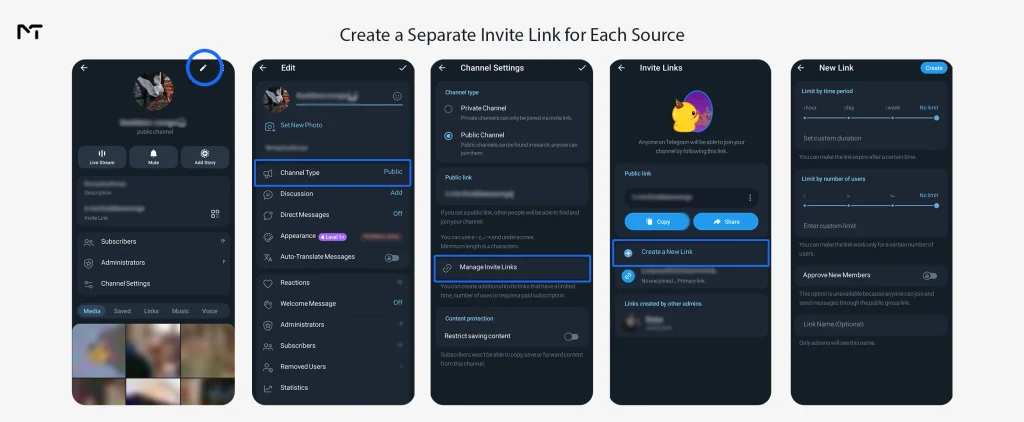
The name field matters more than it looks. Telegram’s developer documentation says a link name can be up to 32 characters, and that name is what you will read later when you review your links, so it has to tell you the source at a glance.
You will also see three optional settings. A time limit makes the link expire on a date, which suits a promotion with an end date. A user limit stops the link working after a set number of members. Request Admin Approval makes every person wait for you to accept them, and Telegram does not let you combine that with a user limit. For plain tracking you can leave all three off.
Once people start joining, open the same Invite Links screen and you will see how many people joined through each link. That counter is the number you are tracking. One link, one place, one counter. If you paste the same link into an Instagram bio and a newsletter, the counter mixes both and the whole point is lost.
How to Name Your Invite Links So Reports Stay Readable
A messy naming system is the reason most tracking setups die after a month. Choose one pattern before you create the first link and never change it. The pattern that works well within the 32 character limit is source, then medium, then campaign, separated by underscores.
Notice how the breakdown above uses short abbreviations instead of full words. Because Telegram cuts off link names at 32 characters, spelling out full platform names like Instagram or Newsletter wastes valuable space. Shortening them to two or three letters leaves plenty of room to describe the specific placement and month. When you build your links, use that exact full string as your campaign value so your website script and your Telegram admin list speak the same language. The table below shows how this pattern adapts across different traffic sources.
| Where you promote | Link name (also your utm_campaign value) | utm_source | utm_medium |
|---|---|---|---|
| Instagram bio | ig_bio_spring | ig | bio |
| Email newsletter | nl_email_march | nl | |
| Partner channel post | partner_post_may | partner | post |
| Paid social ad | fb_paid_launch | fb | paid |
Keep everything in lowercase. Google’s guidance on campaign URLs says the values are case sensitive, which means Newsletter and newsletter show up as two different sources in your reports. Also keep a simple spreadsheet with the link name, the full invite URL, the date you created it, where you posted it, and what it cost. Six months from now you will not remember which link went where, and that sheet is the answer.
You can also turn any of these invite links into a QR code for printed material, and the counter works exactly the same way, as long as that code is used in only one place.
Method 2: Use UTM Links on Your Website or Landing Page
If your traffic arrives from ads, social posts or emails that point to a web page first, this is where UTM tags finally earn their place. The flow looks like this. A visitor clicks a tagged link, lands on your page with the UTM values in the address, Google Analytics records the source and campaign, and then the visitor taps your join button, which leads to the matching invite link.
Here is a tagged link for the newsletter row in the table above:
https://yoursite.com/join/?utm_source=nl&utm_medium=email&utm_campaign=nl_email_marchIf you run several campaigns, you do not need a separate page for each one. A short script can read the campaign from the address and swap in the right invite link. Because the script matches on utm_campaign, this is why the table above uses the full link name as that value.
<a id="join" href="https://t.me/+DEFAULTLINK">Join the channel</a>
<script>
  var links = {
    ig_bio_spring: "https://t.me/+AAAAAAAA",
    nl_email_march: "https://t.me/+BBBBBBBB"
  };
  var params = new URLSearchParams(window.location.search);
  var campaign = params.get("utm_campaign");
  if (campaign && links[campaign]) {
    document.getElementById("join").href = links[campaign];
  }
</script>
Replace the sample links with your own. Anyone who arrives without a UTM value gets the default link, so keep one default invite link for general visits.
On the Google Analytics side, the UTM values are recorded automatically once your tag is installed. GA4 can also record clicks on links that lead to another domain, and a click on a t.me link often shows up that way when enhanced measurement is on. Do not assume this works on your site. Open DebugView, click your join button yourself, and confirm the event appears before you spend any money.
You must also anticipate standard tracking discrepancies caused by user behavior across different screens. When a visitor clicks your tagged link on a desktop computer they land on your web page. If they do not have the Telegram application installed on that specific machine they might read your channel description and decide to search for your channel manually later on their mobile phone. Google Analytics records the initial click perfectly but because the visitor joined through a manual search your specific invite link counter stays flat. You will notice this when web clicks are suspiciously higher than your actual channel growth.
Be clear about what you are measuring here. Google Analytics counts visits and button clicks. Telegram counts joins. Nothing connects one specific visitor to one specific join. What you can do is divide the two for each campaign: joins from the invite link divided by clicks on the join button gives you a join rate, and that is a very honest number to compare across campaigns.
Tracking Subscribers From Paid Campaigns
When you buy a post in another channel or run an ad, the rule is the same: give that placement its own invite link. Write down what you paid, and after a week divide the spend by the joins on that link to get your cost per join, which is the number that makes it easier to run paid ads on Telegram channels without guessing which placement earned its price.
One warning before you launch. If you revoke an invite link, it stops working for new visitors, and anyone clicking an old copy of it will hit a dead end. Never revoke a link that is still live inside a scheduled post or an ad.
Another massive advantage of using specific invite links is protecting your tracking data from bot networks. When you buy a promotional post from an unverified source they might send fake accounts to inflate the numbers and make their channel look successful. This completely pollutes your conversion metrics. To prevent this turn on the Request Admin Approval setting for your new invite link before giving it to the publisher. This forces every new person into a pending list. If you see a flood of accounts with no profile pictures joining at the exact same second you know the traffic is fake and you can safely reject them to keep your analytics entirely accurate.
When the Destination Is a Bot
Everything above applies to channels. If your campaign sends people to a bot instead, the tracking works differently, because a bot can read a value attached to its start link and pass it into Google Analytics once you set up Telegram bot deep linking for each source. For a channel, stay with the invite link method in this article.
Do You Need a Third Party Tool?
Not to get started. Named invite links, a naming sheet and a landing page give you source level answers for free. Tools only start to pay off once you want reports that Telegram does not give you, such as how long members stay before leaving, and most Telegram channel analytics tools are built around exactly that kind of reporting.
Which Sources Help You Track Telegram Channel Subscribers Who Stay
Joins are only half of the story, because a source that brings in a hundred people who leave in a week is worse than one that brings in thirty who stay. Telegram’s native invite link screen shows joins, but it does not tell you how many of those people left later.
A practical workaround is to run one source at a time for a fixed window, for example seven days, and watch your channel’s joined and left numbers in the statistics panel during that period. This needs a channel large enough to unlock statistics, and if your channel doesn’t show statistics yet, start with join counts alone and revisit retention once the panel is available.
Here is a sample scenario to show how the numbers fit together. These figures are invented to illustrate the math and are not real data.
| Source | Spend | Join button clicks (GA4) | Joins (Telegram) | Join rate | Cost per join |
|---|---|---|---|---|---|
| Instagram bio | $0 | 400 | 120 | 30% | $0 |
| Email newsletter | $30 | 250 | 100 | 40% | $0.30 |
| Partner channel post | $60 | Not applicable | 90 | Not applicable | $0.67 |
| Paid social ad | $120 | 900 | 135 | 15% | $0.89 |
Read it like this. The paid social ad produced the most clicks and the most joins, but it has the lowest join rate and the highest cost per join. The newsletter is small but converts best. The partner post had no landing page, so it only has a cost per join. Without separate links, all of this would be one blurred total of 445 new members and you would have no way to decide where next month’s budget goes.
Common Mistakes That Break Subscriber Tracking
- Using one invite link in several places, which merges the counters.
- Putting UTM tags on a t.me link and expecting Telegram to report them.
- Mixing uppercase and lowercase in UTM values, which splits one source into two rows.
- Revoking a link that is still live in an ad or scheduled post.
- Not recording the date and spend for each link, so cost per join cannot be calculated later.
- Sending people to the public username link instead of the tracked invite link.
- Judging a source only by joins and never checking whether those members stay.
FAQ: track Telegram channel subscribers with UTM links
These are the questions channel owners ask most often when they start tracking sources.
Can you add UTM parameters to a Telegram link?
You can add them, but Telegram does not read or report them in your channel statistics. UTM tags only work on web pages you own, so use them on the page before the join and use invite links for the join itself.
Can I create more than one invite link for a Telegram channel?
Yes. Admins can create additional invite links, give each one a name, and read the join count for each separately.
How do I see which invite link brought a subscriber?
Open your channel, go to Invite Links, and check the counter on each named link. This works only if each link is used in one place.
Does revoking an invite link remove the people who joined with it?
No. Revoking a link stops it from admitting new people, but members who already joined stay in the channel.
Is tracking Telegram subscribers free?
The methods in this guide cost nothing. Telegram invite links are free, and Google Analytics is free. Paid tools are optional.
Conclusion: Track Telegram Channel Subscribers Without Guessing
Once you track Telegram channel subscribers with UTM links on your landing page and a named invite link behind every button, guessing stops and comparing starts. Give each promotion its own link, record the spend, and set joins against clicks to see what really pays off. Start with three links this week, one for your best performing source and two for places you are unsure about, and you will have your first real comparison within days. If you want a second pair of eyes on your naming scheme or landing page setup, message @membertelsupport and we will gladly take a look. Thanks for reading, and good luck with your next campaign.
Latest Articles
- How to Track Telegram Channel Subscribers With UTM Links and Invite Links 2026

- Telegram Anonymous Admin: What It Hides, What It Doesn’t, and How to Fix Common Problems
- How to Cancel Telegram Stars Subscription Before You Get Charged Again
- Telegram Stealth Mode: How to View Stories Anonymously 2026
- Telegram AI Text Editor: How to Use It and Build Your Own Custom Styles 2026
- How to Write a Forex Signals Disclaimer for Your Telegram Channel 2026
- How to record Telegram video calls 2026
- Silent Messages on telegram: Your 2 AM Texts Deserve Better Manners
- Telegram Slow Mode: How to Use It in Groups (Admin Guide)
- Telegram Welcome Message: How to Set It Up for New Group and Channel Members (2026)










Recommended products
Buy Non Drop & Offline (Fake) Telegram Members Up to 1 Year Guarantee
Price range: $10.00 through $600.00Automatic Telegram Reactions Bot for Future & Current Posts
Price range: $9.00 through $60.00



We are ready to hear your minds, So feel free to leave a comment

Leave a Reply