
Telegram channel analytics tools are bots and dashboards that track subscriber growth, post engagement, and audience behavior beyond what Telegram itself shows you inside the app. If you run a channel with more than a handful of members you have probably opened the built in statistics panel and felt like something important was missing. You can see how many people viewed a post and you might even leverage Automatic Telegram Views to build initial social proof for your newly published content. You can see your subscriber count go up or down. What you cannot see is who left why they left or which invite link actually brought in people who stuck around.
That gap is exactly where a dedicated Telegram channel analytics tool earns its place.
What Telegram’s Built In Analytics Actually Show You
Open any channel with a public audience and tap the statistics icon. You will see a graph of subscriber growth, a chart of post views, and maybe a story view count if you post stories. For a small channel under a few thousand members, this is genuinely enough. You can eyeball whether a post did well or badly.
If you are a new admin and your Telegram channel doesn’t show statistics yet you usually need to reach a minimum subscriber threshold before the native panel unlocks and reveals this basic data.
The trouble starts once a channel grows past that point. Native stats do not tell you which invite link is pulling in real subscribers versus people who join and leave within a day. They do not show subscription duration, so you have no idea if your audience is loyal or constantly churning. They also update with a delay, and there is no way to export the data or share it with a team member who is not an admin.
Where Native Stats Fall Short
The three biggest blind spots are invite link attribution, churn tracking, and team access. Instead of having to give temporary access to Telegram channels every time a marketer or partner needs to see your daily numbers a dedicated bot simply exports a clean report for anyone you choose. If you are running paid promotions or cross posting in multiple groups, not knowing which source actually converts means you are spending money and guessing at the results. This is the exact problem that pushed a lot of channel owners toward dedicated Telegram channel statistics bots instead of relying on the built in panel.
Another massive blind spot involves understanding exactly when your audience is online and how deeply they engage with your content. Your total subscriber count might look fantastic but if you do not know your notification mute rate or your peak active hours your actual reach is restricted. Native tools simply do not connect these dots. You need advanced tracking to understand if your strategy actually keeps people reading and forwarding your posts to private groups. Knowing the exact time your readers are active helps you schedule posts for maximum visibility so your content does not just get buried in their feed.
Telegram Channel Statistics Bot: Meet Telechurn
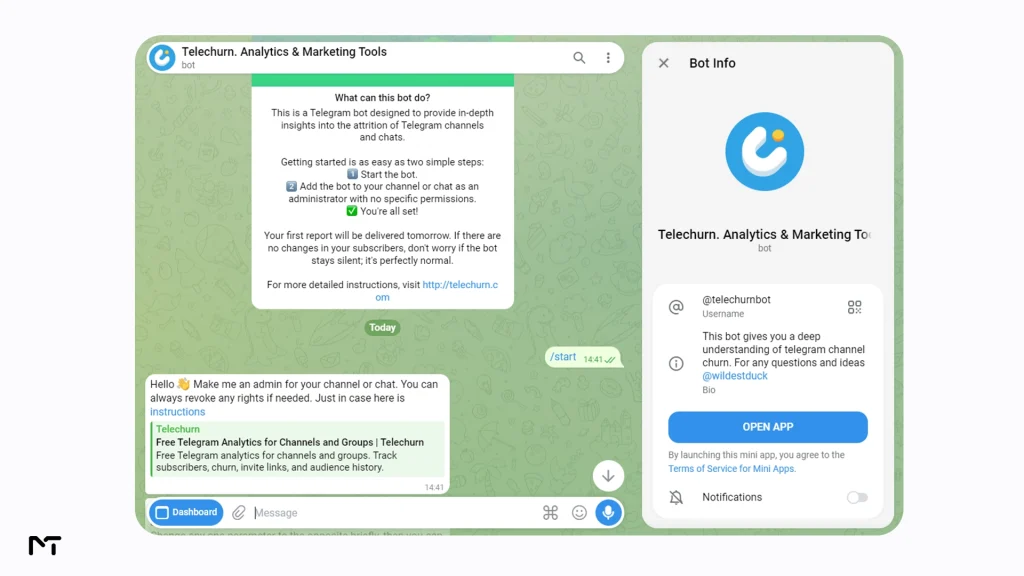
Among the tools worth testing, Telechurn stands out because it does something most competitors do not: it lives entirely inside Telegram rather than sending you to a separate dashboard you have to remember to check. You add it as a bot, it collects data automatically, and it messages you a report every morning.
The bot tracks subscriber joins and leaves, breaks growth down by invite link, and calculates how long people stay subscribed before they unsubscribe. There is a free tier that covers the basics with seven days of history, and a paid plan starting around five dollars a month that unlocks full history, CSV export, and multiple invite link segmentation.
How to Set It Up in Under a Minute
Getting started does not require touching a line of code or reading documentation.
- Open the bot inside Telegram and start it
- Add the bot to your channel or group as an administrator
- Leave the rest of the admin permissions turned off since the bot only needs to read member activity
- Wait for the first report, which typically arrives the next morning
Once it is running, you do not have to do anything else. The daily report shows up in your chat with the bot automatically. A common concern when adding any external software to your community is data privacy and security. You might wonder if an analytics tool can read your private group messages or hijack your channel entirely. The good news is that a legitimate statistics bot only requires access to monitor subscriber activity and read basic chat history to count views. You should never grant an analytics tool the ability to post messages add new admins or change channel information. Keeping those specific permissions restricted ensures your channel remains completely safe while still generating highly accurate performance reports.
Daily Reports and What They Tell You
Each report breaks down how many people joined, how many left, and which invite links were responsible for both. Over a week or two this becomes far more useful than a single snapshot, because you start to see patterns. Maybe a promotion you ran three weeks ago is still bringing in trickle traffic. Maybe an invite link you shared in a forum is bringing in people who leave within hours, which tells you that audience was never a good fit.
Once you use these reports to know exactly when your audience is active you can confidently schedule posts on Telegram channel timelines to ensure your most important announcements land right when people are actually looking at their screens.
Tracking Subscriber Growth and Churn
While raw numbers matter it is crucial to understand how Telegram channel views impact growth because a high view count creates social proof that encourages new visitors to hit the join button. Growth numbers alone can be misleading. A channel that gains five hundred subscribers and loses four hundred and fifty in the same month is not actually growing in any meaningful sense, even though the graph trends upward. This is why churn tracking matters as much as growth tracking, and it is one of the most underused metrics among channel admins.
Understanding Churn Rate on Telegram
Churn rate is the percentage of subscribers who leave over a given period. There is no universal healthy number since it depends heavily on your niche and how you are acquiring subscribers, but a channel relying on paid promotion generally sees higher early churn than one growing through organic content and referrals. Watching this number over time tells you whether your content is retaining the people your growth efforts bring in, which is a different question from whether your growth efforts are working at all.
“Most channel admins completely panic when they see a twenty percent churn rate after running a promotional campaign but early drop off is entirely natural” notes Marcus Vance a senior growth strategist for messaging platforms. “Based on our data from over two thousand advertising campaigns channels that focus strictly on invite link segmentation and optimize for long term retention always outperform those chasing raw unsegmented follower growth. Knowing exactly who stays is far more profitable than just celebrating how many people joined.”
Telechurn calculates this automatically and shows subscription duration ranges, from people who left within a day to people who stayed over a year, so you can see exactly where the drop off happens.
Invite Link Tracking: Finding Out What Actually Works
If you promote your community in multiple places or frequently run paid ads on Telegram channels creating a separate invite link for each source is the single most useful habit you can build. Without it, every new subscriber looks identical in your stats regardless of where they came from.
With individual links tied to each source, you can compare not just how many people joined through each one, but how many stayed. A link that brought in two hundred subscribers sounds great until you notice that a hundred and eighty of them left within a week. A link that brought in fifty subscribers who are still active six months later is doing far more for your channel even though the raw number looks smaller.
Other Telegram Channel Analytics Tools Worth Knowing
Telechurn is not the only option on the market and when evaluating different tools to manage Telegram groups and channels a fair comparison means looking at what else exists for specific use cases.
| Tool | Where It Runs | Best For | Free Tier |
|---|---|---|---|
| Telechurn | Inside Telegram, plus web dashboard | Churn and invite link tracking | Yes, 7 day history |
| Combot | Inside Telegram | Group chat activity and moderation | Yes, basic stats |
| TGStat | External website and bot | Public channel research and competitor benchmarking | Yes, limited depth |
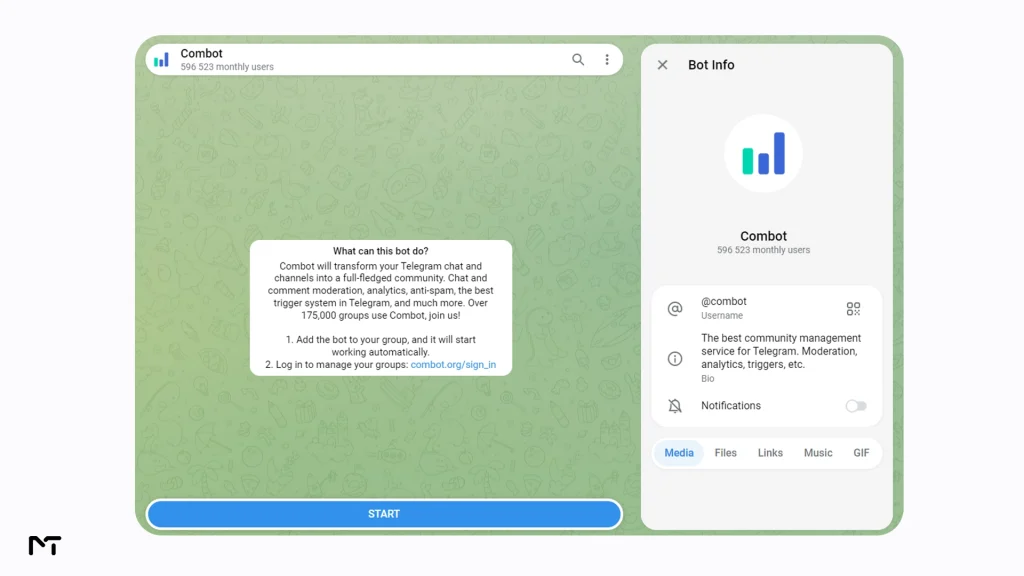
Combot leans more toward group chat moderation with analytics as a secondary feature, so it fits better if you manage active discussion groups rather than broadcast channels. TGStat is strongest for researching other public channels rather than deep tracking of your own audience, which makes it a research tool more than a management tool. For an admin who mainly wants to understand their own channel’s subscriber behavior without leaving the app, Telechurn covers that specific need more directly than either.
You cannot discuss channel research without mentioning Telemetr. This platform acts as a massive external database focused heavily on tracking advertising campaigns and analyzing cross promotion strategies across the entire network. Marketers rely on it to investigate broad market trends before buying sponsored posts and to see where competitors spend their budgets. However because it operates as a heavy web application built for global ad research it often feels overwhelming and unnecessarily expensive if you simply want a clear daily summary of your own community inside your chat app.
FAQ
How to see THow to see Telegram channel statistics?elegram channel statistics?
Open your channel, tap the three dot menu, and select statistics. This shows subscriber growth and post views. For deeper data like churn and invite link performance, you need a dedicated bot such as Telechurn added as an administrator.
Where to see Telegram channel views and subscriber stats?
Post level views appear directly under each post in channels with public statistics enabled. Overall subscriber trends appear in the same statistics panel, accessible from the channel menu on both desktop and mobile.
Is there a free bot for Telegram channel analytics?
Yes. Telechurn offers a free tier that tracks basic subscriber joins, leaves, and one invite link with seven days of history, which is enough for smaller channels to get started without paying anything.
What is a Telegram channel checker?
A channel checker is a tool that monitors and analyzes a specific channel’s activity over time, tracking things like subscriber changes and invite link performance rather than just giving a one time snapshot.
How to track who unsubscribed from my Telegram channel?
Native Telegram statistics do not show this information directly. A bot like Telechurn records unsubscribe events along with how long each person was subscribed before leaving, giving you a clearer picture of retention.
Conclusion
Telegram channel analytics tools exist because the platform’s built in statistics only tell half the story. Knowing your view count is useful, but knowing which invite link brought subscribers who actually stayed, and how long people remain engaged before they drift away, is what actually shapes better decisions about where to spend your promotion budget and how to structure your content. Setting up a bot like Telechurn takes about a minute, runs quietly in the background, and delivers that missing half of the picture straight to your chat every morning.
If you want help turning that data into real subscriber growth once you know where your channel stands, reach out to @membertelsupport and we can walk through what fits your channel best.














Leave a Reply