
Telegram Bot to Bot Communication is a Bot API 10.0 feature that lets two bots send messages to each other and reply directly inside a group or business chat, something Telegram never allowed before. You turn it on per bot from the BotFather Mini App, and once both bots have it enabled, they can mention each other, answer back, and keep a conversation going without a person in the middle.
Telegram rolled this out on May 7, 2026, alongside three other additions: Guest Bots, Chat Automation, and Streaming Text. Pavel Durov and the Telegram team framed the batch as a push toward agentic, AI driven bots that can act on their own instead of waiting for a person to trigger every step. Bot to Bot Communication is the piece that lets those bots actually cooperate with each other instead of working in isolation.
The rest of this guide covers exactly how to turn it on, where it’s genuinely useful for channel owners and developers, how it stacks up against Guest Bots and Chat Automation, and the one mistake (infinite reply loops) that trips up almost everyone who skips the fine print.
Key Takeaways
- Bot to bot communication lets two Telegram bots exchange messages directly, something that was blocked on the platform before.
- You turn it on per bot inside the BotFather Mini App. Both bots involved in a conversation need it enabled for messages to flow both ways.
- It works inside groups and in Telegram’s business chat mode.
- Telegram warns that badly built bots can trigger infinite reply loops, so rate limits and deduplication are not optional.
- The feature opens the door to multi bot pipelines: one bot translates, another summarizes, a third posts the result, all without a human clicking anything.
What Bot to Bot Communication Actually Is
Until recently, Telegram bots lived in their own little bubble. A bot could talk to people. It could sit in a group and answer commands. But it almost never saw a message written by another bot, and it definitely couldn’t reply to one.
That changed with Bot API 10.0. Telegram gave bots a way to send messages to each other by username, and to reply to each other, as long as both sides have opted in through a setting called Bot to Bot Communication Mode.
Practically, this means a bot can now mention another bot in a group, get a real response, and keep the exchange going automatically. No human has to relay information between them anymore.
Why This Is a Bigger Deal Than It Sounds
On the surface it sounds like a small toggle. Underneath, it removes a wall that developers had been building workarounds around for years. Before this update, if you wanted two bots to cooperate, you had to run your own server, have it call both bots through the API, and stitch the conversation together yourself. Now Telegram handles that routing natively.
This matters most for anyone building AI agents on Telegram, especially with how fast Telegram’s AI features have been evolving lately.
An agent bot can now hand off a task to a specialist bot (a translation bot, a payment bot, a moderation bot) and get an answer back inside the same chat, in real time. That’s the piece that pushes Telegram bots closer to what people usually mean by telegram AI agent automation: bots that hand off work to other bots the way a human employee would hand off a task to a coworker.
It also builds on a related, slightly older feature called managed bots, which lets one bot create and control other bots through the API. Combine managed bots with bot to bot communication and a single developer can spin up a small fleet of purpose built bots that talk to each other automatically, without maintaining a separate backend server to coordinate them.
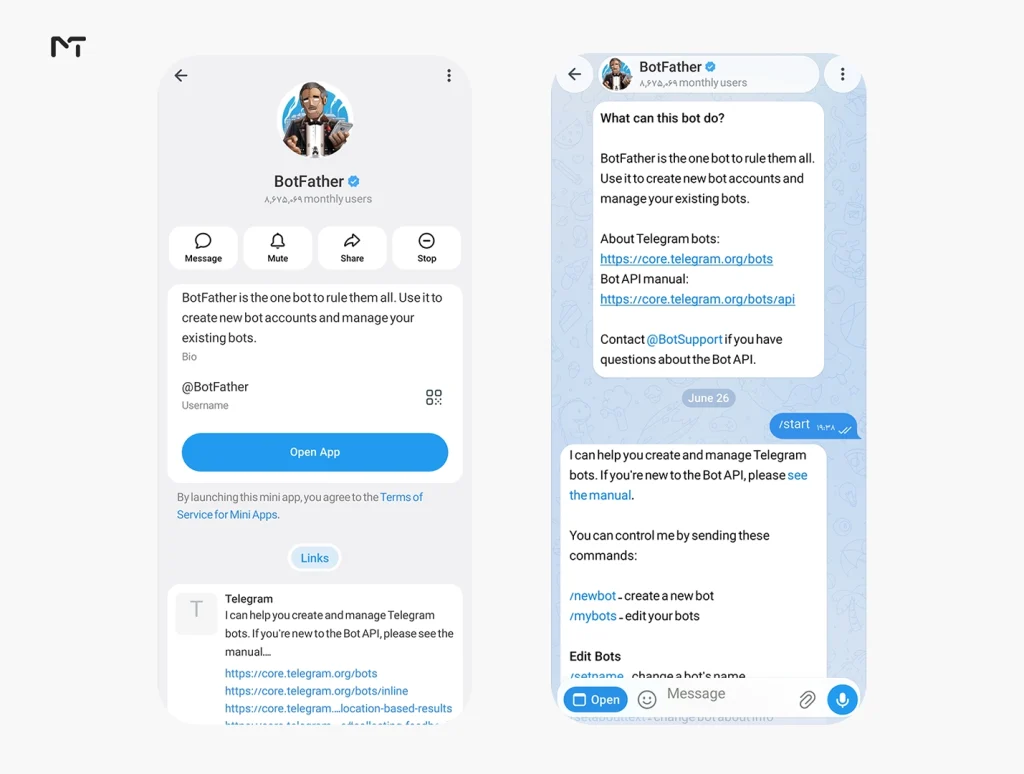
How to Enable Bot to Bot Communication in BotFather
Setup takes less than a minute once you know where to look.
- Open a chat with @BotFather.
- Send
/mybotsand pick the bot you want to enable this for. - Open Bot Settings, or launch the BotFather Mini App from the same menu.
- Find Bot to Bot Communication Mode and switch it on.
- Repeat the same steps for the second bot if you want a two way conversation.
A quick example of what this looks like in practice: say you run a support bot called @HelpDeskBot and a billing bot called @BillingBot. Once both have the mode switched on, @HelpDeskBot can reply to a message from @BillingBot in a shared group, or mention it with /checkinvoice@BillingBot, and get a real answer back automatically. Neither bot needs to poll an external server or wait on a webhook you built yourself. This is the setup most people mean when they search for BotFather bot to bot mode.
If you manage several bots, it’s also worth getting familiar with Guest Mode, which handles a related but different problem, and with Chat Automation, which ties a bot to a personal account instead of a standalone bot.
A Few Requirements Worth Knowing
- Both bots need the setting enabled if you want replies to flow in both directions. If only one bot has it on, that bot can receive messages from other bots but the other side may not.
- The feature works inside groups by default. It also works through Telegram’s business chat mode, so a business bot can reply to another bot on behalf of the account it’s connected to.
- Inside a group, a bot can reach another bot in two ways: by mentioning it directly in a command, like
/command@OtherBot, or by replying to a message the other bot already sent. - A bot with the mode enabled will also start receiving messages from other bots in the group even without a direct mention or reply, under certain conditions, so test this in a private group before rolling it out publicly.
Real Use Cases for Channel Owners, Group Admins, and Developers
This isn’t just a developer toy. It changes what’s realistically possible for anyone already using Telegram bots for automation and engagement in their community.
Automated moderation chains. A content filter bot flags a suspicious message, tags a moderation bot such as one of the Telegram AI Guardian Bots for groups, and that bot takes action, mutes the user, logs the incident, or pings a human admin, all without anyone touching a keyboard.
Multi bot content pipelines. Picture a translation bot that picks up a post, hands it to a summarizer bot, which passes the result to a Telegram Auto Forwarder that pushes it straight to your channel at the right time. Three bots, one workflow, zero manual copy pasting.
AI agent delegation. Developers building on top of large language models can now split responsibilities across bots instead of cramming everything into one. A “front desk” bot talks to users, then quietly delegates specific jobs (fetching data, running a calculation, checking inventory) to backend bots built for that single purpose, the same kind of setup developers build with a multi-account Telegram automation bot with Python code.
Customer support handoffs. A support bot recognizes it can’t answer a billing question and forwards the conversation context to a billing specific bot, which continues the thread without the customer repeating themselves.
Bot to Bot vs Guest Bots vs Chat Automation
Telegram rolled out several related features arTelegram rolled out several new Telegram features around the same time, and it’s easy to mix them up. Here’s how they differ.
ound the same time, and it’s easy to mix them up. Here’s how they differ.
| Feature | What it does | Who it’s for |
|---|---|---|
| Bot to Bot Communication | Lets two bots message and reply to each other directly | Developers connecting multiple bots into one workflow |
| Guest Bots (Guest Mode) | Lets a bot interact with users in any group or private chat without needing to be added or given chat history access | Bots that need lightweight, low friction access to conversations |
| Chat Automation | Connects a bot to a user’s personal profile so it can act semi autonomously inside their own chats | Individual users automating their own replies and routines |
They can absolutely be combined. A guest bot could, for example, pick up a request from a group and pass it to a specialist bot behind the scenes using bot to bot communication. If you’re also managing a fleet of bots programmatically, it’s worth understanding managed bots too, since that feature and bot to bot communication are often used together.
The Infinite Loop Risk (and How to Avoid It)
Here’s the part Telegram is explicit about, and the part most tutorials skip: two bots that can reply to each other can also get stuck replying to each other forever.
Imagine Bot A replies to every message it gets, and Bot B does the same. The moment they start talking, you’ve built an accidental bot argument that never ends, burning your API quota and possibly annoying everyone in the group.
Telegram’s own documentation calls this out directly and expects developers to build safeguards rather than rely on the platform to stop it for you, which ties directly into the broader question of whether Telegram bots are safe when left running unsupervised.
In practice, that means:
- Deduplicate messages. Don’t let your bot process (or respond to) the same message twice.
- Rate limit replies. Cap how often your bot can respond to another bot, for example no more than once every few seconds per sender.
- Set a maximum interaction depth. Decide upfront how many back and forth exchanges are allowed before your bot simply stops replying.
- Test against a bot that never stops. Your bot needs to survive a worst case scenario where another bot replies instantly and continuously, without falling over or getting flagged by Telegram for abusive behavior.
Skipping this step isn’t a small oversight. Telegram has said that bots which fail to control loops properly risk performance issues or platform restrictions, so it’s worth building the safeguards before you flip the switch, not after your bots start spamming a group at 2 a.m.
If you’ve ever seen two Telegram bots talking to each other and wondered whether that was intentional or a bug, this is almost always the reason: someone enabled bot to bot communication without putting a cap on how far the conversation could go.
FAQ: telegram bot to bot communication
What is bot to bot communication on Telegram?
It’s a Bot API 10.0 feature that lets two bots send messages to each other and reply directly, something Telegram bots couldn’t do before. Both bots need the setting enabled in BotFather for it to work both ways.
How do I enable bot to bot mode in BotFather?
Open @BotFather, run /mybots, select your bot, go to Bot Settings or the BotFather Mini App, and turn on Bot to Bot Communication Mode. Repeat for the second bot if you want two way replies.
Can Telegram bots talk to each other automatically, without a human involved?
Yes. Once both bots have the mode enabled, they can mention each other, reply to each other’s messages, and keep a conversation going entirely on their own inside a group or business chat.
Is bot to bot communication safe from infinite loops?
Not by default. Telegram places the responsibility on developers to add deduplication, rate limits, and interaction caps. Without those safeguards, two bots can end up replying to each other endlessly.
What’s the difference between Guest Bots and bot to bot mode?
Guest Bots let a single bot join conversations with users more easily, without needing to be manually added to every chat. Bot to bot mode is specifically about two bots talking to each other. They solve different problems and can be used together.
Wrapping Up
Telegram Bot to Bot Communication closes a gap that Telegram developers have been working around for years. Instead of routing messages through your own server to connect two bots, Telegram now handles that natively, opening the door to real multi bot workflows, from moderation chains to AI agents that delegate tasks to specialist bots.
Turning it on takes a minute in BotFather. Building it responsibly, with rate limits and loop protection in place, takes a bit more thought. Get that part right, and you’ve got a genuinely useful piece of infrastructure for your channel, group, or product.
Got a bot project in mind, or hit a snag setting this up? Reach out through @membertelsupport and we’ll help you sort it out.














Leave a Reply