
To fully utilize the Latest Telegram AI Features, you can access native productivity tools built directly into the app framework. Key updates include automatic AI Summarization for long channel posts or web links powered by the decentralized Cocoon Network, alongside a built-in AI Text Editor in the message bar for instant translation and grammar correction. Additionally, the updated Bot API now supports advanced bot-to-bot communication and automated bot management. These native advancements open up incredible possibilities for creators who manage multiple hubs, allowing automated systems like a Telegram Channel Cloner to potentially leverage integrated AI for smart content curation and seamless duplication across networks.
I have spent years managing large scale communication channels, testing automation frameworks, and analyzing how platform updates impact user retention. When Telegram rolled out these updates, I spent days testing every single component across multiple test channels and active group ecosystems. This isn’t just a list of marketing bullet points. This is my hands-on breakdown of how these native features actually perform, where they stumble, and how you can leverage them to streamline your workflow.
The entire philosophy behind this update centers on giving us deep productivity tools without compromising the core reason we use this platform: absolute data privacy. Telegram bypassed traditional centralized cloud computing models to build something entirely different.
The Core Engine Behind Telegram Privacy Architecture
The absolute standout achievement of this update is how the processing occurs. Most platforms ship your text directly to a centralized server, exposing your data to third party storage. Telegram built its AI native infrastructure on top of the open source Cocoon Network.
When I activate an AI request, the data is encrypted, processed across a decentralized node network, and immediately wiped. It is never stored on a server, and it never builds a permanent behavioral profile on me.
“By utilizing a decentralized network like Cocoon, platform updates shift the balance back to the user. Processing content locally or via encrypted nodes eliminates the structural vulnerability of traditional cloud AI data centers.”
🌟 Specialist Quote on Infrastructure Security
Inside the Latest Telegram AI Features for Native Productivity
The architecture translates into two major user facing features built directly into the core app interface. I have broken these down by how they affect your day to day workflow.
1. Smart Text Summarization
If you run or monitor high volume news, crypto, or tech channels, you know the fatigue of keeping up with massive walls of text. Telegram solved this by adding an intuitive AI Summary button at the top of long posts and Instant View web pages.
- How it works: Tapping the button condenses a 1,000 word analytical report into 3 to 6 scannable bullet points.
- Optimal Settings: To save battery and prevent unwanted background resource usage, I recommend navigating to Settings, opening Advanced, clicking AI Features, and enabling the option labeled “Only Long Content” with manual activation.
Fix Your Unread Links Backlog Instantly With Telegram AI
Let us look at a situation that happens to almost everyone using this platform. You are scrolling through a tech or business channel, and you see a link to a long, comprehensive industry article. You save it to your Saved Messages intending to read it later, but you never do because looking at that massive wall of text feels overwhelming.
This is exactly where I find these Latest Telegram AI Features incredibly useful. When you open that link inside Telegram using the Instant View feature, you do not have to scroll through pages of introduction. Tapping the AI Summary button at the top gives you the core takeaways immediately. It lets you decide in ten seconds whether the article is actually worth your time or if you can just move on. It turns a skipped link into useful, instant knowledge without changing your daily routine.
2. The Integrated AI Text Editor
The message bar is no longer just a space to type text. It now houses an active writing assistant that operates directly inside your input box. By selecting your text and tapping twice, you can trigger a menu that modifies your text instantly.
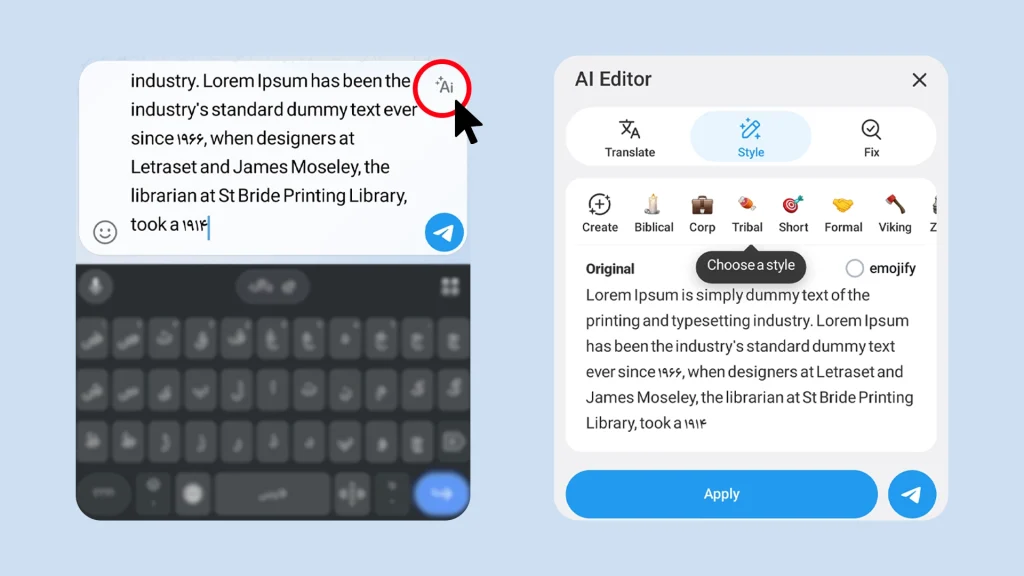
| Feature Tool | Practical Application |
| Grammar Correction | Eliminates typos and fixes syntax structure before sending. |
| Style Transformation | Rewrites text into specific tones like Formal, Short, Corporate, or Zen. |
| Inline Translation | Translates your text while simultaneously applying a specific stylistic tone. |
Where This Feature Matters Most
To understand where this native editor becomes a lifesaver, let me share a situation I deal with constantly. When managing international channels or coordinating with remote team members across different time zones, clear communication is everything.
Just yesterday, I needed to reply to an urgent infrastructure issue raised by a global partner. I typed a quick, blunt message in the chat bar while walking: “Hey, we see the bot crash issue and we are fixing the node error right now so wait a bit.”
Before hitting send, I highlighted the text, tapped twice, and selected the Corporate style transformation. Within two seconds, the AI assistant polished my rough note into a flawless, professional response: “We have identified the network anomaly within the bot infrastructure and our team is actively deploying a resolution. We appreciate your patience during this brief maintenance window.”
This native tool completely eliminates the annoying need to constantly switch back and forth between Telegram and external translation or grammar apps. It serves as an absolute game changer in three specific scenarios:
- Multilingual Content Creation: Translating channel updates into multiple languages on the fly while maintaining a consistent brand voice across different regional audiences.
- Global Client Management: Drafting professional, polished replies to international stakeholders instantly without worrying about grammar slips or language barriers.
- Crisis Communication: Transforming panicked, rushed team messages into calm, authoritative announcements for public channels during server outages or technical updates.
Advanced Bot Automation and the Developer Ecosystem
For those of us running businesses or large communities, the updates to the Bot API are where the real monetization and automation power lies. The system has moved from simple command response bots to fully autonomous agent networks.
[User Command] ➔ [Parent Master Bot] ➔ [Bot-to-Bot API Communication] ➔ [Sub-Bots Executing Tasks]
Guest Bots and Chat Automation
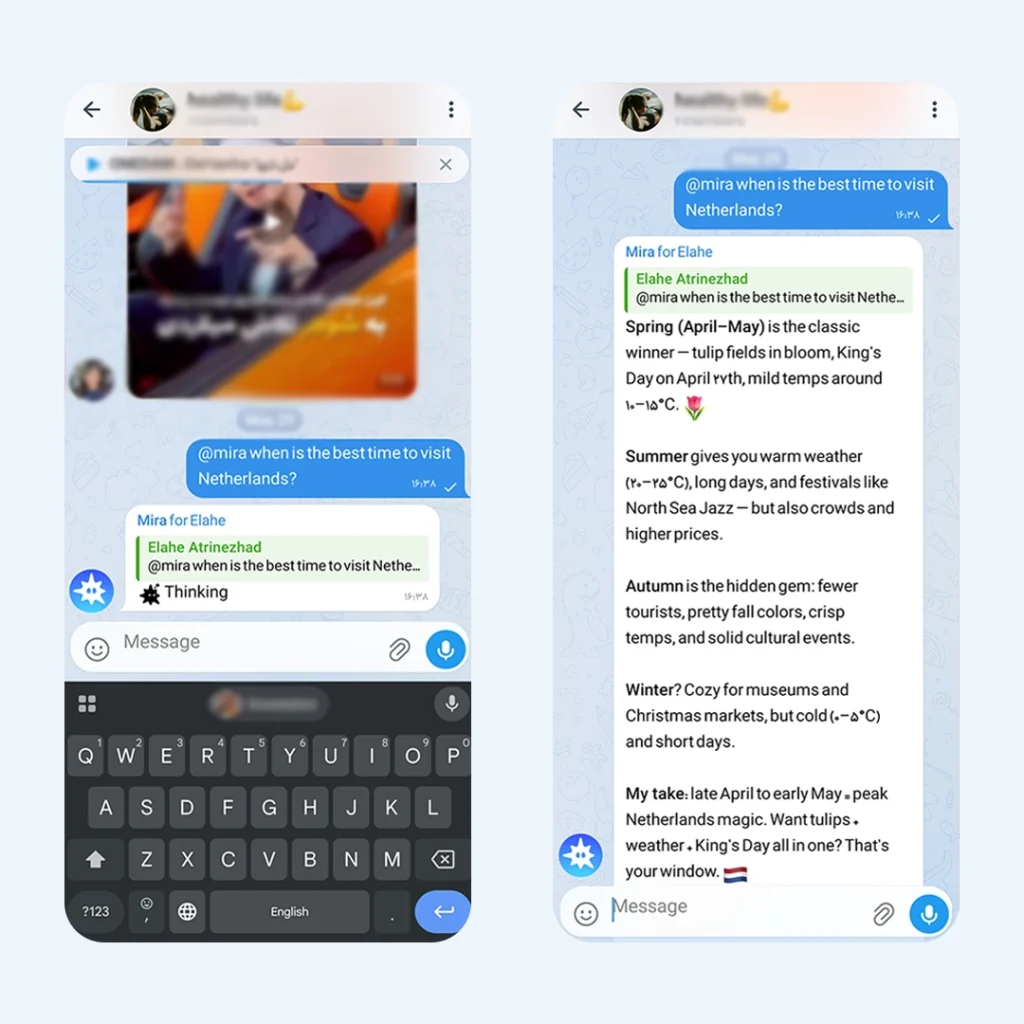
AI bots can now be tagged using their @username in any conversation. Under the new protocol, they can function as “Guest Bots” in groups where they are not even official members. To maintain strict security, these bots can only read the exact messages where they are explicitly tagged.
Let us say you are inside a private project group with your development team. You are discussing a new text draft for a channel announcement, and the team is arguing whether the tone is too aggressive.
Instead of copying the text, opening a separate private chat with an AI bot, and copying the result back, you handle it instantly in the group. You simply type your message, tag the bot, and ask for a quick fix. You reply directly to the draft message with: @YourAI_Bot rewrite this in a professional tone.
The bot jumps into the chat as a guest, processes only that single replied message, drops the polished version, and disappears. Your team gets the answer instantly, and the bot leaves no footprint behind, keeping the rest of your private team discussion completely confidential.
Decentralized Bot Creation
The platform now permits bots to build, deploy, and manage other bots on your behalf. If you have zero coding background, you can chat with a parent master bot, explain the workflow you need, and it will programmatically launch a separate, dedicated sub-bot to handle your customer service or content scheduling.
Where This Architecture Changes the Game
We need to stop expecting complex software automation. This feature is simply here to replace the annoying external bot configuration panels with a direct, conversational chat. It is perfect for:
- Quick Group Welcomes: Setting up a basic greeting message for new members instantly.
- Basic Link Delivery: Creating a tiny utility bot that just hands out your support or contact links when triggered.
A Real World Look at How It Works
I needed a simple, dedicated bot for my group that would just welcome new members and show them a button to contact my support team. Usually, you have to go to an external website, log in, link your account, and configure a bunch of confusing buttons.
Instead, I opened the master bot and typed: “Make a bot that says Welcome to the group and puts a button linked to @membertel underneath.”
The master bot created it in seconds. I did not have to leave Telegram, use a third party website, or look at a single line of settings. It is just a fast, zero friction way to set up a basic, everyday task inside your chat.
Maximizing Performance and Resource Management
Running complex language models inside a mobile app can drain battery life quickly. If you notice your device running warm after utilizing the Liquid Glass interface visual effects or heavy text summaries, follow this explicit setup to optimize your environment.
- Step One: Open app Settings and enter the Power Saving section.
- Step Two: Turn on the toggle for “Disable AI when battery is low.”
- Step Three: Switch off “Background AI processing” to stop the app from indexing link previews when minimized.
- Step Four: Lower or turn off the transparent Liquid Glass visual effects to free up system memory on older hardware.
Frequently Asked Questions
Does Telegram use my private chats to train its AI models?
No. The AI features do not scan or read private one on one chats. Features like text summaries only work on public channels, Instant View links, or group messages where an AI bot is explicitly tagged by a user.
Can I completely disable the AI features if I do not want them?
Yes. You have total control over the system. You can turn off the entire suite by navigating to Settings, opening Advanced, and toggling the AI Features option to off.
Is a Premium subscription required to use the text summaries?
Basic summarization and text editing are accessible to standard accounts. However, higher daily usage limits, faster processing priority during peak traffic hours, and advanced stylistic writing tones are allocated to Premium tier profiles.
Setting up automated bot networks, integrating the Latest Telegram AI Features, configuring secure communication channels, or scaling an enterprise infrastructure inside Telegram requires precision. If you want to deploy these tools for your business or require advanced consulting on custom bot integration, my team is here to guide you through the technical architecture. Connect with us directly at our official support handle: @membertelsupport