
Login with Telegram is a one tap authentication method that replaces your signup form’s email and password fields with a single Telegram login button. A visitor taps it, Telegram confirms they’re a real, already logged in user, and your server receives a signed confirmation instead of ever having to create, store, or reset a password.
If you’re a developer, the part that changed everything is the May 2026 update: Telegram turned its login widget into a full OpenID Connect provider, which means you can now wire it up with standard identity libraries instead of writing custom hash verification from scratch. If you’re a business owner, the part that matters is simpler: fewer people abandon your signup form, and every login doubles as an opened line of direct communication through your bot. This guide covers both sides, plus the exact setup steps, the common errors, and where most integrations quietly fail.
Key Takeaways
- Login with Telegram removes password storage from your site entirely because Telegram handles the identity check on its own infrastructure.
- Since May 2026, the Login Widget also works as a standard OpenID Connect provider, meaning you can use the Authorization Code flow with PKCE and any OIDC compatible library instead of hand rolling hash verification.
- Switching a bot from the classic widget to OpenID Connect in BotFather is a one way change. There is no toggling back once you confirm it.
- Setup still starts the same way it always has: a bot through BotFather, a registered domain or redirect URI, and server side verification of whatever Telegram sends back.
- Businesses get two things out of this at once: fewer abandoned signup forms and a direct Telegram messaging channel with every user who opts in.
What Is Login with Telegram
Login with Telegram is Telegram’s identity system for third party websites and apps. Rather than building your own registration form and password database, you connect a small script or an OIDC client to a Telegram bot that represents your app. When a visitor taps the login button, Telegram confirms they’re a genuine, already authenticated Telegram user and returns a signed confirmation to your server.
There are technically two ways this data comes back to you today. The older, still supported approach is the iframe based JavaScript widget, which redirects the user back to your site with a set of parameters: an id, first name, last name, username, profile photo, a timestamp, and a hash your server checks to confirm nothing was tampered with in transit. The newer approach wraps all of that inside a signed OpenID Connect ID token, which is easier to validate because it follows a protocol most identity libraries already understand.
Either way, the end result is the same for your users: one tap, no typing, and no new password to remember.
How Login with Telegram Differs From a Password Based Login
A traditional login form asks the user to invent a password and asks your server to store that password securely, forever, along with all the salting, hashing, and breach monitoring that responsibility carries. Login with Telegram sidesteps both sides of that problem. The user has nothing new to remember beyond their existing Telegram account, and your server has nothing sensitive to keep except a verified Telegram user ID and whatever profile fields the user agreed to share.
This also changes what a data breach on your side would actually expose. If your database is ever compromised, there’s no password hash for an attacker to crack, because there was never a password to begin with.
Why Login with Telegram Is More Secure Than a Password
Passwords fail for a reason that has nothing to do with encryption strength. People reuse the same password across dozens of unrelated sites, so a breach on any one of them can hand an attacker credentials that still work on yours. Login with Telegram removes that entire attack surface.
No Password to Steal, Phish, or Reuse
There’s no password field on your site for a phishing page to imitate, no password table for an attacker to exfiltrate, and no credential stuffing attack that has anything to work against. Telegram’s own infrastructure protects the user’s account, and your site simply trusts a cryptographically signed confirmation that the login actually happened. The same logic is why more businesses have moved away from SMS one time codes entirely, choosing to send verification codes securely through Telegram’s own messaging infrastructure instead.
Built In Two Step Verification From the User’s Side
A large share of Telegram users already have two step verification enabled on their own account. When that user logs into your site through Telegram, that protection travels with them automatically. A stolen phone or a SIM swap alone isn’t enough to get into their Telegram account, which means it isn’t enough to get into yours either, and you didn’t have to build any of that protection yourself.
The 2026 Update: Telegram Login Widget Now Supports OpenID Connect
In late May 2026, Telegram expanded the Login Widget so it can act as a complete OpenID Connect provider on top of standard OAuth 2.0. This is a genuine shift from the older iframe based widget, and it changes how a serious application should plan its integration going forward.
| Feature | Old Widget | New OpenID Connect Flow |
|---|---|---|
| Protocol | Custom callback with manual hash verification | Standard OIDC on top of OAuth 2.0 |
| Data returned | Name, username, photo, auth date | Signed ID token with profile claims, phone number optional |
| Security model | Manual HMAC hash check on your server | Signed ID token, verifiable with any OIDC library |
| Phone number access | Not available | Available with explicit user consent |
| Messaging permission | Separate setup | Requestable in the same consent screen |
| Token signing | N/A | RS256 by default, EdDSA or ES256K optional for the openid scope |
Authorization Code Flow with PKCE
The new flow follows the same Authorization Code exchange with PKCE that Google, Microsoft, and most modern identity providers already use. Teams already relying on an OIDC compatible library or an identity broker such as Auth0, Keycloak, or Authentik can add Telegram as just another provider in that same configuration array, instead of writing a separate hash verification routine from scratch.
What Changed for Developers
In practice this means less custom code to maintain. Rather than manually recomputing and comparing a hash, your application can pull Telegram’s automatic configuration discovery document, fetch the correct signing keys, and validate an ID token the exact same way it would validate one from any other OIDC provider. Telegram signs tokens with RS256 by default, so any standard library works without modification. If you specifically need EdDSA or ES256K instead, BotFather lets you switch under Login Widget, Advanced, though selecting either of those algorithms is limited to the openid scope only, since tokens signed that way may be verified on chain by smart contracts, and profile and phone scopes get rejected under that configuration.
How to Add Telegram Login to Your Website
The setup itself is shorter than most developers expect, four steps whether you’re going with the classic widget or the newer OIDC flow. Here’s exactly where each one fits.
Step 1: Create a Bot With BotFather
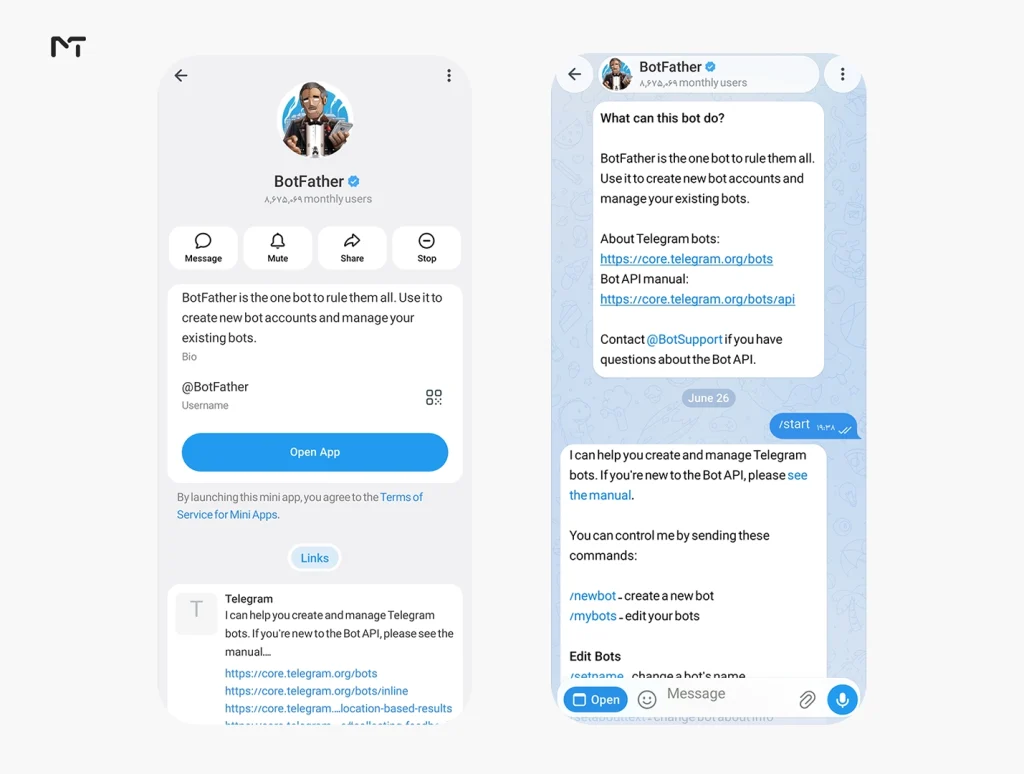
Every integration starts with a bot. Message @BotFather, run the new bot command, and give it a name and profile picture that clearly represents your website. Users see this bot’s identity on the confirmation screen when they log in, and they’re far more likely to complete the login if the name and logo look familiar and trustworthy rather than generic.
Step 2: Register Your Domain and Allowed URLs
For the classic widget, send the setdomain command to BotFather and link it to your site. Telegram only processes login requests coming from a domain you’ve registered this way, which itself blocks anyone from spoofing your login flow on a different domain.
For OIDC, open the BotFather mini app, go to Bot Settings, then Web Login, and add your Allowed URLs. That means the origin where your widget or login button lives, plus the exact redirect URI your OIDC callback listens on. Getting this list right matters more than it looks. A missing or mismatched redirect URI is the single most common reason OIDC setups fail on the first attempt.
Step 3: Choose Your Integration Method
For a quick setup or a site that doesn’t already use an identity broker, embedding the classic widget script is still the fastest path, and it remains fully supported. For a longer term, more standards based integration, especially if your stack already speaks OIDC, configure a client using the client ID and client secret BotFather provides, along with the redirect URI you registered in the previous step.
Step 4: Verify the Login Data on Your Server
Never trust anything that arrives at your frontend as the final word. Whether you’re checking a legacy hash or validating a signed ID token, that verification has to happen on your server, confirming the issuer, the audience, and the expiration before you treat anyone as logged in. For the classic widget, also check the auth date. Telegram treats a login as stale after twenty four hours by default, and an expired auth date should never be accepted.
Switching From the Old Widget to OpenID Connect
If you already have the classic widget running and want to move to OIDC, there’s one detail that catches a lot of teams off guard: the switch is permanent. Once you confirm OpenID Connect Login for a bot inside BotFather’s Web Login settings, there’s no toggle to go back to the classic widget for that same bot. If you want to test the new flow without touching production, the safer route is registering a second bot for staging first.
Until you make that switch, your existing widget integration keeps working exactly as it does today. Telegram isn’t deprecating the classic flow on any announced timeline, so migrating is a choice, not a forced upgrade, and it’s worth planning around a low traffic window regardless.
Requesting Phone Number and Messaging Permission
The OIDC flow can request more than a name and a profile photo, but only with the user’s explicit, separate consent. A phone scope and a messaging permission scope can both be requested during the same consent screen the user already sees when they authorize your app, so you’re not adding a second interruption to the flow.
Neither of these is granted automatically just because a user completes login. The phone number stays hidden unless the person actively agrees to share it, and permission to message them through your linked bot is its own opt in, separate from authentication itself. If you’re planning to use this for order updates or account alerts, ask for messaging permission clearly and explain why, since a vague consent prompt tends to get declined more often than an honest one.
Telegram Login Beyond the Browser: Mini Apps and Native SDKs
Once a user has authenticated through your bot, you’re not limited to a website session. The same connection can power a Telegram Mini App, letting your entire web application run inside Telegram’s own interface without a separate login step, or your bot can handle account related actions directly inside the chat itself through the Bot API.
For native mobile apps, Telegram also maintains ready made SDKs for iOS and Android that wrap the same OIDC flow in a platform appropriate dialog, so a Kotlin or Swift app can trigger the same one tap confirmation a web user sees, without embedding a browser based widget.
Common Setup Errors and How to Fix Them
Most Telegram login problems trace back to one of a handful of causes.
invalid_client on the OIDC flow usually means Web Login was never registered for that bot in BotFather, or the app is sending the bot token where the separate OIDC client secret belongs. These are two different credentials.
A redirect that lands on a hash fragment like tgAuthResult instead of a proper authorization code means your redirect URI isn’t listed in BotFather’s Allowed URLs, so Telegram quietly falls back to the classic widget’s redirect behavior instead of the OIDC flow you expected.
The widget button never appears at all is almost always a missed setdomain command, a bot username typed with the leading @ included where it shouldn’t be, or the container element not existing in the DOM yet when the script runs.
Authentication fails right after a successful looking redirect often comes down to an expired auth date, a bot token mismatch, or testing on plain HTTP, since Telegram requires HTTPS for both flows, with the usual exception of a tunneled local development URL like ngrok.
Business Benefits of Offering Telegram Login
Beyond the security argument, there’s a straightforward business case for adding this login option. It touches two things every product owner already cares about: how many people actually finish signing up, and how you reach those people afterward.
Lower Signup Friction
Every additional field on a signup form costs you a percentage of visitors who quit before finishing, and that cost is highest on mobile, where typing an email and a password on a small keyboard is genuinely annoying. A one tap Telegram login collapses that entire form into a single confirmation tap.
Direct Communication Channel via Bot
Once someone logs in through your linked bot and separately agrees to messaging permission, you gain a channel for order updates, support replies, or account alerts that doesn’t depend on email open rates, which tend to sit far lower than most businesses would like.
Telegram Login vs Google and Apple Sign In
Google Sign In and Apple Sign In both work well, but each comes with its own setup overhead. Google requires configuring an OAuth consent screen through Google Cloud Console, and Apple requires an active paid Apple Developer account before you can even generate credentials, along with stricter review requirements if your app also appears in the App Store.
Telegram login skips both of those costs. Creating a bot through BotFather is free, takes a few minutes, and doesn’t require enrolling in any paid developer program. The tradeoff runs the other way too. Telegram’s user base skews toward regions and demographics where the app is already dominant, so it works best as an additional option alongside Google or Apple rather than a full replacement for either, unless your audience is already concentrated on Telegram.
Frequently Asked Questions
Is login with Telegram safe?
Yes. It relies on Telegram’s own verified account infrastructure, and in the OpenID Connect flow, on a signed token your server checks against Telegram’s published public keys. There’s no password exposed anywhere in the process.
Is Telegram login free for developers?
Yes. Creating a bot and using either the classic widget or the OpenID Connect flow costs nothing.
Does switching to OpenID Connect break my existing widget integration?
Not until you confirm the switch yourself inside BotFather. The classic widget keeps working normally right up until that point, and the switch itself is permanent for that bot once confirmed.
Does Telegram login require a password?
No. The user authenticates through their existing Telegram account, and your site never asks for or stores a password at any point.
What data does my website get when someone logs in with Telegram?
By default, a website receives the user’s name, username, and profile photo. Phone number access and messaging permission are only included if the user explicitly consents to those additional scopes during login.
Can a user revoke Telegram login access to my site later?
Yes. Users can review and remove connected apps from their own Telegram privacy settings at any time, which immediately invalidates any session your app was relying on.
Conclusion
Login with Telegram gives developers a fast path to secure authentication and gives businesses a lighter signup process with a messaging channel built in on the side. The May 2026 OpenID Connect update makes it fit naturally into a standard identity stack instead of demanding a one off integration, so if you’ve been putting this off because the old hash verification felt like extra work, that reason is largely gone now. If you run into setup questions while wiring this into your own bot or app, reach out to @membertelsupport and we’ll help you sort it out.














Leave a Reply