
A Telegram Mini App dashboard for group admins is a custom web interface built on Telegram’s own Mini Apps platform that gives you real time control over your group directly inside Telegram. Instead of switching between Telegram’s built in stats screen and a separate bot command list admins get one place to see overall member activity, track the active engagement of their Online Telegram Members, moderate the chat, and send updates all without leaving the app.
If you run a large group, you already know the pain point. Telegram shows you basic numbers like member growth and post views, but it stops there. You can’t cross reference activity across multiple groups, you can’t automate moderation actions from a visual panel, and you definitely can’t build anything custom on top of it. That’s the gap a Mini App dashboard fills.
Why Group Admins Need a Dedicated Mini App Dashboard
Before touching any code, it helps to see exactly where Telegram’s own tools fall short and where a custom dashboard picks up the slack.
If your team is entirely new to this ecosystem and wondering what is the Telegram Mini App concept as a whole it helps to first understand how these built in web interfaces operate seamlessly inside the messenger.
The Limits of Telegram’s Native Group Analytics
Telegram gives every group and channel admin a built in statistics screen. You can open it from the group settings and see subscriber growth, post engagement, and where your traffic is coming from. For a small group, that’s often enough.
Once you’re managing several groups, or a group that mixes paying members with free ones, the native tool runs out of road quickly. It doesn’t let you compare performance across groups side by side. It doesn’t track individual member behavior over time. And exporting the data for deeper analysis isn’t straightforward, so most admins end up guessing instead of measuring. In fact many community managers get frustrated and ask is my Telegram member count wrong simply because the native application struggles to display accurate real time data during massive join spikes.
This is exactly why a growing number of communities are moving toward a Telegram mini app dashboard for group admins instead of relying on the native panel alone.
“Relying solely on native text commands creates a serious moderation bottleneck when your community scales past five thousand members. We noticed a forty percent drop in spam response times after moving our staff to a dedicated visual interface. Centralizing the noise into actionable data points on a single screen cuts reaction time down to seconds instead of minutes.”
Alex Mercer, Lead Community Architect
Real Use Cases: Moderation, Member Insights, and Broadcast Control
A dashboard built specifically for admins usually covers three jobs at once. Implementing a visual panel is the ultimate secret to getting Telegram group management made easy because it completely removes the steep learning curve for newly hired staff members.
Moderation is the first one. Rather than typing bot commands one at a time, an admin can open the dashboard, see a list of flagged messages or new joiners, and ban, mute, or warn someone with a single tap.
Member insights come next. A dashboard can show who’s active, who’s gone quiet, and which topics or threads get the most replies. That data helps admins decide when to post, what content keeps people engaged, and who might be worth reaching out to directly.
Broadcast control rounds it out. Instead of pinning a message and hoping people see it, admins can schedule announcements, target specific member segments, and track how many people actually opened the message.
What You Need Before You Start
A few pieces need to be in place before you write a single line of the dashboard itself.
A Telegram Bot Registered Through BotFather
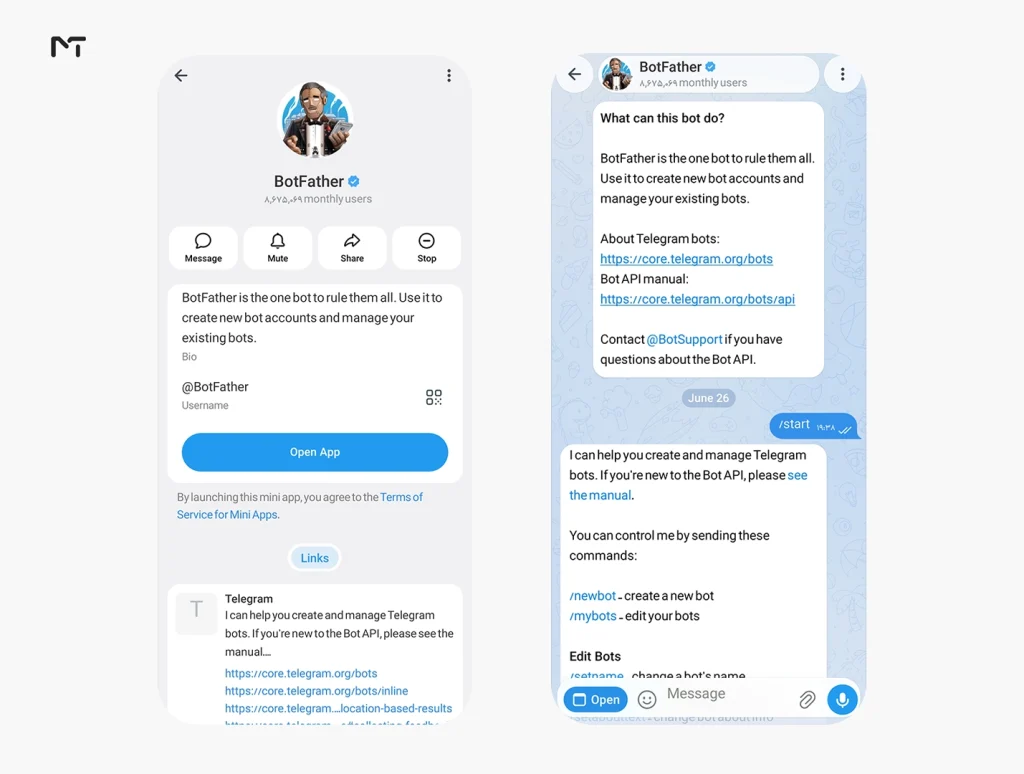
Every Mini App is tied to a bot. You create the bot through BotFather, Telegram’s own bot for managing bots, then register your Mini App under that bot and give it a name, description, and icon. BotFather also generates the token your backend will use to talk to the Telegram Bot API.
Choosing a Frontend Stack
You can technically build a Mini App with plain HTML, CSS, and JavaScript, but most teams use React or Vue because the dashboard needs state management for live data like member counts and moderation queues. Telegram maintains an official Mini Apps SDK, and community projects like tma.js add typed helpers that make working with Telegram specific data less error prone. If you are still weighing your platform options a quick look at Telegram Mini Apps vs traditional mobile apps reveals how keeping your admins inside the chat interface drastically boosts their response time.
Beyond just picking a framework you must consider the visual experience. The Telegram platform provides dynamic theme parameters that pass the current color scheme of the user directly to your application. Your frontend components should use these values to automatically switch between light mode and dark mode. Building your interface to instantly match the native colors creates a seamless environment where the admin completely forgets they even opened an external web page.
Hosting and HTTPS
Telegram will only load your Mini App over HTTPS. There’s no way around this, even for testing, so you’ll need a valid SSL certificate from day one. Many developers use a tunneling tool during local development, then move to a proper hosting provider once the dashboard is ready for real users.
Step by Step: Building the Dashboard
With the bot, stack, and hosting sorted, here’s the order these pieces actually come together in.
Setting Up the Mini App and Web App URL
Inside BotFather, you set a Web App URL for your bot. This is the address Telegram loads when someone opens your dashboard from a chat. During development this can point to a tunnel address, but for production it needs to point to your live, HTTPS hosted frontend. To master this critical setup phase you must learn how to properly configure a BotFather Mini App on Telegram so your frontend web address links securely to the bot interface without causing any connection errors.
Validating initData
This step gets skipped more often than it should, and it’s the one that actually protects your dashboard. When someone opens your Mini App, Telegram passes a signed payload called initData containing the user’s ID, username, and a hash. Your backend has to verify that hash using your bot token before trusting anything in the request. Skip this step and anyone could spoof being a different user, including pretending to be an admin.
Connecting the Bot API for Group Data
Once a request is verified, your backend calls the Telegram Bot API to pull group data such as member lists, chat administrators, and message history where your bot has access. This is the layer that turns raw Telegram data into the numbers and charts your dashboard actually displays.
Pulling current group statistics directly from the API is only part of the solution since Telegram does not store long term historical metrics for your custom dashboard. To populate those member growth and activity charts over time your backend must actively listen to group events through webhooks and log them securely into a dedicated database. This infrastructure ensures your dashboard can instantly render weekly or monthly trends without repeatedly querying Telegram servers.
When planning your backend architecture for heavy data loads you might want to evaluate the Telegram Bot API vs MTProto to figure out which protocol actually delivers the speed your custom analytics engine demands.
Building the Core Dashboard Views
At minimum, plan for three views: a member overview showing growth and activity trends, a moderation queue listing recent flags or reports, and a settings panel where admins adjust what the bot automates versus what needs manual approval.
Adding Admin Specific Features
Once the core views are working, these are the features that make the dashboard feel built for admins rather than just a copy of Telegram’s own stats screen.
Before letting anyone tap a ban button the dashboard must respect the existing hierarchy of your moderation team. Your backend should verify the specific administrative rights of the person opening the app ensuring that junior moderators might only see options to delete messages while the group owner retains exclusive access to permanent bans and broadcast scheduling. Implementing this role based access prevents accidental abuse of power and keeps your community secure.
Ban and Mute Controls Directly From the Dashboard
Rather than admins memorizing bot commands, buttons in the dashboard can trigger the same API calls behind the scenes. This alone tends to be the feature admins notice first, since it turns a command line style workflow into something anyone on the team can use without training.
Member Growth and Activity Charts
Simple line charts showing daily joins, leaves, and message volume give admins a much clearer picture than scrolling through Telegram’s default stats screen. Even a basic chart library is enough here, since the value comes from having the data centralized rather than from complex visualization. To take these visualizations to the next level you should explore exactly how to get Telegram bot statistics in real time so your dashboard always reflects the absolute latest community engagement numbers.
Automated Alerts for Spam or Unusual Activity
A dashboard can also flag patterns that look like coordinated spam or raid activity, such as a sudden spike in new joins followed by identical messages. Pairing this with the regex based moderation rules many admins already use for blocking spam and ad links gives the dashboard a proactive layer instead of a purely reactive one. Once your dashboard spots these malicious patterns you can dive into advanced Telegram group moderation techniques to permanently block stubborn spam campaigns and organized raids before they ruin your chat flow.
Testing and Deploying Your Mini App
Before rolling the dashboard out to a live group, test it in a private test group first. Check that initData validation actually rejects tampered requests, confirm the moderation actions apply correctly, and make sure the dashboard loads properly on both mobile and desktop Telegram clients, since screen sizes behave differently inside the app.
Once testing passes, point your BotFather Web App URL to the production build and add the bot to your live groups. You just need to safely add admin to your Telegram channel and group ensuring the dashboard only receives the precise permissions it requires to function without creating security risks.
Common Mistakes to Avoid
Admins building their first Mini App dashboard tend to run into the same handful of problems.
| Mistake | Why It Causes Problems | Better Approach |
|---|---|---|
| Skipping initData validation | Anyone can forge requests and impersonate users | Always verify the signed hash server side |
| Giving the bot full admin rights by default | Increases risk if the bot account is compromised | Grant only the permissions each feature actually needs |
| Building every feature before testing with real admins | Wastes time on features nobody uses | Ship a small moderation and analytics view first, then expand |
| Ignoring mobile layout | Most group admins check the dashboard from their phone | Design mobile first, test on both iOS and Android Telegram |
Common Questions
Do I need to know how to code to build one?
Some coding knowledge is required for a custom dashboard, since it involves a frontend, a backend, and integration with the Telegram Bot API. Admins without development experience often work with a freelance developer or a small team for the initial build.
Can a Mini App dashboard replace my moderation bot?
Not entirely. A dashboard works best as a visual layer on top of your existing moderation bot, giving admins a faster way to review and act on what the bot already flags.
Is a Mini App dashboard free to build?
The Mini Apps platform itself doesn’t charge you anything. Your costs come from hosting, development time, and any paid libraries or services you choose to integrate.
Final Thoughts
Building a Telegram mini app dashboard for group admins isn’t a weekend project, but it solves a real problem that Telegram’s native tools were never designed to handle. Once the initData validation, bot API connection, and core views are in place, admins get a single screen for moderation, member insights, and broadcasts instead of juggling commands and a stats page that only shows part of the picture. Building custom visual tools for your staff is just the beginning of exploring the powerful benefits of Telegram Mini Apps for modern businesses since automating your moderation workflow directly impacts your bottom line and community growth.
If you’d rather skip the development work and get expert help setting up Telegram tools for your group or channel, reach out to @membertelsupport.














Leave a Reply