
Understanding Telegram Bot API vs MTProto comes down to their core design. The Telegram Bot API is a simplified HTTP interface for professional Telegram Bot Development while MTProto is Telegram’s own protocol that gives full access to everything a regular user account can do. If you only need a bot that replies to commands and posts messages the Bot API covers you completely. If you need something closer to how a real Telegram client behaves MTProto is what you actually want.
Key Takeaways
- The Bot API talks to Telegram through simple HTTP requests, while MTProto connects directly to Telegram’s servers using its own protocol.
- Bots built with the Bot API cannot read message history before they were added, cannot see who reacted to a post, and cannot fetch a message just by its ID.
- MTProto unlocks features the Bot API was never designed to expose, but it also comes with more responsibility around your own API credentials.
- Most channel admins and small automation projects never actually need MTProto. Larger operations with multiple accounts or heavy data needs usually do.
What Is the Telegram Bot API
When Telegram introduced bots, they built a layer specifically so developers could create them without touching the underlying protocol at all. That layer is the Bot API. You typically start by interacting with the BotFather Mini App on Telegram to generate your unique Telegram Bot Token and from that point on you are sending plain HTTP requests to the official servers. Telegram’s own servers translate those requests into the internal protocol behind the scenes, so you never have to deal with it yourself.
This is why almost every public Telegram bot you’ve ever used, whether it’s a group moderation bot, a poll bot, or a customer support bot, runs on the Bot API. It’s approachable, well documented by Telegram directly, and works with almost any programming language through libraries like python telegram bot, telegraf, or aiogram.
The approachable design means beginners can easily Create a Telegram Bot Without Coding using visual block builders while experienced programmers might write custom scripts to Create a Telegram Crypto Price Alert Bot Using Python or build complex utility tools.
The tradeoff is that Telegram deliberately limited what the Bot API exposes. It was built to cover common bot needs, not to replicate everything a full Telegram client can do.
Telegram MTProto Explained
MTProto is the actual protocol Telegram uses everywhere. Your phone app, your desktop app, and the browser version all speak MTProto to Telegram’s servers. It’s not a wrapper or a simplified layer like the Bot API. It’s the real thing.
When developers say they’re building something “on MTProto,” they usually mean they’re using a library that connects to Telegram the same way an official app would, using an API ID and API hash instead of a bot token. This can be done to control a bot account too, but it also opens the door to controlling a full user account, which is something the Bot API was never designed to allow.
Because MTProto is lower level, connecting through it takes more setup than calling a simple HTTP endpoint. You’re responsible for handling the connection, the session, and the authentication yourself, usually through a library rather than writing it from scratch.
Most developers making the switch rely on well established frameworks to handle the heavy cryptographic lifting. Python developers typically turn to libraries like Telethon or Pyrogram while those working in JavaScript often use GramJS. These tools manage the complex session states and security layers automatically allowing you to focus on your core application logic just as easily as you would with standard bot wrappers.
How Telegram Bots Work Behind the Scenes
It helps to picture this as two layers stacked on top of each other. At the bottom is MTProto, the protocol every request eventually turns into no matter which path you take. On top of that sits the Bot API, an extra translation layer that Telegram runs on their own servers so your bot can just send normal web requests instead of speaking MTProto directly.
So every Bot API call is quietly being converted into an MTProto call somewhere on Telegram’s side before it reaches their core systems. Skipping the Bot API and using MTProto directly just means you’re cutting out that translation step and talking to the same core system without a middleman.
The Core Differences at a Glance
| Factor | Telegram Bot API | MTProto |
|---|---|---|
| Connection type | HTTP requests | Direct protocol connection |
| Setup difficulty | Simple, token based | More involved, needs API ID and hash |
| Can control user accounts | No | Yes |
| Can fetch old messages by ID | No | Yes |
| Reads message reactions freely | Limited | Yes |
| Access hash control | Handled by Telegram | Handled by you |
| Best suited for | Standard bots, moderation, notifications | Custom clients, advanced automation, userbots |
Telegram Bot API Limitations
The limitations aren’t bugs. They’re intentional boundaries Telegram put around the Bot API so it stays simple and safe for the average developer. A few that catch people off guard once their project grows past the basics.
A bot cannot pull a message by its ID the way a full client can. It only sees what comes through as an update in real time, so anything that happened before the bot joined a chat is invisible to it.
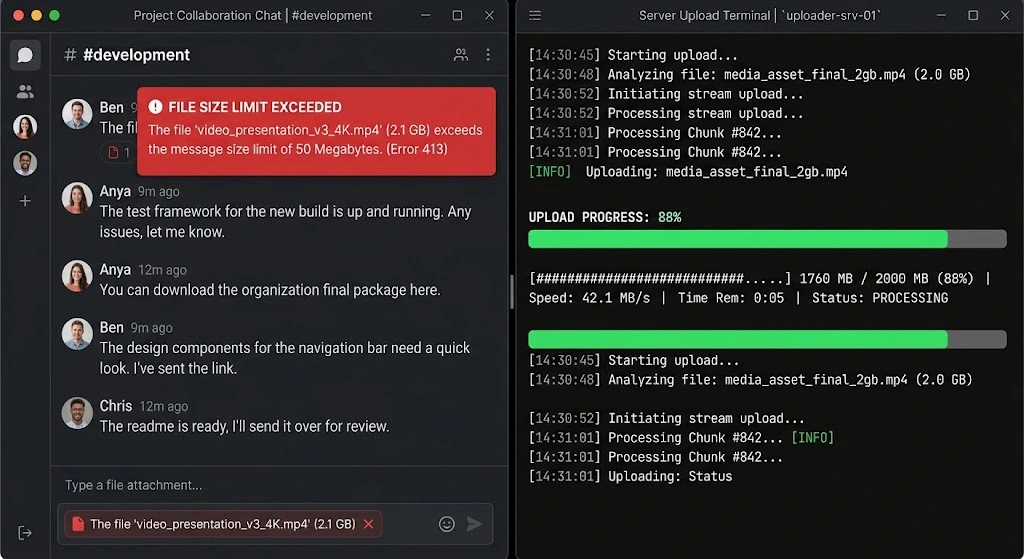
Another major limitation that surprises new developers is file handling. The public Bot API strictly caps file uploads at fifty megabytes and downloads at twenty megabytes. If your project involves processing large videos or heavy documents you will hit this barrier immediately. MTProto on the other hand allows handling massive files up to two gigabytes just like a regular user app. Telegram does offer a middle ground called the Local Bot API Server. By hosting this official open source server on your own hardware you can bypass the cloud file size limits and rate restrictions without having to rewrite your entire codebase for MTProto.
Access hashes, the tokens Telegram uses internally to let you interact with a specific user or chat, are only stored temporarily by the Bot API. If your bot hasn’t heard from someone in a while, some calls involving that person can start failing until they interact with the bot again. This expiring internal memory is a very common reason why developers suddenly complain that their Telegram Bot Is Not Responding to specific inactive users.
Running the same bot token in two places at once causes the older session to stop receiving updates entirely. There’s no multi session support the way MTProto allows.
None of this makes the Bot API a bad choice. It just means it was built for a specific job, and once your automation needs go beyond that job, you start hitting walls that weren’t obvious on day one.
Userbot vs Bot Telegram: Which One Do You Actually Need
This is where a lot of confusion comes from. A bot account and a userbot are not the same thing, even though both can be automated.
A bot account is created through @BotFather and is clearly marked as a bot to everyone who talks to it. It can only do what Telegram allows bots to do, regardless of whether you’re using the Bot API or MTProto to control it.
A userbot is a regular Telegram user account being controlled through code, usually via an MTProto library. Because it behaves like a real account, it can do things bots simply cannot, like joining group chats that don’t allow bots, or reading full chat history like any member would.
Because these setups exist in a gray area people frequently ask Are Telegram Bots Safe and the reality is that official automated accounts carry zero risk to your profile but running a custom userbot requires careful management to avoid immediate bans. Anyone going this route should treat it carefully rather than assuming it is automatically safe just because it is technically possible.
Telegram API for Automation: When It Makes Sense
If you decide to Use Telegram API to Automate Your Bot for daily tasks you rarely need complex protocol connections. Whether you are building an internal Telegram Bot for Workflow and Productivity or just handling basic chat moderation the standard HTTP endpoints are perfectly sufficient. There is no real benefit to adding extra complexity for tasks the basic framework already handles smoothly.
Where MTProto for automation starts to make sense is when you need something a bot account structurally cannot do. Managing several client accounts from one system, pulling full message history for analytics, or building a tool that needs to behave like a real user rather than a labeled bot are the kinds of situations where the extra setup pays off.
“We ran our community moderation tools on standard webhooks for a year but once we crossed two hundred thousand daily messages we started seeing unacceptable timeout errors. Rebuilding our core systems around a direct native protocol connection took our engineering team three weeks but it immediately dropped our message delivery latency by over forty percent and completely eliminated the fifty megabyte upload limit that was choking our media processing workflow.”
David Chen Lead Infrastructure Engineer
Telegram API for Channel Management
For day to day channel management, the Bot API is usually more than enough. Posting content, managing admins, running polls, moderating comments, and responding to member questions can all be handled through a bot without ever touching MTProto.
The exception is larger operations where admins need to pull deep Telegram Bot Statistics or manage multiple communities at once. The standard interface makes it quite difficult to figure out How to See Who Is Using Your Telegram Bot on a granular level. If you need precise reaction tracking or historical message access a hybrid setup works much better than forcing everything through one simple layer.
If you’re managing growth or engagement across several channels and keep running into what the Bot API can’t show you, that’s usually the sign you’ve outgrown it, not a sign something is wrong with your setup.
Frequently Asked Questions
What is MTProto in Telegram?
MTProto is Telegram’s own communication protocol. It’s what every official app, whether on mobile, desktop, or web, uses to talk to Telegram’s servers, and it’s built entirely by Telegram’s own team.
Can a bot use MTProto instead of Bot API?
Yes. A bot account can be controlled through MTProto directly instead of going through the Bot API layer, though it takes more setup and usually means using a library that supports it.
Is Bot API enough for channel automation?
For most channels, yes. Posting, moderation, and basic engagement automation are all well covered by the Bot API. Only more advanced needs like deep analytics or multi account management tend to require more.
What can MTProto do that Bot API can’t?
MTProto allows fetching messages by ID, resolving access hashes yourself, running multiple sessions at once, and controlling full user accounts rather than just bot accounts, none of which the Bot API supports.
Do I need MTProto for a Telegram bot?
Not usually. Unless your project needs something specific that the Bot API structurally cannot provide, sticking with the Bot API keeps things simpler and easier to maintain long term.
Final Thoughts: Telegram Bot API vs MTProto
Ultimately the choice of Telegram Bot API vs MTProto really comes down to what your project actually needs, not which one sounds more powerful. The Bot API handles the vast majority of real world use cases without any of the extra setup MTProto requires. It is only when you hit a wall the Bot API was never built to cross that MTProto starts making sense. Understanding that difference early saves a lot of wasted effort rebuilding something later on.
For questions about managing your Telegram channel or growth setup, reach out to @membertelsupport.














Leave a Reply