

You can view sensitive content on Telegram by turning off its built in content filter inside Settings. The exact menu you need depends on whether you are using Android, desktop, or the web version, since Apple App Store rules block the option entirely on iOS. Once the filter is off, channels and messages previously hidden behind a warning screen will open normally. However, you should know that sometimes these limitations are strictly tied to the country code of the phone number you used to register. If local laws in your region enforce strict filtering, the option might remain permanently hidden. In such cases, many users choose to Buy Telegram Accounts registered in countries with open policies to bypass these regional blocks completely.
Telegram calls this filter sensitive content and turns it on for every account by default. It quietly hides channels, groups, and media the platform has tagged as adult, violent, or otherwise not suitable for a general audience. Most people never notice it exists until they click a channel link and see a message saying it cannot be displayed. That is usually this filter doing its job rather than an actual error.
Key Takeaways
- The setting is called Sensitive Content, and Telegram enables it by default on every new account.
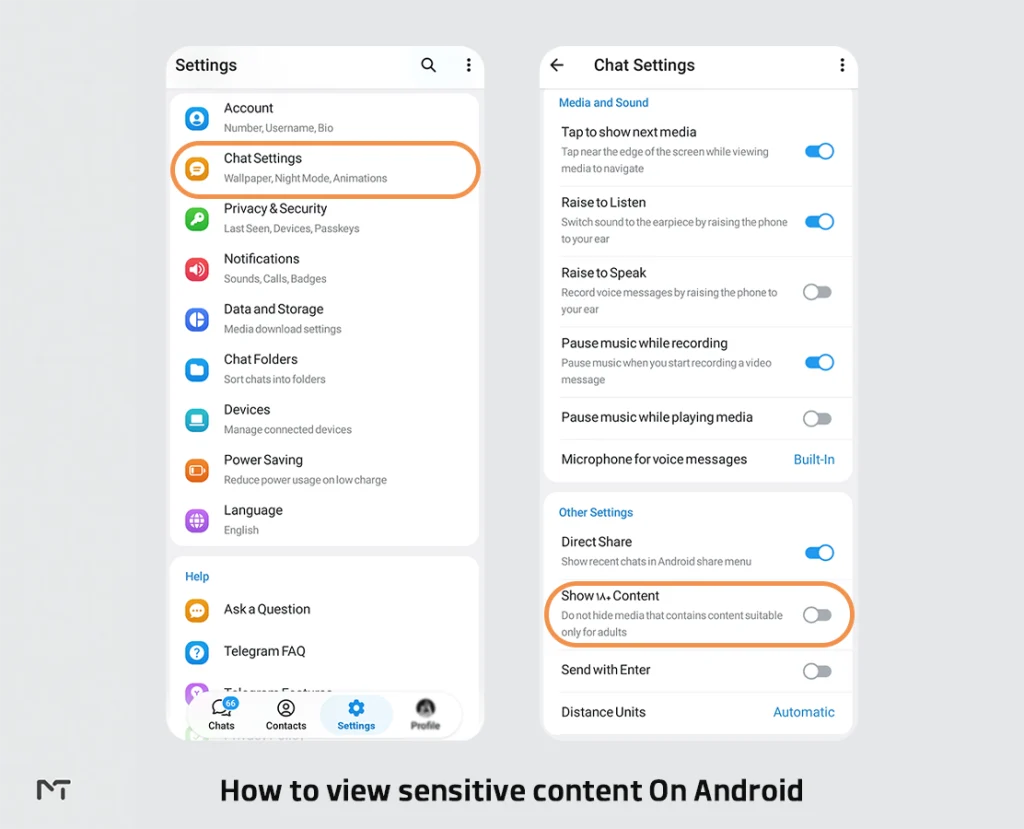
- On Android, you’ll find it under Settings, then Chat Settings, then Show 18+ Content.
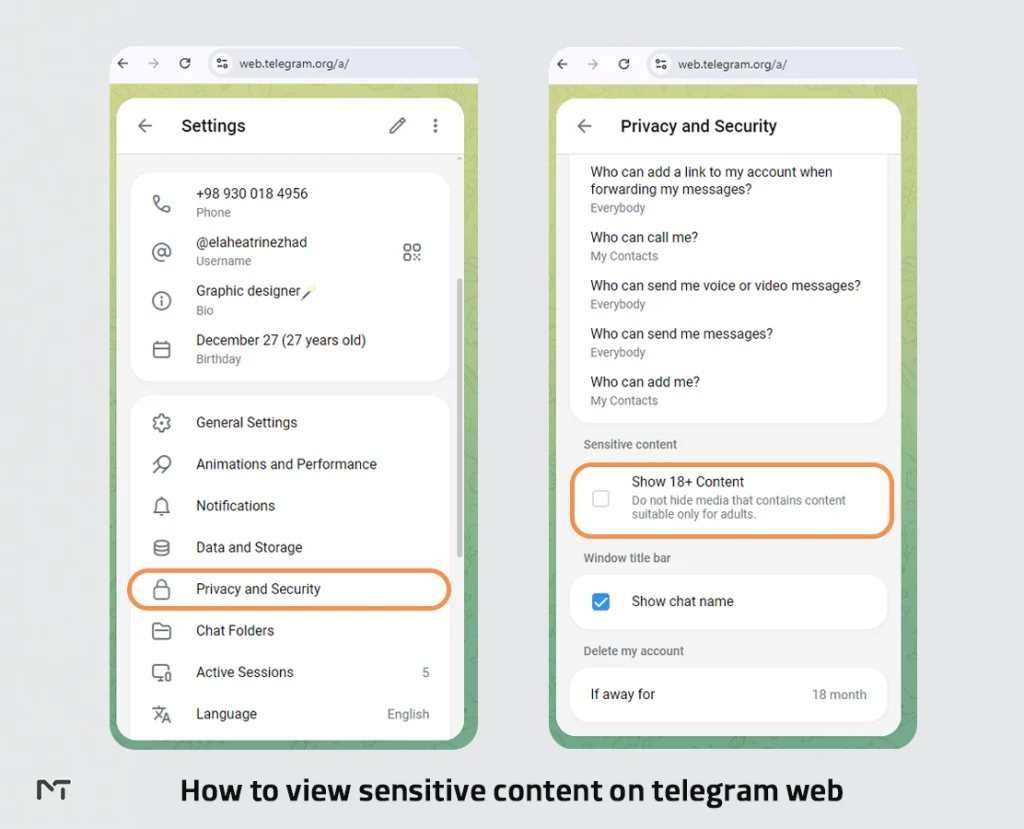
- On desktop and web, it’s under Settings, then Privacy and Security.
- iOS does not offer this toggle at all because of Apple’s App Store policy. You’ll need to use Telegram Web through a browser instead.
- The setting only affects your own account. It doesn’t remove Telegram’s separate, non negotiable ban on illegal material such as child sexual abuse content, which stays blocked no matter what you toggle.
Why Telegram Restricts Sensitive Content in the First Place
Telegram built this filter to strike a balance between letting people run open, uncensored communities and keeping the app usable for everyone else, including people who’d rather not stumble into adult content by accident. According to Telegram’s own moderation policy, the company runs a completely separate, zero tolerance system for illegal material like child abuse content, which is scanned against hash databases and removed automatically regardless of anyone’s personal settings. The sensitive content toggle only governs legal adult material, things like nudity, graphic imagery, or content some regions consider inappropriate for minors. Understanding that distinction matters, because it means flipping this switch never grants access to anything Telegram treats as illegal.
Regulators in different countries also push Telegram toward filtering by default. Some app stores and some national laws require platforms to hide adult content unless a user actively opts out, which is part of why the setting exists as an opt in toggle rather than something bundled into every account from day one. If you want more background on how Telegram enforces its rules more broadly, our article on Telegram’s rules and policies covers that in more depth.
“Telegram’s dual approach to content moderation is what keeps it listed on major app stores while maintaining its reputation as a free speech platform,” explains Sarah Jenkins, a digital privacy researcher. “By forcing users to actively seek out and disable the content filter on unmonitored platforms like their web or direct APK versions, they successfully shift the legal liability from the platform itself to the individual user.”
How to View Sensitive Content on Telegram by Device
The steps genuinely differ by platform, and mixing them up is the most common reason people give up halfway through. The steps genuinely differ by platform, and mixing them up is the most common reason people give up halfway through. Finding your way around these hidden menus is an essential part of Mastering Telegram, and knowing exactly where to look is one of those Telegram Tricks that saves you a lot of time. Here is how to do it on each device separately.
Here’s each one separately.
On Android
- Open Telegram and tap the menu icon in the top left corner.
- Select Settings.
- Tap Chat Settings.
- Scroll down until you see Other Settings or a section labeled Sensitive Content.
- Toggle on Show 18+ Content.
That’s the whole process. No restart is usually needed, though if a channel still won’t load, closing and reopening the app tends to fix it. If you follow these steps and still cannot find the sensitive content toggle on your Android device, the issue likely stems from Google Play Store restrictions. In certain regions, the version of Telegram downloaded from the Play Store completely hides this option to comply with local store policies. To get around this limitation, you can open your browser, visit the official Telegram website, and download the direct APK file. Uninstall your current app, install the version directly from Telegram, and the toggle will appear exactly where it should be under Chat Settings.
On iOS (iPhone and iPad)
Apple’s App Store guidelines don’t allow apps to ship with a built in way to unlock adult content, so Telegram simply doesn’t include this toggle on iOS. There’s no hidden menu or secret tap sequence that gets around it inside the official app. Your two realistic options are opening Telegram Web in Safari or Chrome, where the restriction doesn’t apply, or using it from a desktop computer where your account settings sync across devices anyway.
On Telegram Desktop (Windows and Linux)
- Open the Telegram Desktop app and log in.
- Click the menu icon in the top left corner and choose Settings.
- Go to Privacy and Security.
- Find the Sensitive Content section and switch it on.
On Telegram for macOS
The native Mac app organizes its menu slightly differently. Open Settings from the top menu bar, click Privacy, then look for Show Sensitive Content and enable it. If a channel still shows a warning after that, quitting Telegram completely with Command and Q, then relaunching, usually clears it. Keep in mind that if you downloaded Telegram from the Mac App Store, you might face the exact same invisible limitations as iOS users due to Apple’s overarching content guidelines. For the best results on an Apple computer, you should download the standalone macOS client directly from the official Telegram website. Once installed, open Settings from the top menu bar, click Privacy, look for Show Sensitive Content, and enable it. If a channel still shows a warning after that, quitting Telegram completely using Command and Q, then relaunching it, usually clears the cache and resolves the display error.
On Telegram Web
- Go to web.telegram.org and log in with your account.
- Click the menu icon and open Settings.
- Navigate to Privacy and Security.
- Check the box for Disable Filtering.
Because Telegram syncs your account settings, turning this on through Web or Desktop will also apply the change everywhere your account is logged in, including your phone, even though the toggle itself isn’t visible on iOS.
What Actually Changes Once You Turn It On
Before you flip the switch, it helps to know Telegram doesn’t just unlock content and dump it in front of you unfiltered. Media inside channels tagged as sensitive still shows up blurred by default, so you get a preview warning and choose to tap through rather than having it load automatically. Channel names and pinned messages will often carry labels like 18+ or NSFW, which is worth reading before you join anything, since admins are supposed to state their content rules up front.
One thing worth flagging: enabling this setting is a signal that you, as the account holder, accept responsibility for what you choose to view. Telegram treats it that way, and so should you, particularly if the device is shared with anyone underage.
Common Problems and Fixes
The Sensitive Content option isn’t showing up at all. Try logging into Telegram Web from a browser instead of the app. Some regions hide the setting entirely on certain app versions, and switching platforms often reveals it.
You toggled it on, but it didn’t save. Log out and back in, or clear the app’s cache. Telegram occasionally resets privacy settings after an update, and a fresh login usually restores your choice. Telegram occasionally resets privacy settings after an update, and a fresh login usually restores your choice. The developers frequently roll out Telegram Security Updates that might clear your local app cache, which explains why your preference suddenly reverts to default without your permission.
Channels are still blocked after enabling the setting. Fully close and restart the app rather than just minimizing it. If that doesn’t help, the channel may have been removed by Telegram’s own moderation for violating its terms, in which case no personal setting will bring it back. in which case no personal setting will bring it back. In fact, if you ever wonder why a Telegram Channel Was Banned completely, it usually means the admins crossed the line from legal adult material into strictly prohibited territory.
The channel is blocked despite having the correct settings and using a VPN. Telegram sometimes applies content restrictions based on the country code of the phone number used to register the account rather than your physical location. If your account is tied to a phone number from a region with strict national laws regarding adult content, the platform may permanently block access to certain channels on that specific account. In these rare cases, the only functional workaround is creating a secondary Telegram account using a phone number from a different country where such restrictions do not apply.
When Local Laws Limit This Feature
If you’re in a country where local regulation restricts adult content platforms broadly, the sensitive content toggle may simply not appear no matter what device you’re using, since Telegram applies these limits based on regional app store rules rather than your account. Some people work around this using a VPN connected to a different region, but that comes with a real tradeoff: free VPN services are known for logging and reselling user data, so if you go this route, use a paid provider with an independently audited no logs policy rather than the first free app you find. And it’s worth being honest with yourself about local law here too. A VPN changes what your device appears to be able to see, but it doesn’t change what’s legal to access from where you actually are.
Sensitive Content on Telegram: Platform Comparison
| Platform | Where to Find It | Available Everywhere | Notes |
|---|---|---|---|
| Android | Settings, Chat Settings, Show 18+ Content | Mostly, some regions excluded | Fastest option for most Android users |
| iOS | Not available in app | No | Use Telegram Web in a browser instead |
| Desktop (Windows/Linux) | Settings, Privacy and Security | Mostly | May require an app restart |
| macOS | Settings, Privacy, Show Sensitive Content | Mostly | Restart with Command and Q if it doesn’t apply |
| Web | Settings, Privacy and Security, Disable Filtering | Mostly | Best fallback for iOS users |
Staying Safe While Viewing Sensitive Content
- Don’t hand out personal details to accounts or admins in channels you just joined, even if the group looks established.
- Check who’s actually running a channel before trusting anything it posts. Pinned messages and channel descriptions usually say more than the bio does.
- Keep antivirus or basic device protection active, since some communities built around restricted content also attract phishing links and scam bots. Keep antivirus or basic device protection active, since some communities built around restricted content also attract phishing links and scam bots. If you want to recognize these malicious patterns before falling victim, learning how to Spot and Avoid These 15 Telegram Scams will keep your account perfectly safe.
- If you manage a community and you’re trying to build one from scratch, an empty channel is its own kind of problem, since new visitors tend to bounce off a group with no activity. Some admins solve that early momentum gap with a paid Telegram members service to get a channel looking active enough to hold a real audience’s attention, separate from anything related to sensitive content settings.
- Be careful about blindly joining dozens of sensitive groups at once. If other users flag your profile or you interact with spam bots, the platform might restrict your messaging abilities. If this happens, dealing with a Telegram Limited Account How Long the penalty lasts and fixing it will be your main priority.
Frequently Asked Questions
Why is sensitive content hidden on Telegram by default?
Telegram turns the filter on for every new account so people don’t encounter adult or graphic material without choosing to. It’s an opt in system built around user consent rather than a permanent ban, and toggling it off is entirely up to the account holder.
Can I turn off the sensitive content filter permanently?
Yes, the setting stays on until you change it again, though in regions where local rules restrict the option, Telegram may reset or hide it after an app update. If that happens, checking Telegram Web usually confirms whether it’s a regional block or just a glitch.
Is it safe to use a VPN to access this setting?
It can be, but only with a paid, reputable provider. Free VPN apps often make money by logging and selling your browsing data, which defeats the point of using one for privacy in the first place.
Why don’t I see the Show 18+ Content option on my iPhone?
Apple’s App Store rules don’t allow apps to include a direct toggle for unlocking adult content, so Telegram left it out of the iOS build entirely. Telegram Web in Safari is the standard workaround.
Does enabling sensitive content give me access to everything on Telegram?
No. It only unlocks legal adult content that Telegram has tagged as sensitive. Illegal material, including child abuse content, remains permanently blocked and actively scanned for regardless of your personal settings, and reporting it directly to Telegram is the right move if you ever come across it.
Conclusion
Viewing sensitive content on Telegram really comes down to knowing which menu applies to your device, since the setting lives in a different place on Android than it does on desktop, and doesn’t exist at all on iOS. Once you find the right toggle, the process itself takes under a minute, and Telegram’s blurred preview system still gives you a final say over what actually loads on screen. Treat the setting the way Telegram intends it, as a personal choice you’re accountable for, and you’ll get the access you’re after without running into the scams and shady workarounds that tend to circle this topic.
Have you run into a device where the sensitive content setting wouldn’t show up? Tell us which platform in the comments, or message us directly at membertelsupport and we’ll help you sort it out.














Leave a Reply