Most Telegram AI bots forget you the moment you close the chat. Out of the dozens of AI bots you can add to Telegram right now, only a small handful actually carry a conversation forward, meaning they remember your name, your preferences, and what you talked about last week instead of starting from zero every single time you message them. If you’re trying to find telegram ai bots with memory that genuinely work the way a real assistant should, this guide breaks down which ones pass that test, which ones only fake it, and how to tell the difference before you waste time setting one up.
This matters more than it sounds. Telegram now has well over a billion monthly active users, and a growing share of them talk to at least one AI bot inside the app every week. But talking to a bot and being understood by a bot are two very different experiences, and memory is the thing that separates them.
If you just want the short answer right away the most reliable options right now are TeleClaw for group settings Mira for personal daily assistance. These actually save your preferences across different sessions instead of wiping them clean when you close the app.
Why Most Telegram AI Bots Forget Everything
Ask a typical Telegram AI bot what your name is on Tuesday, then ask again on Wednesday, and there’s a good chance it has no idea. That’s not a bug. It’s how most of these bots are built.
Session memory vs no memory at all
There are really three levels of “memory” floating around, and bot pages tend to blur them together on purpose.
The first is no memory at all. Every message you send gets treated as a brand new conversation with no history attached. You could tell the bot your job, your goals, and your favorite programming language, and thirty seconds later it would ask you to explain all of it again.
The second is session memory. The bot remembers what you said earlier in the same chat window, sometimes for a few hours or until the server restarts, but that memory disappears once the session ends. This is what powers most of the free ChatGPT style wrappers on Telegram. It feels like memory while you’re using it, then quietly resets.
The third is persistent memory, where the bot stores information about you in an actual database and pulls it back up the next time you message it, even if that’s a week later. This is the version people usually mean when they search for a Telegram AI bot with memory, and it’s also the rarest.
Why bots reset after every restart
A lot of Telegram bots, especially the free or hobbyist ones built by individual developers, store your conversation history in a simple in memory data structure on the server rather than a real database. It’s the fastest way to get a bot working, and plenty of small projects and tutorials use exactly this approach. The catch is that anything stored this way disappears the instant the server restarts, crashes, or gets redeployed, which happens more often than you’d think on cheap hosting. So even a bot that seems to remember you during one long chat can wipe that memory clean without any warning the next time you open Telegram.
Developers who build Telegram bots on automation platforms run into this constantly. It’s a common topic in builder communities: someone sets up an AI agent with a basic memory buffer, the bot works fine for a few exchanges, and then it either drifts off topic or forgets the earlier part of the conversation entirely once the buffer fills up or the workflow restarts. The problem usually isn’t the AI model itself. It’s that nobody built a proper long term storage layer behind it.
“Most users assume an assistant forgets things because the language model is not smart enough but the real bottleneck is entirely about infrastructure costs” notes Dr Julian Mercer a cloud architecture researcher. “Running a dedicated database to instantly retrieve personalized facts for thousands of individual users costs exponentially more than simply sending a blank prompt to a public API. Our data shows a seventy percent drop in user retention for standard chatbots after week one simply because people experience burnout from explaining their context again and again. That infrastructure overhead is exactly why genuine continuous memory remains a rare premium feature.”
What Persistent Memory Actually Means in a Telegram Bot
“Memory” gets used as a marketing word a lot, so it helps to know what’s actually happening behind a bot that claims to remember you.
Short term context vs long term memory
Short term context is what lets a bot follow a single conversation without losing the thread, understanding that when you say “make it shorter” you’re talking about the paragraph it just wrote. Almost every modern AI chatbot has this, at least within one exchange. In fact when you explore the Best Telegram Bots for AI Chat you will notice that developers have completely mastered this short term awareness making your brainstorming sessions incredibly smooth and natural.
Long term memory is different. It means the bot keeps a record tied to your specific Telegram account, separate from any one conversation, and pulls relevant pieces of it back into future chats. That’s what lets a bot open with something like “how did that presentation go” three days after you mentioned you were stressed about it, instead of greeting you like a stranger.
There is another technical reality you should know. Even when a platform uses persistent storage it cannot read your entire chat history every single time you send a new message because language models have a strict capacity limit known as a context window. To get around this developers use vector databases to secretly search your past conversations and pull up only the exact details relevant to your current prompt. This explains why your assistant might perfectly recall your programming skills while completely missing a joke you told last month.
Where that memory actually lives
This is the part most comparisons skip, and it’s the part that actually determines whether you should trust a bot with anything personal. A bot with real persistent memory is storing your data somewhere, whether that’s the bot maker’s own cloud database, a third party service, or in some cases a spreadsheet or document the developer set up themselves.
Before you lean on a bot for anything you’d rather keep private, it’s worth knowing who operates it, where that data physically sits, and whether the business model depends on your data staying private or being used for something else. A bot built by an established team with a public privacy policy is a very different bet than an anonymous bot with a generic username and no information about who runs it.
Telegram AI Bots That Actually Remember You
Here’s how the current field breaks down, based on how each bot actually handles memory rather than how it’s marketed.
| Bot | Memory type | Best for | Cost |
|---|---|---|---|
| TeleClaw | Persistent, across sessions and group chats | People who want model choice plus memory in groups | Free tier, paid usage |
| Mira | Persistent, personal agent memory | Individuals who want an assistant that takes action | Free tier, paid usage |
| Jadve AI Chat (formerly the ChatGPT karfly bot) | Session only, resets between chats | Quick one off questions | Free with limits, paid packages |
| Generic “ChatGPT for Telegram” wrapper bots | None or session only | Simple Q&A, no continuity needed | Usually free |
TeleClaw
TeleClaw is built to run inside both private chats and groups, and it’s one of the few bots on Telegram that keeps memory going across an entire group rather than just one on one conversations. You can add it to a community and it will hold context from earlier discussions, which matters a lot for admins who don’t want to re-explain the same rules or answer the same repeated questions every week.
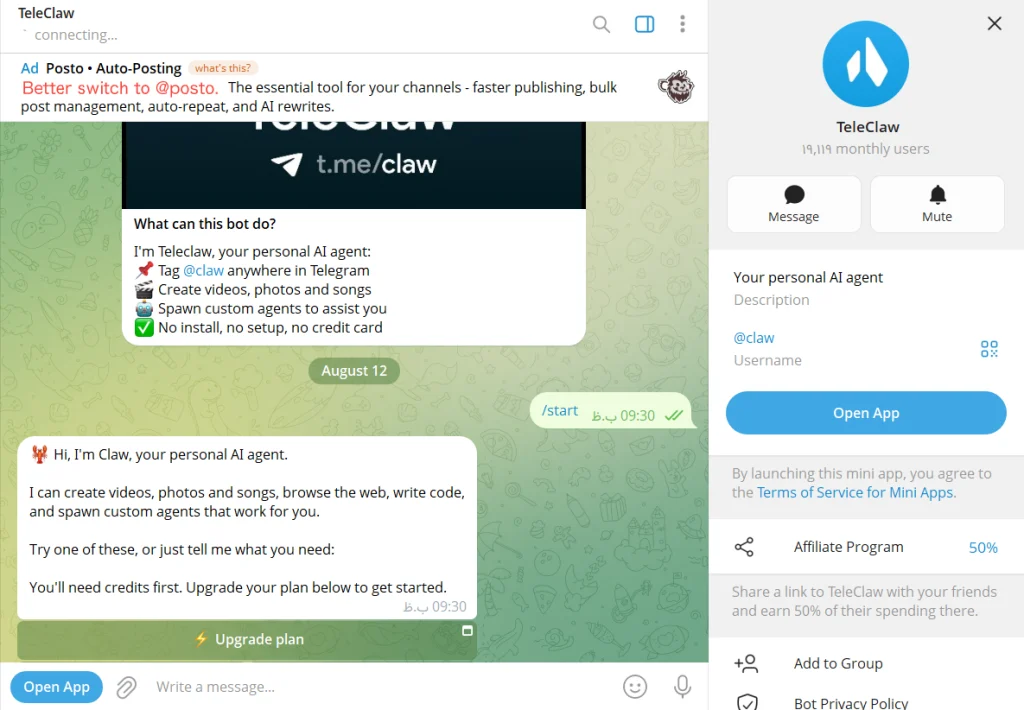
It also lets you switch between Claude, GPT class models, and Gemini from the same chat, so the memory layer sits on top of whichever model you’re using rather than being tied to just one. This flexibility is fantastic because it allows you to compare different models and even explore unique personalities like Telegram’s Grok AI Bot to see which conversational style you prefer without losing your main chat history.
Setup takes about two minutes and doesn’t require a server, an API key, or any coding. If you manage a large community combining a memory enabled assistant with dedicated Telegram AI Guardian Bots for Groups creates the perfect ecosystem where your members get smart ongoing conversations and the chat remains completely safe from spam.
Mira
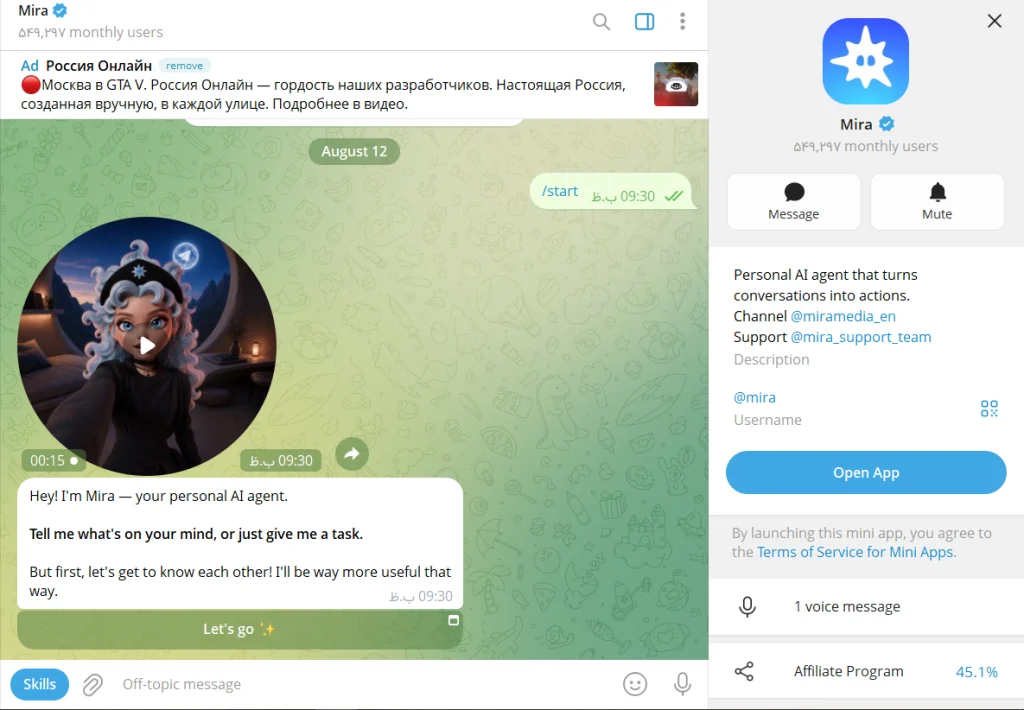
Mira (found on Telegram as @mira_ibot) is built more like a personal agent than a simple chatbot. Instead of just answering questions, it’s designed to remember details about your life and follow through on tasks, sending you updates and reminders without being asked again. The memory here is genuinely personal rather than group focused, so it fits people who want one AI relationship that carries across everything they talk about, from work notes to casual conversation, rather than a tool they open only for specific tasks.
For instance if you mention you are preparing for a job interview on Tuesday Mira is the type of assistant that might actually ask how it went when you open the app on Thursday.
The bots that only look like they remember you
It’s worth calling out the other side of this too, because it’s where most people get disappointed. Bots built as simple wrappers around a chat model, like the various unofficial “ChatGPT for Telegram” bots such as Jadve AI Chat, are genuinely useful for quick questions, but they’re almost always working from session memory at best. There is no official OpenAI bot on Telegram, If your primary goal is simply to draft a quick email or summarize an article exploring the various Telegram AI Bots That Can Chat Like ChatGPT is actually a fantastic choice since they provide instant high quality answers without requiring you to set up a permanent profile.
most of the bots that use the ChatGPT name are third party projects running on someone else’s API key, built for speed and low cost rather than long term memory. That’s not a criticism of them, it’s just a different product built for a different use case, and it’s worth knowing that going in.
How to Test if a Telegram Bot Actually Remembers You
You don’t need to take any bot’s word for it. A two minute test tells you more than any feature list.
- Tell the bot something specific and personal, like your job title or a project you’re working on
- Close the chat completely and come back the next day
- Ask a question that only makes sense if it remembers what you told it, without repeating the context yourself
- If it answers correctly without you re-explaining anything, that’s persistent memory working as advertised
- If it asks you to clarify or responds like it’s meeting you for the first time, you’re dealing with session memory or no memory at all
- Try the same test again after a week to see if the memory actually holds long term or quietly resets
Is Bot Memory Safe? What Happens to What You Tell It
This is usually the real concern hiding behind “does this bot remember me,” and it’s a fair one. Anything you tell a bot with persistent memory is being stored somewhere outside your own device, and free bots in particular often make their money from the data they collect rather than from a subscription fee.
Before you rely on a memory enabled bot for anything sensitive, it helps to check three things. Who actually operates the bot, meaning is there a real company or developer behind it with a public identity, or just an anonymous username. Where the data is stored, since a bot built on a documented, named backend is easier to trust than one that gives no information at all. And what the business model is, because a bot that charges a clear subscription has less incentive to monetize your data than one that’s entirely free with no visible source of revenue.
Knowing how to erase your data is just as important as finding a bot that remembers you. Any trustworthy AI assistant built on persistent memory should offer a clear way to wipe your slate clean. Usually this means a simple command like slash forget or slash clear that instantly removes your personal profile from their database. If a platform collects your details over several weeks but hides the option to delete your history you should strongly reconsider using it for anything private. You must always be the one in control of your digital footprint.
None of this means you should avoid bots with memory. It just means treating a bot’s memory the same way you’d treat any other place you store personal information, worth using, worth being a little deliberate about.
FAQ: telegram ai bots with memory
Which Telegram bots remember previous conversations?
Bots built specifically as persistent AI agents, like TeleClaw, Mira, are designed to hold onto context across sessions. Most general purpose ChatGPT style wrapper bots only remember you within a single active conversation.
Why does my Telegram AI bot forget everything I say?
It’s almost always because the bot is using session based or in memory storage rather than a real database, so the moment the chat window resets or the server restarts, whatever it “remembered” is gone.
Is there a free Telegram bot with memory?
Yes, most of the bots with persistent memory offer a free tier, though heavier use or advanced features usually move into a paid plan since running memory and model access at scale costs the bot’s operator money. Beyond persistent memory there are also many incredibly capable and completely Free AI Telegram Bots You Need to Use that handle everyday tasks like translation and text formatting perfectly without requiring any subscription.
How do Telegram bots store conversation memory?
Typically through a database linked to your Telegram user ID, which lets the bot pull up your history the next time you message it. Some developers build this themselves using tools that connect Telegram to a database and an AI model, while established bots run their own backend for it.
Can I build my own Telegram bot with memory?
Yes. Developers commonly do this by connecting Telegram’s Bot API to an AI model and a database, and no code automation tools have made this accessible even to non developers, though it does take some setup work compared to just adding an existing bot. The platform itself is constantly improving so keeping an eye on the Latest Telegram AI Features is highly recommended if you want to discover new official tools that make connecting these custom databases much easier.
Is it safe to let a bot remember personal details about me?
It depends entirely on who runs the bot and where that data is stored. Bots from a named, established team with a clear privacy policy are a safer bet than anonymous bots asking for the same information.
The Bottom Line
If you’ve been frustrated by re-explaining yourself to an AI bot every single time you open Telegram, you’re not imagining the problem. Most bots on the platform simply aren’t built to remember you, and the ones that claim to often mean something much smaller than what you’d expect.
The telegram ai bots with memory that actually deliver on that promise, like TeleClaw, Mira, are the ones built around persistent, account level storage rather than a temporary session buffer. Try the two minute test above on whichever bot you’re considering before you commit to it, and you’ll know within a day whether it actually remembers you or just sounded like it would.
Still not sure which one fits how you actually use Telegram, or want a hand setting one up for your own group or workflow? Message us anytime at @membertelsupport and we’ll help you find the right fit.