
To localize a Telegram bot for international users, read each user’s language from the language code field, store that preference, replace hardcoded text with translated resource files, and update your bot’s name, description, and commands in BotFather for every language you support. Do all four and a bot that only spoke one language starts to feel like it was built for whoever actually opens it.
Whether you are coding a custom project from scratch or launching a Telegram AI Support Bot for global clients, getting started requires a clear roadmap. The short step by step process involves four main actions:
Translate the bot metadata directly through BotFather.
Extract the language code from the user’s first interaction.
Save that language preference to your database.
Connect your messages to language specific resource files.
I run into this problem constantly with bot owners. Someone builds a bot for one market, it does well, the audience grows past that first language, and suddenly people are dropping off at the very first message because the bot never learned to speak to them. The fix is more approachable than most people expect once you break it into pieces.
Key Takeaways
- Telegram sends a user’s language automatically through language_code, but only once they have started the bot at least once.
- Real localization means separating text from code with resource files, not writing a separate copy of your bot for every language.
- BotFather lets you set a translated name, description, and command list per language, and almost nobody bothers to use it.
- Machine translation is fine for high volume content, but anything tied to payments, security, or first impressions needs a human to check it.
- Persian and Arabic need their own layout and rendering checks, since right to left text brings problems a plain translation won’t catch.
Translation vs Localization: Why the Difference Matters
People use “translate” and “localize” as if they mean the same thing, and that mix up is where most bot owners get stuck.
Translation swaps words from one language into another. Localization goes past that. The bot adjusts date formats, currency, button labels, even tone, based on who is using it and where they are. A bot that is translated but not localized might greet a Japanese user in polite Japanese and then show prices in dollars with dates in month first order, which still reads as slightly foreign even to a fluent speaker.
The technical name for building a bot that can support many languages is internationalization, shortened to i18n. Localization, or l10n, is filling in the actual content for each language once the bot already supports the structure. You do i18n once while building the bot. You do l10n every time you add a language.
How Telegram Detects a User’s Language
Telegram makes this part simpler than most platforms do. Every update your bot receives includes a language_code field on the user object, written as an IETF language tag such as en, fa, or pt-BR.
That means you do not need to ask users what language they speak the first time they message your bot. Read language_code from the incoming update, match it against what you support, and reply accordingly.
A few limits are worth knowing before you build around this field:
- It only shows up once a user has opened a private chat with your bot directly. If someone only sees the bot inside a group without starting it themselves, the field may be missing entirely.
- Some clients report a regional code like it-IT while others send just it, so your matching logic needs to fall back from the regional code to the base language.
- It reflects the user’s Telegram app setting, not necessarily the language they would rather read in, so a manual override still matters.
Getting your language detection right is a core requirement when you start building Telegram customer support for global businesses. A client who cannot read your initial greeting will simply close the chat and look for a competitor.
Building the Bot Step by Step
Once you understand where the language signal comes from, the actual build breaks down into four smaller tasks: setting up your message files, catching and saving each user’s language, giving people a way to switch manually, and deciding what happens when a translation is missing.
Structuring Messages with Resource Files
The most common mistake in early localization attempts is writing branching logic that jumps into a separate block of hardcoded text for each language. That works fine for two languages. It falls apart by the time you reach five.
The better approach is a resource file per language, usually JSON or YAML, where every message shares the same key across languages. Your code then calls something like t(“welcome_message”), and the right string comes back based on whichever language is active for that user. Libraries such as grammY and Telegraf already have plugins built around this exact pattern, so there is rarely a reason to build the lookup logic from scratch.
Handling Variables and Plurals
Static text is just the baseline. Most bots need to send dynamic data like a username or an account balance, which means your translations must support variables. A basic JSON file for English usually looks like this:
JSON
{
  "welcome_message": "Hello, {{name}}! Welcome back.",
  "coin_balance_one": "You have 1 coin.",
  "coin_balance_other": "You have {{count}} coins."
}
Numbers bring up another common roadblock. English keeps pluralization simple. Other languages, including Russian and Arabic, follow much more complex rules depending on the exact number of items involved. You should pick a localization library that handles these plural rules natively. Without one, you will find yourself writing endless conditional statements just to avoid awkward phrasing like “You have 1 coins.”
Detecting and Storing the User’s Language
On someone’s first interaction, read their language_code, check it against the languages your bot actually supports, and save the result in whatever database record already holds their other user data. If their code does not match anything you support, fall back to your default language.
Querying your database to check a language preference on every single incoming message is a quick way to slow down a growing bot. The smarter approach is caching that preference. Storing the user choice in memory or using a fast tool like Redis keeps your bot responding instantly. Your database gets to rest and only needs to update when someone actually asks to switch their language.
Adding a Manual Language Command
Automatic detection is a starting point, not the whole solution. A simple /language command with a keyboard of supported languages lets people switch on their own, which matters more than it looks, since plenty of users keep their phone in one language while preferring to read in another.
Handling Missing Translations
Decide ahead of time what a bot should do when a string has not been translated yet for a given language. Falling back to your base language is the safer default, rather than sending a blank message or a broken placeholder, and this becomes more important the faster you add new features than your translators can keep up with.
Localizing Bot Metadata Through BotFather
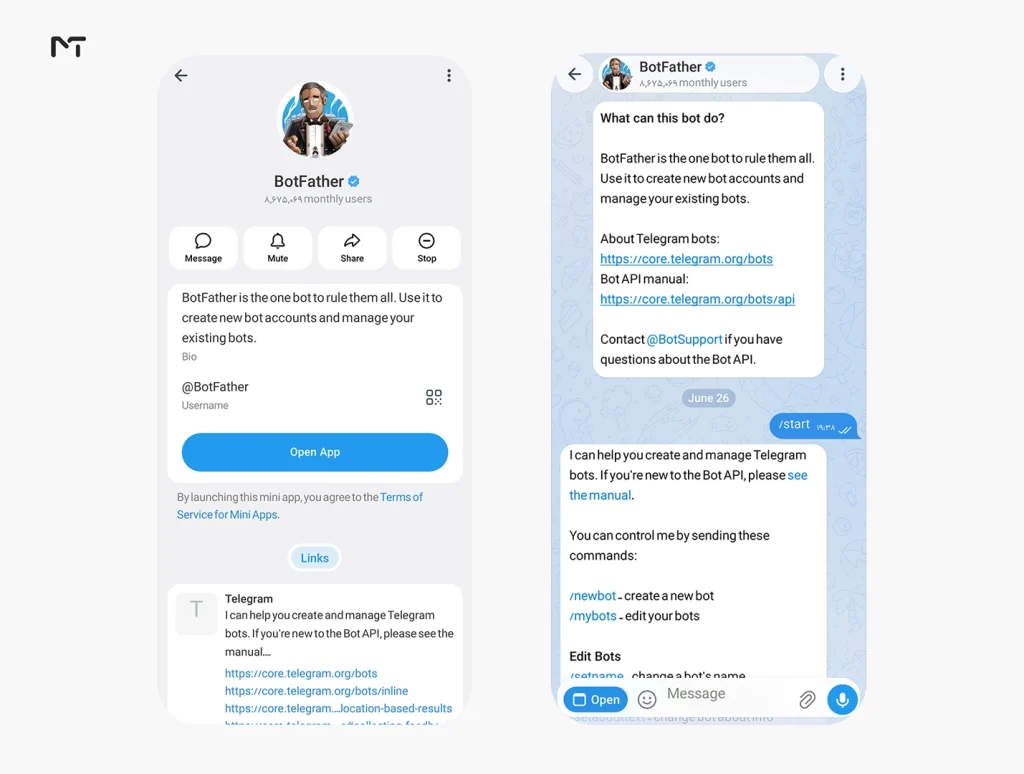
Most bot owners localize their messages and stop there, forgetting that the bot’s name, description, about text, and command list can be localized too. This is metadata users see before they ever send a message, which makes it one of the highest impact places to put translation effort.
Through BotFather, or directly through the Bot API methods setMyCommands, setMyDescription, and setMyShortDescription, you can set different values for each language code. Telegram automatically shows each user the version that matches their app language, and falls back to your default for everyone else.
Choosing How to Translate the Content
Once the bot can technically handle multiple languages, you still need the translated text itself. Here is how the common options compare.
| Approach | Best For | Watch Out For |
|---|---|---|
| Manual human translation | Onboarding, payment text, legal notices | Slower and costs more at scale |
| Google Cloud Translation | High volume, broad language coverage | Can miss tone and brand specific wording |
| DeepL | European languages where phrasing matters | Fewer supported languages than Google |
| GPT based translation | Context aware phrasing, adjustable tone | Still needs a review pass for regulated or technical content |
Most growing bots settle on a mix: human translation for anything touching money, security, or first impressions, and API based translation for the rest, with a native speaker spot checking it periodically. If you already handle translation for channel content, the same logic extends further. A Telegram post translator bot that shares content across language specific channels solves a related but separate problem from localizing the bot’s own interface, and the two tend to work well side by side for teams running multilingual communities.
Using dedicated Telegram bots for message translation inside public chats is a great way to bridge communication gaps in groups. However localizing your own bot interface requires a completely different approach from simply translating user messages on the fly.
Supporting Right to Left Languages
Persian and Arabic add a layer beyond translation, since the text direction itself flips. A few things worth checking specifically:
- Inline keyboard buttons can end up in reversed order if direction is not accounted for when the layout is built.
- Numbers and dates inside right to left sentences sometimes render in an unexpected order depending on the client.
- Mixed content, such as an English brand name sitting inside a Persian sentence, needs testing on both mobile and desktop, since rendering is not always identical across the two.
Test every right to left language on an actual device rather than trusting a preview, since emulators and web previews do not always catch these problems.
Testing Before You Launch a New Language
Before rolling out a new language, walk through the full user journey in that language, not just a handful of individual messages. Check button labels, error messages, and anything triggered by edge cases like an expired session or a failed payment, since these are the messages teams forget first and users run into at the worst possible moment.
If a critical button label fails to load because of a missing translation key users might assume your Telegram bot is not responding and abandon the session entirely. Thorough testing guarantees that these edge cases render smoothly.
Localizing Telegram Web Apps
Many modern bots rely heavily on Telegram Web Apps. If you use Mini Apps, your frontend needs localization too. The tricky part is that standard bot updates drop the language field once the user opens the web interface.
You have to pull the user language from the initialization data instead. The Telegram Web App JavaScript API provides this under window.Telegram.WebApp.initDataUnsafe.user.language_code. Grab that code and pass it straight into whatever localization tool your frontend framework uses. This keeps the web view perfectly synced with the chat language and stops you from asking the user to pick their preference a second time.
Frequently Asked Questions
How do I make my Telegram bot support multiple languages?
Read the language_code field from incoming updates, store each user’s language preference, and serve all text from language specific resource files instead of hardcoded strings.
What is language_code in a Telegram bot?
It is a field Telegram includes on the user object for most updates, showing the user’s Telegram app language as an IETF tag such as en or fa.
Can Telegram bots detect a user’s language automatically?
Yes, through language_code, though it only becomes available once the user has started a private chat with the bot at least once.
Does BotFather support multiple languages for a bot’s description?
Yes. You can set a translated name, description, and command list per language, and Telegram shows each user whichever version matches their app language.
What is the best translation option for a Telegram bot?
It depends on the content. Human translation works best for onboarding and payment related messages, while API based tools like Google Cloud Translation or DeepL handle high volume content efficiently.
How do I support Persian or Arabic in a Telegram bot?
Beyond translating the text, test button layouts and mixed language sentences on real devices, since right to left rendering can behave differently across Telegram clients.
Final Thoughts: Localize a Telegram Bot
Figuring out how to localize a Telegram bot for international users is not one feature you switch on. It comes down to a handful of smaller decisions: reading language_code correctly, keeping your text separated from your code so new languages are easy to add, and remembering that BotFather’s metadata deserves the same attention as your messages. Get those pieces right and the bot stops feeling like it was built for one country, and starts feeling like it was built for anyone who opens it.
Every new language you support opens the door to a wider audience. Setting up a Telegram bot for lead generation becomes significantly more effective when it greets potential clients in their native language right from the first interaction.
If you hit a wall managing a multilingual audience beyond what the bot itself can handle, the team at @membertelsupport can point you toward the right tools for your setup.














Leave a Reply