
If you can’t take screenshot on Telegram, the app or your phone is blocking it on purpose, and the cause is almost always one of six things: a secret chat on Android, a channel or group with Restrict Saving Content turned on, view once or self destructing media, a story posted with screenshots off, your own Passcode Lock setting, or a work profile policy on your phone. Only the last two are yours to change. The rest are decisions made by whoever sent the content, so the realistic fix is a different route to the information, not a trick to beat the block.
Below you will find a quick table that matches what you see on screen with its cause, an explanation of the “security policy” error, a comparison of Android, iPhone and Desktop, and the fixes that are safe to use. If you run a channel yourself, there is also a short section on switching the protection on for your own content.
Can’t Take Screenshot on Telegram: Quick Diagnosis
Match what you see on your screen with a row below to find the likely cause before you read the details.
| What you see | Most likely cause | Can you change it? |
|---|---|---|
| “Can’t take screenshot due to security policy” on Android | Secret chat, protected channel, timer media or Passcode setting | Only the Passcode setting |
| The screenshot saves but is completely black | Protected content or secure media | No |
| Screenshot works, but the chat shows “took a screenshot” | Secret chat on iPhone | No, the alert is built in |
| Blocked in one chat, fine in every other chat | Chat level protection set by an admin or sender | No, ask them |
| Blocked in every app on a work phone | Device policy from your employer | Only through your IT team |
| Blocked in all Telegram chats, but not in other apps | Passcode Lock option on Android | Yes |
What “Can’t Take Screenshot Due to Security Policy” Actually Means
That message does not come from Telegram. It comes from Android. Telegram marks a screen as secure, Android refuses to capture it, and the system shows the notice. The same mechanism is used by banking apps and streaming apps. It is also why screen recordings of protected chats come out black and why screen sharing shows an empty window.
Apple does not give apps the same switch. On an iPhone, Telegram cannot stop the screenshot button from working, so it relies on alerts inside secret chats and, for some protected media, on showing a blank image. That difference explains most of the confusing reports you read in forums, where one person says screenshots work and another says they never do. They are simply on different platforms.
Six Reasons Behind a Blocked Screenshot on Telegram
Telegram has several separate layers that can stop a screenshot, and each one behaves differently. Some belong to the chat itself, some are set by the person who sent the content, and two sit on your own phone. Going through them in order is the quickest way to find yours, because the fix depends entirely on which one you are dealing with.
1. Secret Chats
A secret chat is end to end encrypted and tied to the device that created it. Telegram’s own rule is simple: on Android the screenshot is disabled, and on iPhone the other person receives a notice in the conversation if you take one. Telegram Desktop does not support secret chats at all, so there is nothing to capture there.
2. Restrict Saving Content in Groups and Channels
Since the 8.3 update in late 2021, owners of groups and channels can switch on Restrict Saving Content. It stops forwarding, limits saving media, and on mobile blocks screenshots. When the feature launched, the Telegram team said its goal was keeping posts available only for their intended audience.
These restriction features frequently evolve alongside major Telegram security updates so you might notice changes in how the app handles screen captures on newer operating systems.
This is the setting behind most blocked screenshots in paid channels, course material, private research groups and client report channels. Telegram reported passing one billion monthly users in 2025, and a growing share of that activity is creators sharing work they expect to be paid for. That is the reason these controls exist and the reason they are unlikely to disappear.
3. View Once and Self Destructing Media
When a sender attaches a timer to a photo or video, or sends it as view once, Telegram treats it like secret chat content. The idea is that the media exists for a short time and then it is gone. On Android the capture is refused. On an iPhone the result depends on the media type and your version of the app, and you may get a blank image instead of the picture.
4. Stories With Screenshots Turned Off
The person posting a story can switch off screenshots and saving for it. If you open such a story and the capture fails, that is the reason. For stories without that option, Telegram does not tell the poster when someone takes a screenshot.
5. Your Own Passcode Lock Setting (Android)
This is the one cause you can fix yourself. With a passcode enabled, Telegram can hide the app content from your recent apps screen, and when that is active it also blocks screenshots in every chat. Open Settings, then Privacy and Security, then Passcode Lock. Look for the option labelled Show App Content in Task Switcher (on some versions it appears under a name that mentions allowing screenshots) and switch it on. Menu labels change between versions, so match the idea, not the exact words.
6. Work Profile or Device Policy
If your phone is managed by an employer or school, an administrator can disable screen capture for every app on the device or for everything inside the work profile. Test a screenshot in a notes app or your browser. If that fails too, Telegram is not the cause, and only the person who manages the device can change the policy.
Can’t Take Screenshot on Telegram on Android, iPhone and Desktop
The same chat can behave differently depending on the device you use, so find your platform in this comparison.
| Where | Android | iPhone | Telegram Desktop |
|---|---|---|---|
| Regular private chat | Works, no alert | Works, no alert | Works, no alert |
| Group or channel without restrictions | Works, no alert | Works, no alert | Works, no alert |
| Secret chat | Blocked | Works, other person gets an alert | Not available |
| Restrict Saving Content | Blocked | Depends on version | Depends on version |
| View once or timer media | Blocked | Often blank or alerted, depends on version | Depends on version |
| Story with screenshots off | Blocked | Depends on version | Depends on version |
Telegram describes protected content as something that prevents screenshots, but enforcement differs by platform and app version. Treat this table as a map of what to expect, and test on your own device before you rely on it.
How to Fix It: What Works and What Doesn’t
Everything below follows Telegram’s documented behavior, so confirm the menu names on your own version.
- Test another app first. Take a screenshot in your notes app. If it works there, the block is inside Telegram. If it fails everywhere, look at the device policy or a phone setting instead.
- Check Passcode Lock on Android. Use the path in section five above. If the option was off, switch it on and try again in a normal chat.
- Force close and update. If a normal chat is blocked when it should not be, close Telegram fully, reopen it, and install pending updates for Telegram and your operating system.
- Ask the sender or admin. This is the method that works most often. Ask for a copy of the file, a written summary, or permission to save it. Channel owners can usually share a downloadable version outside Telegram.
- Write the information down. For an address, a reference number or a short instruction, typing it into your notes takes ten seconds and breaks no rule.
- Photograph the screen with another device. A camera is not subject to any software block, so this works technically. I would only use it for personal records. Passing on paid or private content may go against the creator’s terms and against Telegram’s rules, and in a secret chat the other person trusted that nothing would be kept.
Skip modified Telegram apps, virtual machines and “bypass” tools. An unofficial client handles your login and your messages, which means you hand an unknown developer access to both. If you need to capture a call, read how to record Telegram video calls using the official options instead.
Does Telegram Notify Screenshots?
Many people worry the other person will find out, so here is when Telegram actually sends an alert and when it stays silent.
| Situation | Does the other person get notified? |
|---|---|
| Regular private chat | No |
| Group or channel | No |
| Secret chat on iPhone | Yes, a service message appears in the chat |
| Secret chat on Android | The screenshot is blocked, so nothing is captured |
| Story | No, unless the poster turned screenshots off, which blocks the capture |
| Screen recording | No dependable alert, so don’t assume either way |
If You Run a Channel: Turn On Restrict Saving Content
Protecting your own posts takes less than a minute.
- Open your channel or group and tap its name at the top.
- Choose Edit, then open Channel Type (or Group Type).
- Switch on Restrict Saving Content.
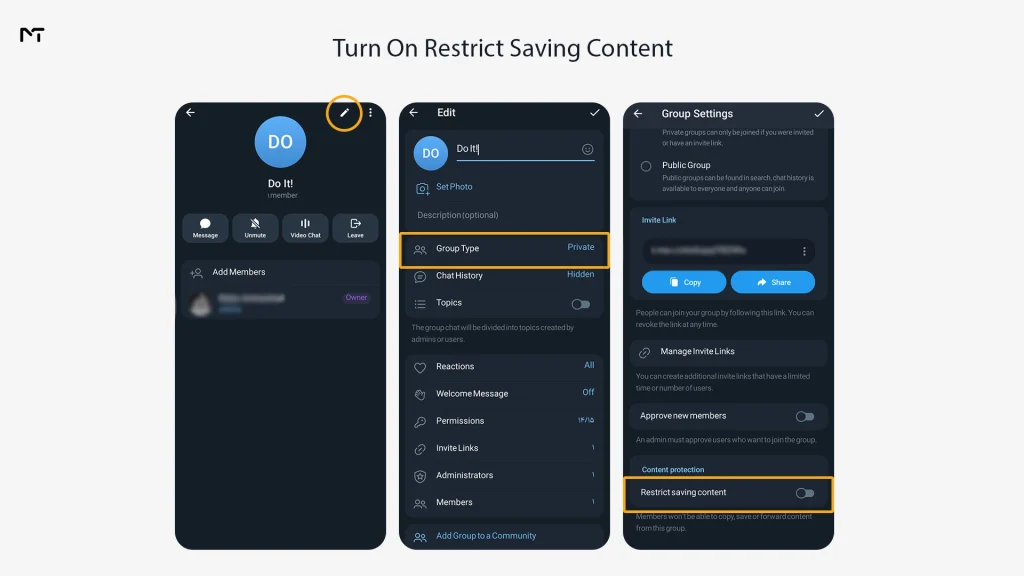
From that point, members cannot forward your posts, saving media is limited, and mobile screenshots are blocked. It will not stop someone from pointing a second phone at the screen or retyping what they read, so never publish anything whose leak would seriously hurt you. For paid material I would combine the setting with join request approval, so you know who is inside before they see anything.
Real Situations Where This Comes Up
These are the cases that come up most often, along with the move that usually solves each one.
| Situation | What is happening | Practical move |
|---|---|---|
| You need a delivery address from a secret chat | Capture is blocked on Android | Write it down, or ask them to resend it in a normal chat if they agree |
| A course channel you paid for hides its notes | Restrict Saving Content is on | Ask the admin for a downloadable version |
| Telegram works fine but nothing can be captured on your company phone | Device policy | Ask IT which approved method you should use |
| You can’t capture any Telegram chat on your own phone | Passcode Lock option | Switch on the setting described above |
FAQ
Quick answers to the questions people ask most about blocked screenshots.
Why is my Telegram screen recording black?
Telegram marks protected screens as secure, and the system hands the recorder an empty frame. You cannot change this from your side for protected chats.
Can I screenshot a Telegram secret chat?
On Android, no, the system refuses. On an iPhone you can, but the other person gets a notice in the conversation.
Does the other person know if I screenshot a normal chat?
No. Telegram only sends screenshot alerts in secret chats.
Why can’t I take screenshots in Telegram but I can in other apps?
Either the chat has protection set by an admin or sender, or your Passcode Lock option hides app content. Check whether the block happens in every chat or only one. That single test tells you which cause you have.
Is it legal to photograph a protected screen?
I’m not a lawyer, and the answer depends on your country and on the creator’s terms. Keeping a note for yourself is very different from redistributing someone’s paid work, and I would not do the second.
Final Word: Can’t Take Screenshot on Telegram
Most of the time, when you can’t take screenshot on Telegram, the block is deliberate and tied to one specific chat, so the fastest fix is to work out which of the six cases you are in, then change the one setting you control or ask the person who controls the rest. If you run a channel and want a second opinion on protection and access settings, our team at @membertelsupport answers these questions every day.














Leave a Reply