

To set up a Telegram welcome message, open your group or channel profile, tap Edit, choose Welcome Message and add the messages you want new members to see. Only the person who just joined sees them, so the rest of your chat stays clean. No bot is involved, and Telegram’s announcement does not mention a Premium requirement.
Telegram introduced the feature on August 25, 2026, as part of its 13th anniversary update. This guide walks through the exact steps for groups and channels, what you can put inside a welcome message, examples you can adapt, the jobs that still need a bot, and what to check when nothing shows up.
What Is a Telegram Welcome Message?
A Telegram welcome message is a private greeting that Telegram shows to someone the moment they join your group or channel. In Telegram’s own words, it gives newcomers extra information without cluttering the chat for others. Enthusiasts who track Telegram Beta All Versions noticed this early on. They saw hints of a system acting like Telegram Ephemeral Bot Messages, meaning the greeting exists only for the person who joined and stays invisible to everyone else.
Before this update, admins had two workarounds. They pinned a rules message at the top of the chat, which everyone had to scroll past forever, or they installed a bot that posted a public hello. The new feature sits between those two. It reaches the newcomer directly and leaves the shared conversation alone.
Telegram calls the result a welcome pack: one message or several, with text, media and formatting. The company puts the setup this way in its blog post: “Easy! No bots or voodoo magic required.”
One thing to keep straight: this is not the greeting message in Telegram Business. That feature answers people who message your personal account. A welcome message belongs to a group or channel and is aimed at people who join it.
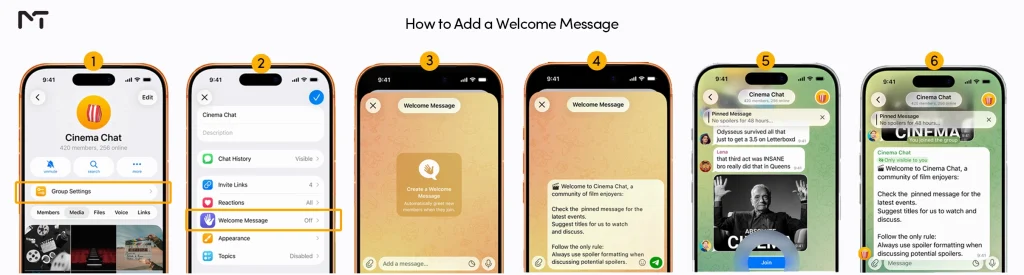
Understanding how this feature looks in action helps you plan your greeting better. The visual guide below shows exactly what happens the moment a new user joins your community.
What You Need Before You Start
| Requirement | What to check |
|---|---|
| App version | Update Telegram first. Older apps cannot render the new feature and show a placeholder with an update button instead |
| Your role | Telegram’s announcement says chat owners. Some outlets say admins, so open your admin permissions and see whether a welcome messages option is there |
| Chat type | Groups and channels are both supported |
| Premium | Telegram’s announcement lists no Premium requirement |
| Content ready | Draft your text, links and any image before you open the editor. Early beta reports mentioned a limit of three messages, and Telegram said such numbers could change, so confirm in your app |
| A second account | You cannot judge the result as the owner. Keep another account for a test join |
You should keep in mind that standard message limitations still apply to these greetings. A single message block can hold up to 4096 characters. However, aiming for a much shorter text is a good idea so you do not overwhelm your newcomers. Another detail to remember is that Telegram lacks a built in analytics dashboard for this specific feature. You will not be able to see exactly how many new members viewed your text or clicked your internal links unless you rely on custom tracking URLs.
Telegram now ships updates fast. It says it released 12 major updates with more than 55 features over the past year, so turn on automatic updates in your phone’s app store settings. Half of the “why can’t I see it” questions come down to an old app.
How to Set Up a Telegram Welcome Message in a Group (No Bot Needed)
- Update the app. Install the latest version of Telegram from Google Play or the App Store.
- Open the group profile. Tap the group name at the top of the chat.
- Tap Edit, then Welcome Message. Menu labels can differ a little between Android, iOS and desktop, but Telegram’s announcement describes this exact route.
- Add your messages. Telegram’s instructions say to send the messages inside that screen, so you write them the way you would write chat messages. Add text first, then any image, video or file. Use the text editor for formatting such as bold text, links and tables. Telegram’s rich text editor opens from an expand icon that appears after you type more than three lines in a message box.
- Test it from a second account. Join the group with another account and read what appears. Fix typos, broken links and awkward order now, not after fifty people have seen them.
Order matters when you use more than one message. Put the message people must read first, usually the rules or the single action you want from them. Save the friendly extras for the end.
Telegram has not said whether someone who leaves and rejoins sees the welcome again. Test that with your second account before you rely on it, especially if your welcome message contains a one time offer.
How to Set Up a Telegram Welcome Message in a Channel
The steps are the same as for a group: open the channel profile, tap Edit and choose Welcome Message. The difference is what the message replaces. A group has a live conversation where a hello can get lost. A channel has no chat window for subscribers, so a welcome message is the only place you can speak to a new subscriber directly.
That makes it a good spot for three things. Tell people what you post and how often. Point them to your other channels or a discussion group. And say what to do if they want to contact you.
Two cautions apply to channels. First, at least one bug report on Telegram’s tracker described channel welcome messages failing to send when they included the new in message buttons. Keep your channel welcome to text and media until Telegram confirms a fix, and test any button before you publish it. Second, managing entry requires extra testing. If you decide to set a join request on a Telegram group or channel, Telegram has not fully documented how the approval delay interacts with the instant welcome message feature.
If you ever need to change your greeting or stop sending it entirely, the process takes only a few seconds. Return to your group or channel profile, tap Edit, and select the Welcome Message option again. You can rewrite your existing text from that screen, swap out attached media, or clear everything out. When you delete all the message blocks, the welcome feature automatically turns off. Future members will then join your chat without receiving any automated private notification.
Telegram Welcome Message Examples and Templates
The announcement does not describe name placeholders, so write each message so it works without the member’s name. Each block below is one message. Use two or three of them together as a welcome pack.
Community group
Message 1: Welcome. This group runs on three rules: be kind, stay on topic, no promotions. The full rules are pinned at the top.

Message 2: Tell us who you are in one line and what you hope to get from the group. Introductions get answered fastest.
Support group
Message 1: You are in the support group. To get help quickly, post your device, app version and what you already tried.

Message 2: Screenshots beat long descriptions. Search the pinned FAQ first, because your answer may already be there.
Public news channel
Message 1: Thanks for subscribing. We post twice a day, morning and evening, and never spam.

Message 2: Want to discuss a story? Join our discussion group from the button in the channel description.
Paid or private channel
Message 1: Your access is active. Everything you need is pinned in this channel.

Message 2: Renewal reminders and support replies come from our support account. Save it now so you can reach us later.
Developer or open source chat
Message 1: Welcome. Before you post a question, read the pinned docs and search the issue tracker.

Message 2: When you ask for help, include your version, your operating system and the exact error text.
A few habits separate welcomes people read from welcomes people ignore. Ask for one action, not five. Lead with the rule that causes the most trouble. Keep each message short enough to read without scrolling. And revisit the text every month, because a welcome that mentions last quarter’s event makes the chat look abandoned.
Telegram Welcome Message vs Pinned Message vs Welcome Bot
| Feature | Telegram welcome message | Pinned message | Welcome bot |
|---|---|---|---|
| Who sees it | Only the new member | Everyone, permanently | Usually the whole group, sometimes a private message |
| Appears automatically | Yes | No, people must notice it | Yes |
| Clutters the chat | No | Slightly | Often, unless it deletes old greetings |
| Captcha or spam checks | No | No | Yes, in most group bots |
| Member’s name in the text | Not described in the announcement | No | Yes, through placeholders |
| Third party admin rights | None | None | Required |
| Cost | No Premium requirement mentioned | Free | Many are free, some sell paid plans |
My view: for most small and medium chats the built in message is enough, and it is safer because no outside bot gets admin rights. The pinned message still has a job, since it holds the full rules that a short welcome only summarizes.
Sometimes the built in tool is not enough for complex moderation. Setting up a welcome message in Telegram bot remains the better choice if you need to hold newcomers behind a captcha or greet people publicly by their first name.
Add Buttons to a Telegram Welcome Message (For Developers)
The same update lets developers place several buttons directly inside a message. Telegram’s blog says these can be used as welcome messages too, and it jokes about a welcome flow that reveals which kind of panda you are. Combined with ephemeral messages, buttons can power surveys, quizzes, small games or a step by step onboarding flow.
Bot API 10.3, released on August 24, 2026, also added an admin right called can_send_welcome_messages. It appears in the ChatAdministratorRights and ChatMemberAdministrator classes and as a parameter of the promoteChatMember method. This new right is a strong hint that welcome message control is no longer restricted to the owner. When you Add Admin to Telegram Channel and group settings, you can now delegate this exact greeting task to your trusted team members.
A beta tracker also reported that welcome messages sent by bots appear as if they came anonymously from the chat owner, not from the bot. Treat that as an early observation, since final behavior can differ. If you are not a developer, skip this section. The plain welcome message above covers what most communities need.
Why Your Telegram Welcome Message Is Not Showing
| Problem | Likely cause | Fix |
|---|---|---|
| You see a placeholder or nothing at all | Outdated app | Update Telegram on the test device and on yours |
| The Welcome Message option is missing | You are not the owner, or your admin role lacks the right | Ask the owner to make the change or to grant the permission |
| You never see your own message | The message only shows to new members | Test with a second account that has not joined yet |
| Rejoining shows nothing | Behavior for returning members is not documented | Test with a fresh account and do not rely on repeat delivery |
| Channel message with buttons fails | A reported bug with in message buttons in channels | Use plain text and media in channels for now |
| Newcomers get two greetings | A bot posts its own public welcome | Keep one public greeting and switch off the other |
| Some messages are missing | A message limit may apply | Merge messages. Beta reports mentioned a limit of three |
Keep Your Telegram Welcome Message Safe and Honest
Beta notes raised a real concern: a message that arrives privately after you join can be used to trick people, for instance with a line such as “the channel admin has a message for you”. Do not become that admin. Never ask newcomers for verification codes, passwords or payment details in a welcome message. Link only to places you control. And if you are the one joining a chat, treat links inside any welcome message with the same caution you would apply to a private message from a stranger.
Where a Telegram Welcome Message Pays Off
First impressions often decide whether a new subscriber stays active or mutes your channel permanently. Sarah Jenkins, a digital community strategist, points out that groups using automated private onboarding retain roughly thirty percent more active participants during their first week. She mentions that when users receive clear guidelines privately upon joining, they feel respected rather than bombarded by rules in a public chat window. This approach drastically reduces early spam and unintentional rule violations.
| Situation | What the welcome does | Result to expect |
|---|---|---|
| Fast growing community group | Delivers rules once, privately | Fewer repeated rule questions in the main chat |
| Customer support group | Explains what details to include | Better first messages and quicker answers |
| Course or membership channel | Shares access details and who to contact | Fewer “how do I start” messages |
| Public news channel | Sets posting expectations and links a discussion group | More people move into your discussion space |
| Local neighborhood group | Sets tone and asks for a short introduction | Warmer chat, fewer conflicts |
Scale explains why this matters. Telegram groups can hold up to 200,000 members, and the platform passed one billion monthly users in 2025. A pinned message cannot greet that many people one by one. A welcome message can.
Applying this simple greeting setup is just the beginning for service teams. If you want to Build the Perfect Telegram Customer Support for Global Businesses, combining these automated private messages with clear shift schedules and quick reply templates is essential.
Frequently Asked Questions
How do I set up a Telegram welcome message?
Open your group or channel profile, tap Edit, choose Welcome Message and send the messages you want new members to see. Then join with a second account to test the result.
Can I add a welcome message to a Telegram channel?
Yes. Telegram supports welcome messages in both groups and channels. In a channel it is the only way to speak privately to each new subscriber.
Do I need a bot for a Telegram welcome message?
No. The feature is built into Telegram. You only need a bot for captchas, public greetings by name, cleanup of join notices or analytics.
Who can see a Telegram welcome message?
Only the person who just joined. Other members do not see it, which is why you cannot preview it as the owner.
Do I need Telegram Premium?
Telegram’s announcement lists no Premium requirement. Check your own app after updating, since availability details can change.
Can I add photos, files, buttons or several messages?
You can attach media and send several messages, and you can use rich formatting including tables. Buttons inside messages are aimed at developers and bots, and channel welcome messages with buttons had a reported bug.
Can admins set the welcome message, or only the owner?
Telegram’s announcement speaks about chat owners. Bot API 10.3 added a dedicated admin right for welcome messages, so open the permissions of one of your admins and look for that option.
Final Thoughts on the Telegram Welcome Message
A Telegram welcome message finally gives group and channel owners a clean, private way to greet new members without pinned clutter or extra bots. Update your app, open Edit, write two short messages, and test them from a second account today. Then decide whether your chat also needs a bot for captchas and moderation.
If your welcome message will not save, or you want help deciding between the built in option and a bot, message our team on Telegram at membertelsupport.














Leave a Reply