
The Telegram Rich Text Editor is a Premium only tool that turns a regular chat message into a formatted, blog style post, complete with headings, tables, lists, quotes, and inline photos or videos. If you already pay for Telegram Premium, you can open it directly from the message box. If you’re on the free plan, you’ll need to upgrade before you can use it.
Here’s what the editor actually does, how to turn a plain message into something that looks like a real article, and whether paying for Premium just to get this one feature makes sense for you.
Key Takeaways
- The Rich Text Editor was rolled out in July 2026 and is limited to Telegram Premium subscribers.
- It supports headings, tables, bulleted and numbered lists, quotes, code blocks, and media placed directly inside a message.
- Messages formatted with the editor can hold up to 32,768 characters, far above the usual message limit.
- Cocoon, Telegram’s built in AI system, can help generate text, tables, or formulas inside the editor.
- Free users keep access to basic formatting (bold, italics, links) but not the full visual editor.
What Is Telegram’s Rich Text Editor?
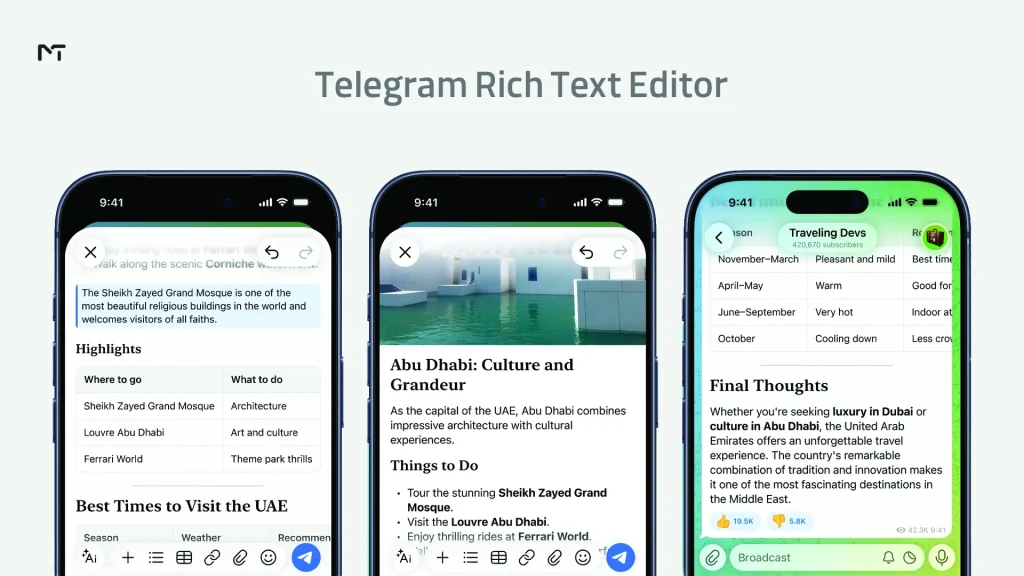
Telegram has always let users bold a word or italicize a phrase using Markdown style shortcuts. The Rich Text Editor is a different tool entirely. It’s a visual, WYSIWYG style editor built for writing long posts that read more like an article than a chat bubble.
Instead of typing symbols and hoping the formatting parses correctly, you get an actual toolbar. You can insert a heading, drop in a table, add a bulleted list, or place a photo between two paragraphs, all without leaving the chat window. It is the ultimate upgrade for anyone looking to create engaging Telegram content that captures attention instantly and keeps readers hooked.
When It Was Released and What It Replaced
Telegram rolled out the editor on July 14, 2026, as part of a major update that also introduced Telegram Communities and private bot replies. Before this change, anyone wanting to publish a long and structured post had to rely on clever spacing and basic Markdown. The other option was writing the whole thing in a different app and pasting a screenshot into the chat. The new editor finally brings real publishing tools directly into your message box. It also includes an automatic save function for rich message drafts. This means your work and formatting stay completely safe even if you need to switch to another conversation right in the middle of typing.
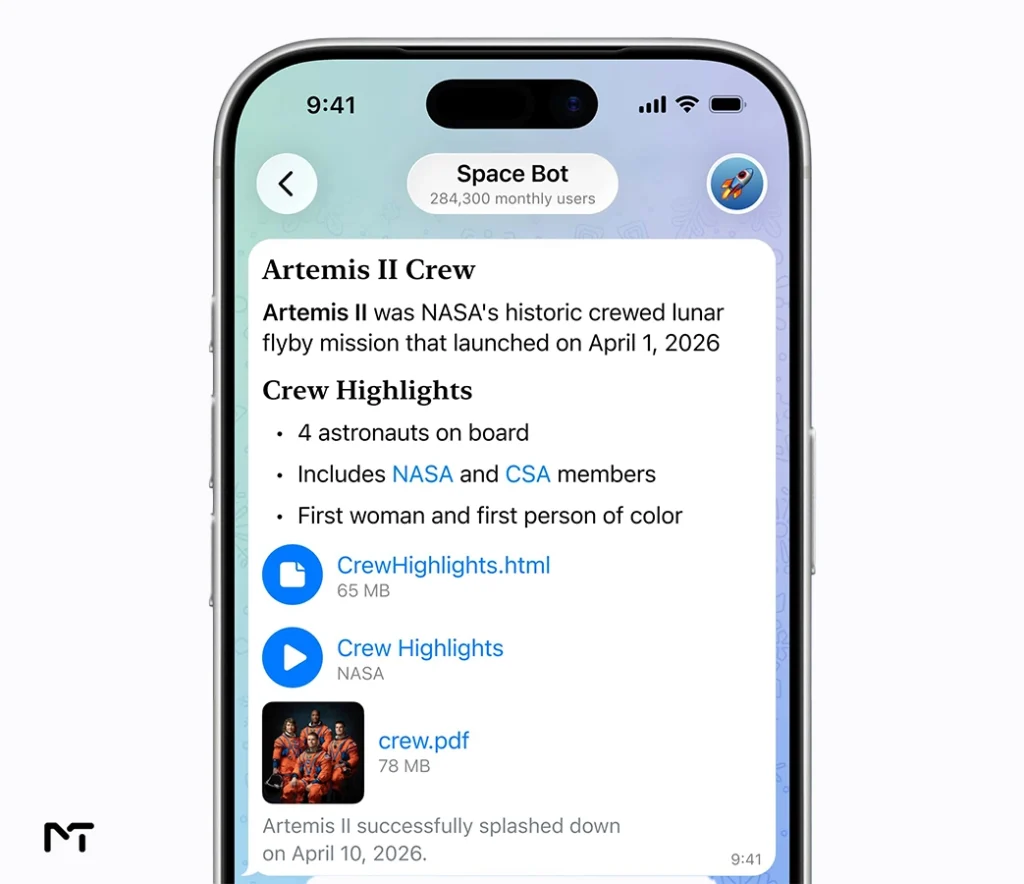
The editor hasn’t stood still since launch either. A follow up update in late August added support for documents, files, and music inside the same inline flow that started with photos and videos. Where you once could only drop an image or a clip between paragraphs, you can now insert a PDF, a spreadsheet, or a track the same way, and it appears as a clean inline block your readers can open without ever leaving the chat. For anyone using the editor to publish guides or resource lists, that’s one less reason to link out to another platform.
Key Features at a Glance
| Feature | What It Does |
|---|---|
| Headings | Break long posts into readable sections |
| Tables | Present comparisons, pricing, or data directly in a message |
| Lists | Bulleted and numbered lists for guides and steps |
| Quotes and pull quotes | Highlight a key sentence or citation |
| Code blocks | Show code or monospaced text cleanly |
| Inline media | Place photos or videos between paragraphs, not just at the top or bottom |
| Inline documents and music | Place files, documents, and music inside the text just like photos and videos |
| Cocoon AI tools | Generate or refine text, tables, and formulas inside the editor |
| Character limit | Up to 32,768 characters in a single message |
How to Access and Use the Rich Text Editor
Using the editor is simple once you know where to look, but the exact steps differ slightly by device.
Step 1: Confirm You Have Telegram Premium
The Rich Text Editor only appears for Premium subscribers. If you don’t see the option described below, check your subscription status in Settings before assuming something is broken on your end. If you want to access these tools without spending direct cash, you might want to look into how to convert Telegram stars to Telegram Premium as a clever alternative.
Step 2: Open the Editor
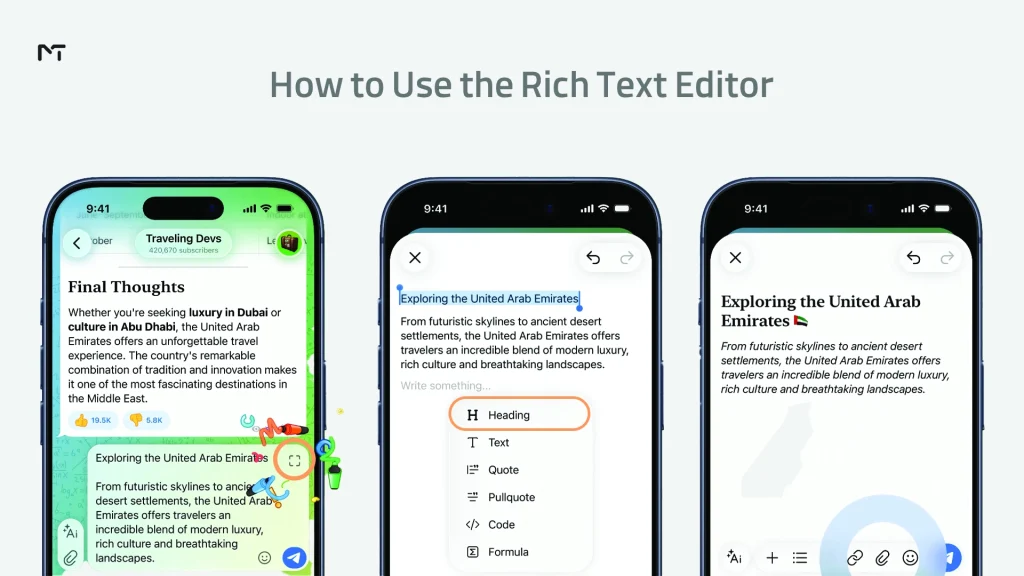
- On mobile (iOS and Android): Start typing a message, then look for the formatting icon above the keyboard or in the attachment menu. Tapping it switches the message box into the full editor view.
- On desktop (Windows, Mac, Linux): Open a chat, click into the message field, and use the formatting toolbar that appears once you select text or click the editor icon next to the send button.
Rollout across platforms hasn’t been perfectly uniform, so if the icon isn’t showing up yet, check that you’re running the latest version of Telegram on that device before assuming it isn’t available to you.
Step 3: Format Your Message
Once inside the editor, you can:
- Add a heading by selecting a line of text and choosing a heading style.
- Insert a table for anything that benefits from rows and columns, like pricing plans or comparisons.
- Build a bulleted or numbered list for steps, tips, or recommendations.
- Add a quote block to call out an important line.
- Drop a photo or video anywhere in the text, not just at the top of the message. To make your media look truly professional before publishing, you can use an AI Telegram Bot for Photo Editing and Image Generation to create unique visuals right inside the app. If you already have existing clips or graphics that need a quality boost, relying on Telegram Video and Image Enhancer Bots is a fantastic way to upgrade your content before inserting it into your article.
Step 4: Use Cocoon AI Tools (Optional)
Inside the editor you can also call on the built in Cocoon system to draft text, generate a table from a short prompt, or produce a formula. This specific tool is just one amazing part of the latest Telegram AI features designed to help you write better. Telegram states these requests are processed with a focus on privacy and are not used to build a profile of the user.
Step 5: Send Your Formatted Message
Once you’re happy with the layout, send it like any other message. Because the character limit is so much higher than usual, Telegram displays a “Show more” button after roughly the first 8,000 characters so long posts don’t overwhelm the chat window.
Rich Text Editor vs. Regular Telegram Formatting
Telegram still supports its older Markdown style formatting for anyone who prefers typing shortcuts over using a toolbar. Here’s how the two compare.
| Classic Markdown Formatting | Rich Text Editor | |
|---|---|---|
| Availability | All users, free and Premium | Premium only |
| Headings | Not supported | Supported |
| Tables | Not supported | Supported |
| Interface | Typed symbols (asterisks, underscores) | Visual toolbar |
| Character limit | Standard message limit | Up to 32,768 characters |
| Media placement | Attached separately | Placed inline between paragraphs |
| AI assistance | None | Cocoon AI tools included |
If you only need to bold a word or add a link, the classic method still works fine and costs nothing. The Rich Text Editor is built for something bigger: newsletters, announcements, guides, and posts that would otherwise need a separate blogging platform.
Rich Text Editor vs Telegraph
Veteran users probably know all about Telegraph which is the free standalone publishing platform the company built years ago. You might be wondering how the two options compare. Telegraph costs nothing to use and creates an entirely separate webpage that search engines can actually find and index. The new premium editor takes a completely different approach by keeping your audience strictly inside the chat window. Your subscribers don’t need to click external links or wait for an extra page to load. They get to read your beautifully formatted article directly inside the message bubble. If your main goal is keeping readers focused on your content without making them leave the app, this premium feature is definitely the better choice.
Is Telegram’s Rich Text Editor Only for Premium Users?
Yes. Telegram made this a Premium exclusive feature from launch, similar to how voice to text transcription and increased upload limits are gated behind the subscription. Free users can still read Rich Text Editor posts sent by others without any restriction; the limitation only applies to creating them.
What Free Users Can Still Do
Free accounts keep full access to the classic formatting tools: bold, italic, underline, strikethrough, spoiler tags, monospace text, and clickable links. For casual chatting, none of that changes.
The Character Limit in Context
The 32,768 character allowance is worth pausing on. That’s roughly ten times longer than a typical long form social media post, and closer to a short blog article in length. For channel owners who used to link out to an external site for anything longer than a few paragraphs, this removes a real barrier.
Is It Worth Upgrading to Telegram Premium Just for This?
This is the part most people actually want answered, so here’s a direct breakdown.
Who Actually Benefits
- Channel owners and anyone relying on Telegram for content creators who regularly publish long announcements, recaps, or guides and do not want to rely on an external blog.
- Community admins who post rules or onboarding material that benefits from headings and lists. Having these visual elements right in the chat makes Telegram group management made easy and stress free.
- Small business owners using Telegram as a support or sales channel, where a formatted price table or feature comparison reads far better than plain text.
Who Should Probably Skip It
- Casual users who mostly chat one on one or in small groups have little use for headings and tables in everyday conversation.
- Anyone whose main goal is Premium’s other perks, like faster downloads or larger file uploads, can still weigh those separately; the Rich Text Editor shouldn’t be the deciding factor on its own.
Weighing the Cost
Telegram Premium is a single subscription that unlocks dozens of features at once, not just the Rich Text Editor. Before making a final choice, it really helps to figure out who should actually pay for Telegram Premium based on daily usage habits. If you were already close to upgrading for the increased upload limits, faster downloads, or ad free browsing in public channels, the editor is a strong bonus rather than the main event. If your only reason to consider Premium is formatting a handful of long messages per month, it’s worth testing the free trial period first, if one is available, before committing.
FAQ
How do I access the Rich Text Editor on Telegram?
Open a chat as a Telegram Premium subscriber, then tap the formatting icon above the keyboard on mobile, or use the toolbar next to the message field on desktop.
Is Telegram’s Rich Text Editor free?
No. It’s currently limited to Telegram Premium subscribers. Free users can view formatted messages but cannot create them.
What’s the character limit for Rich Text Editor messages?
Up to 32,768 characters in a single message, with a “Show more” button appearing after roughly the first 8,000 characters.
Can I add tables and images inside a single message?
Yes. The editor supports tables, headings, lists, quotes, code blocks, and inline photos or videos placed anywhere within the text.
Does the Rich Text Editor work on both mobile and desktop?
Yes, though the toolbar location differs slightly between iOS, Android, and desktop clients, and some newer options may roll out to platforms at different times.
What happens if someone reads a formatted message on an older version of Telegram?
You might worry that your custom post will look like broken code to people who haven’t updated their app recently. Fortunately that is not going to happen. The servers automatically convert your rich text into a clean and simple plain text format for those users. Your audience will still be able to read everything you wrote perfectly fine. They just won’t be able to see the advanced visual elements like custom tables or embedded media until they finally go ahead and download the latest update.
Conclusion: Telegram Rich Text Editor
The Telegram Rich Text Editor turns a chat app into something closer to a lightweight publishing tool, letting Premium subscribers add headings, tables, lists, and inline media without leaving a conversation. Utilizing these formatting tools correctly is a massive step toward mastering your Telegram presence and standing out from ordinary channels. Whether it’s worth paying for comes down to how often you actually publish long, structured content on Telegram.
Channel owners and admins will likely get real, repeated value out of it, while casual users probably won’t notice much difference in their day to day chatting. If your main draw to Premium is this one feature, weigh it against the subscription’s other perks before deciding. Still trying to decide if upgrading is the best move for your channel? Or maybe you are ready to unlock all these amazing formatting tools but need a reliable way to activate your subscription safely.
We have got your back. Just send a quick message to our friendly team at @membertelsupport. We are always online and ready to answer your questions or help you get your premium account sorted out in minutes.














Leave a Reply