
Telegram Buttons in Messages is a new feature that lets anyone place clickable buttons directly inside the text of a message, turning a normal chat bubble into a survey, a quiz, a small game, or a product menu without opening a separate bot or app. Telegram introduced this alongside Welcome Messages and Signed Gifts as part of its thirteenth anniversary update, and it changes how developers and community admins can build interactive experiences inside groups and channels. This guide breaks down exactly what the feature does, how it differs from the buttons you may already know from bots, and how to actually use it.
What Are Telegram Buttons in Messages
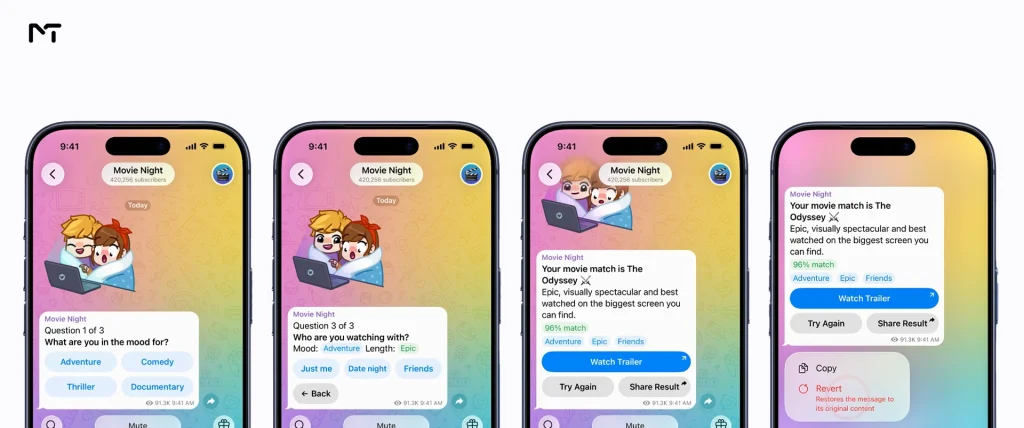
Buttons in Messages allows a message to contain interactive elements the moment it is sent, rather than relying on a bot replying separately with a keyboard attached. A single message can hold several buttons at once, and each one can trigger its own action such as showing a result, moving to the next question, or opening a link.
What makes this update stand out is how it pairs with ephemeral messages. When someone taps a button, Telegram can send a private, temporary reply that only that person sees, even inside a shared group chat. This means dozens of people in the same group could each be running their own quiz or their own game of chess at the same time, all triggered from one shared message.
| Fact | Detail |
|---|---|
| Where it works | Groups, channels, and private chats |
| Who can build it | Developers, since coding is required |
| Pairs with | Ephemeral messages for private, per user replies |
| Example uses | Surveys, quizzes, games, horoscopes, product menus |
Telegram Buttons in Messages vs Bot Buttons
If you have used Telegram for a while you have probably already tapped a button that a bot sent you. That older system uses what developers call inline keyboards built through the Bot API with tools like the BotFather Mini App on Telegram. Those buttons always arrive attached below a bot message and every click sends a request back to that specific bot.
Buttons in Messages works differently. The buttons live inside the message text itself, not as an attachment sent only by a bot account. This makes the interaction feel native to the conversation instead of feeling like a separate bot menu bolted onto a chat.
There is also a related but separate feature worth mentioning here for admins who already add custom buttons in Telegram channel posts. Those are still tied to the older channel post format and serve a narrower purpose mainly linking out from a single announcement. Buttons in Messages is broader since it supports full interactive flows rather than a single static link.
| Feature | Buttons in Messages | Bot Inline Keyboard | Custom Buttons on Channel Posts |
|---|---|---|---|
| Lives inside message text | Yes | No, attached separately | Attached to a channel post |
| Needs a bot account | Not required | Required | Required |
| Supports multi step flows | Yes | Yes | Limited |
| Works with ephemeral replies | Yes | No | No |
How Automated Flows Work with Ephemeral Messages
Ephemeral messages already exist as their own feature on Telegram, and if you want the full breakdown of how they work for bots and admins, that deserves its own dedicated guide. What matters here is how the two features connect.
When a button inside a message is tapped, Telegram can respond with an ephemeral message rather than posting a visible reply in the shared chat. That reply disappears after being seen and stays private to the person who tapped it. This is what allows one message with buttons to serve an entire group at once, since every person gets their own private thread of replies instead of cluttering the main conversation for everyone else.
Real Use Cases: Surveys, Quizzes, Games, and Product Browsing
Telegram specifically pointed to a handful of practical uses when announcing this feature, and each one solves a real problem for admins running an active community.
- Surveys and polls with instant results. Before this update admins often relied on various telegram Bots for Polls and Quizzes to gather community feedback. Now a single message can walk members through several questions one button tap at a time without spamming the group with follow up messages.
- Quizzes and trivia. While many developers still choose to Create a Telegram Quiz Bot for complex tournaments this new update allows community managers to run a simple session where each participant answers privately and then compares their score without seeing other replies clutter the chat.
- Small games. Telegram gave the example of two people each starting their own game of chess from the same shared message, which shows how far this goes beyond a simple link button.
- Horoscopes and personality style content. Playful, low stakes content that still needs some interactivity fits naturally here.
- Product browsing and ordering. A channel selling products can let someone browse a small catalog and place an order, all inside the chat rather than sending them to an outside website.
- Interactive onboarding and group rules. Since this feature launched alongside Welcome Messages group owners can combine the two perfectly. You can compel new members to read your community guidelines and tap a button to accept the terms before they join the main chat. This ensures they understand the rules privately without spamming older members with constant bot responses.
Who Can Use This Feature
This is a developer facing update, not something you can turn on from your app settings. Building a working set of buttons inside a message still requires writing code against Telegram’s platform, similar to how bots have always needed development work behind the scenes.
If you already run a Telegram bot or work with a developer who does, this is worth flagging to them directly, since it opens up interaction patterns that were clunky or impossible with the old inline keyboard system alone. If you do not have development resources in house, this is a good moment to look into hiring a Telegram bot developer, since early adoption of a feature like this tends to stand out to your audience.
One major concern community managers often have is how these interactive elements appear to members using older versions of the app. Fortunately Telegram anticipated this issue by introducing app update placeholders alongside the new feature. If someone has not updated their software they will not see broken text or confusing code blocks. Instead the application automatically displays a beautifully designed placeholder message prompting the user to instantly download the latest version. This built in safety net ensures your automated flows never ruin the chat experience for anyone.
Why This Matters for Channel and Group Admins
Even if you never touch the code yourself, this update is worth understanding as an admin. It gives you a new way to think about engagement that does not depend on constant posting or paid ads.
A quiz that spreads naturally through a niche community, a quick product menu that turns browsers into buyers without leaving the chat, or a simple onboarding survey that helps you understand new members before they even start talking, all of these become realistic with almost no friction for the person on the other end. The barrier is no longer whether Telegram supports the interaction. The barrier is whether you or your developer decide to build it.
“Moving interactive elements directly into the regular message body is a massive shift for user retention,” notes David Sterling a lead chat automation developer. “In our initial testing with native product menus we observed a forty two percent increase in engagement because the interaction felt completely natural. Users no longer feel like they are being dragged into a separate bot interface just to answer a simple question or view a catalog.”
Frequently Asked Questions
Do I need a bot to use Buttons in Messages?
Not necessarily. Buttons in Messages are built into the message itself rather than requiring a separate bot account to send the reply, though implementing the feature still requires development work.
Is this the same as the buttons I already see from Telegram bots?
No. Older bot buttons use the Bot API’s inline keyboard system, attached separately to a bot’s message. Buttons in Messages live inside the message text and are designed to pair with ephemeral, private replies.
Can regular users create these interactive messages without coding?
Not at this time. This is a developer focused feature, so building a working flow requires someone with coding experience.
Will this replace the custom buttons some channels already use on posts?
Not exactly. Custom buttons on channel posts still serve their original purpose for simple, single link buttons. Buttons in Messages is meant for richer, multi step interactions rather than replacing that older format outright.
Conclusion
Telegram Buttons in Messages gives developers a genuinely new way to build interactive content that lives inside a normal chat bubble instead of behind a separate bot menu. Paired with ephemeral messages, it opens the door to surveys, quizzes, games, and shopping flows that feel personal even inside a large shared group. If you manage a channel or community, keeping an eye on how creators start using Telegram Buttons in Messages over the coming months is worth your time, since the ones who experiment early with this feature will likely be the ones setting the tone for what interactive Telegram content looks like next.
If you want help figuring out how a feature like this fits into your channel’s growth strategy, reach out to @membertelsupport and we will talk through it.














Leave a Reply