
Setting up an automated Telegram trading journal takes less than an hour and requires absolutely zero coding when using prebuilt tools like the Gumroad Smart AI package or a custom n8n workflow. These setups connect a standard Telegram bot directly to Google Sheets allowing you to log entry prices stop losses and trade directions instantly from your phone. Automating this process eliminates manual data entry fatigue and builds an accurate historical dataset to identify the habits draining your account.
That gap is exactly why this guide exists. Below you will find the options that genuinely work today, how to set each one up, and what to check before you trust any of them with your trading data.
Why Telegram Bots for Automated Trade Journaling Are Harder to Find Than You Think
Search for trading bots on Telegram and you will get pages full of Solana snipers, copy trading tools, and crypto execution bots. Almost none of them log trades for review later. They are built to act fast, not to help you reflect on a decision you made three days ago.
Journaling is a different job entirely. It is not about speed. It is about capturing what happened, why you took the trade, and what your numbers actually look like across fifty or a hundred trades. That is a smaller and far less commercial niche, which explains why so few dedicated products exist for it and why the search results are so cluttered with tools that do not match what you are actually looking for.
The Real Landscape: Bots, Templates, and Platforms
Options for automated forex trade journaling on Telegram fall into three honest categories. The first is ready made no code templates you can set up yourself using tools like n8n connected to Google Sheets. The second is open source bots on GitHub that a developer can deploy, though these need some technical comfort. The third is full trading journal platforms that added a Telegram bot as one input method among several, with the bulk of their value living in a separate dashboard.
None of these is a single tap solution, and any guide that promises one is either outdated or overselling the category. What follows is what actually works, starting with the fastest way to get logging today.
Ready to Use Options You Can Set Up Today
Setting up a working bot does not require writing code. Two options stand out for getting a Telegram journal running within the hour, and they take different approaches to the same problem.
Smart AI Trading Journal on Gumroad
This is a prebuilt package rather than something you build from scratch. You text your trade details to a personal Telegram bot in plain language, an AI layer extracts the asset, entry price, stop loss, take profit, and direction, then saves everything into a Google Sheet automatically. Later, you update a trade by referencing its trade ID to add the closing profit or loss and any notes.
It costs a small one time fee and suits traders who want automation without touching configuration screens. The tradeoff is that your data lives in a spreadsheet you manage yourself, so backups and access control are on you, not a vendor.
n8n Trading Journal Template
For traders willing to spend a bit more time on setup, a free public workflow template connects a Telegram bot to Google Sheets using AI to parse trade messages. You create the bot through BotFather, connect a Google account, and the workflow handles extraction and logging from there.
This route takes more initial effort since you are running your own automation instance, but it costs nothing and every field, rule, and column is yours to customize. If your trading style needs a specific data point that a prebuilt tool does not capture, this is the option that lets you add it.
Comparing Your Trading Journal Options
Choosing the right setup depends entirely on your budget and how much control you want over your data. The comparison below breaks down the three main paths so you can decide which fits your daily routine best.
| Setup Option | Cost | Setup Time | Customization Level | Best Suited For |
| Smart AI Package Gumroad | One time fee | Under ten minutes | Moderate | Traders wanting instant effortless automation |
| n8n Workflow Template | Free | About an hour | Maximum | Traders who want total control over every data field |
| SaaS Platforms Forex Journal | Monthly subscription | Five minutes | Low | Traders needing built in visual dashboards |
What You Need Before You Start
- A Telegram account and about five minutes to create a bot through BotFather
- A Google account to hold the spreadsheet backend
- Either a free n8n account or the Gumroad package, depending on how much setup you want to handle yourself
- A clear list of the fields you actually want tracked, since adding new ones later means editing the workflow again
Handling Chart Screenshots And Visual Data
One of the biggest advantages of using a messaging app for your trade journal is how easily it handles images. A row of numbers cannot capture the full context of a trade but a screenshot of your chart tells the whole story. When you set up your automated workflow you can configure it to accept images. You simply take a screenshot of your technical setup on your phone and send it to your bot along with your trade details. The system will save the image link directly into your spreadsheet making your weekend reviews much more effective.
Build Your Own Telegram Trade Journal Without Coding
Both options above follow roughly the same underlying process, so here is the general path from zero to a working journal.
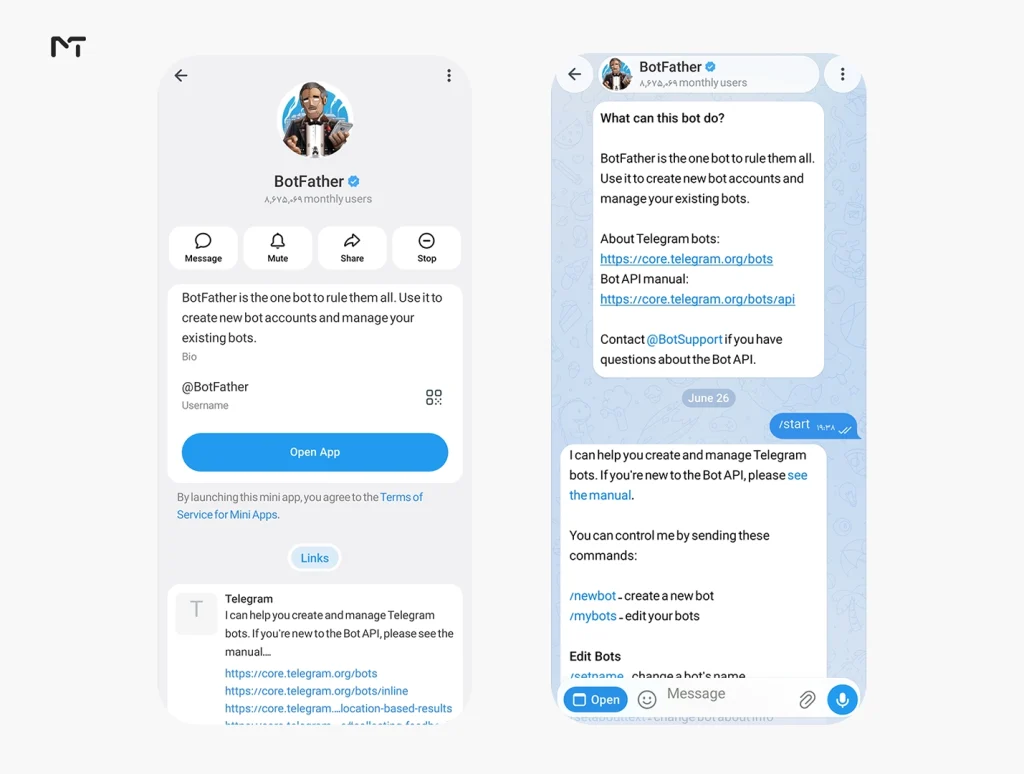
- Open BotFather in Telegram and send the newbot command to create your bot, then save the API token it gives you.
- Create a Google Sheet with columns for trade ID, pair, entry price, stop loss, take profit, direction, notes, and profit or loss.
- Connect that sheet to your chosen automation tool using the API token from step one.
- Send a test trade to your bot in plain language and confirm it lands correctly in the sheet before relying on it for real trades.
- To understand how seamless this is you should know exactly what you will be typing. Since the artificial intelligence processes natural language you do not need to memorize strict formats or commands. You can simply open your chat and type something like bought EURUSD at one point zero eight with a stop loss at one point zero seven and target at one point one zero. The automation will read that casual sentence extract the exact numbers and place them perfectly into their designated columns in your spreadsheet.
- Settle on a consistent message format so parsing stays accurate over time, even when the tool relies on AI to read free text.
Developers who want full control can look at an open source project on GitHub called Trade Journal telegram bot, built with the Telegraf framework, TypeScript, and SQL. It is a small community project rather than a polished product, so expect to read the code and deploy it yourself instead of finding a support team behind it.
SaaS Platforms With Telegram Bot Integration
Some full trading journal platforms treat Telegram as one input channel rather than the whole product. Forex Journal, for example, lists Telegram bot integration as a feature so you can log a trade from your phone the moment you close it, alongside a dashboard for equity curves, win rate, and prop firm phase tracking. Since this is a newer platform, check its current availability and pricing before committing, as features listed as coming soon can shift by the time you sign up.
Beyond simple messaging interfaces developers are now building comprehensive Telegram Mini Apps for Forex Traders offering rich visual dashboards right inside the chat application for tracking equity curves and performance metrics.
This path fits traders who want deep analytics, multi account tracking, and eventual MetaTrader sync in one place, and who see the Telegram bot as a convenience layer rather than the core tool. If all you want is a fast way to log a trade from your phone, a standalone bot setup from the previous section is usually simpler and cheaper.
Does Journaling Actually Improve Your Trading
It is worth pausing on why any of this setup is worth your time. It is worth pausing on why any of this setup is worth your time. Marcus Vance a quantitative trading psychologist who analyzed over five thousand retail accounts last year found something that surprised many. Traders who never journaled often had a higher raw win rate than those who logged every trade. However the journaling group was the one actually making money over the same twelve months.
Vance notes that traders without a journal tend to close winning trades early to lock in certainty while letting losers run because closing them means admitting defeat. Automated journaling breaks that habit entirely. When logging a trade takes less than ten seconds there is no friction left to excuse bad habits. Writing down a trade you closed too early and then watching it keep running in your notes forces you to confront the mistake in a way that vanity metrics like win rate never will.
That is the real case for automated logging. It is not about vanity metrics like win rate. It is about building a record detailed enough to catch the habits that quietly drain an account.
What to Look for in an Automated Trade Journal
| Factor | Why it matters | Good sign |
|---|---|---|
| Data ownership | You want your trade history even if the tool disappears | Exports to Google Sheets or CSV |
| Read only access | Journaling should not require trade execution permissions | The bot only asks for logging, not API trading keys |
| Field flexibility | Every trader tracks different variables | You can add custom fields or tags without a workaround |
| Consistency over features | A journal you actually use beats one with more charts | Logging a trade takes under thirty seconds |
| Privacy | Trading data is financially sensitive | A clear statement on encryption and data handling |
The most common mistake traders make with any trade journal bot is picking the one with the most features and abandoning it two weeks later because logging a single trade takes too long. A basic tool you use every time beats an advanced one you open twice a month.
Frequently Asked Questions
Is there a Telegram bot for automated trade journaling?
Yes though options are limited compared to the massive variety of Telegram Trading Bots available for executing automated market orders. The most practical choices right now are prebuilt templates like the Gumroad Smart AI Trading Journal and the free n8n workflow, both of which connect a Telegram bot to a Google Sheet for logging.
How do I automatically log my forex trades?
Set up a Telegram bot through BotFather, connect it to a Google Sheet using an automation tool such as n8n, and send your trade details as a message each time you open or close a position. The automation extracts the details and updates your sheet without manual entry.
Can Telegram sync directly with MetaTrader?
Not on its own. A basic bot can log trades you report to it manually but if you want instant execution a dedicated Telegram Signal Copier to MT4/MT5 is required since journaling tools do not handle live trading connections by default.
What is the best free trading journal option?
For traders comfortable with a bit of setup, the free n8n workflow connected to Google Sheets gives you a fully customizable trade journal at no cost. For a simpler option with less configuration, the Gumroad package is a lower cost alternative that trades some flexibility for convenience.
Why should I keep a forex trading journal at all?
A journal turns scattered memories of trades into a dataset you can actually review. Without one, most traders remember their best trades vividly and forget the pattern behind their losing ones, which is usually where the real lessons sit.
Final Thoughts
Telegram bots for automated trade journaling are still an early and underserved category compared to crypto trading bots, but the tools that exist today, from the Gumroad template to the free n8n workflow to platforms like Forex Journal, are enough to get a real automated system running this week. Pick the option that matches how much setup effort you want to put in, log every trade the same way, and review the data monthly rather than letting it pile up unread.
For those running private channels who want to scale their operations and manage Forex VIP clients with a Telegram artificial intelligence bot our support team is happy to walk through your advanced workflow setup. Reach out anytime at @membertelsupport.














Leave a Reply