

If you are running an online business or looking to connect with an international audience, mastering your communication flow is everything. You no longer need to stay up until two in the morning just to reply to a client in a different time zone.
To schedule Instagram DMs without using third party software, you must use a free professional Creator or Business account. Inside the chat window, type your text, hold down the send button until the scheduling menu appears, select your preferred delivery date and time, and confirm the action.
Managing a brand or a growing creator account often feels like a full time race against time. You have to create reels, write captions, engage with stories, and most importantly, stay on top of your inbox. For years, scheduling posts was a lifesaver, but direct messaging remained a real time headache. Now that the ability to schedule Instagram DM threads is built directly into the app, you can fully automate your outreach strategy.
Let us break down exactly how this feature works, how you can use it to reclaim your time, and the current limitations you need to keep in mind.
Can You Actually Schedule Messages on Instagram?
The short answer is yes. However, there is a catch that most generic tech blogs fail to mention. This feature is not rolled out universally to every single personal account out there. Instagram prioritizes professional accounts for these types of utility tools.
Understanding how the platform prioritizes professional accounts for feature rollouts ties directly into how Instagram’s Algorithm values active business profiles that engage consistently with their audience.
To check if you have access, you need to make sure your profile is set to either a Creator or a Business account. If you are still running a standard personal profile, you can easily switch this in your account settings for free. Once that is done, you unlock the ability to draft and time your messages directly inside the app without relying on sketchy third party software.
How to Schedule Instagram DMs (Step by Step Guide)
Using this feature is incredibly straightforward, but the exact method depends entirely on whether you are working from a smartphone or managing your brand communication from a desktop computer. Follow these exact steps for each platform.
Scheduling DMs on the Instagram Mobile App
Open your Instagram app on your iOS or Android mobile device and navigate to your inbox by tapping the messenger icon in the top right corner.
Select the conversation with the person or client you want to message.
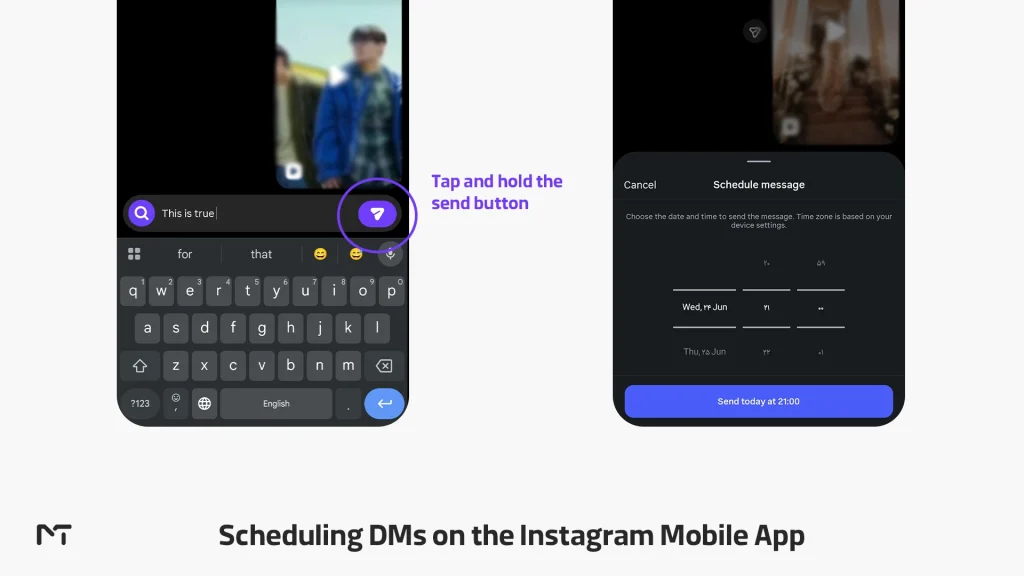
Type out your text in the text bar just like you normally would, but do not tap the regular send button yet.
Tap and hold the send button. A pop up menu will appear offering scheduling options. If the hold option does not trigger, look for the plus icon next to the text bar depending on your specific app version updates to find the scheduling clock.
Select your desired date and time, keeping the recipient time zone in mind.
Confirm the time and tap schedule to lock in your message.
Scheduling DMs on Desktop via Meta Business Suite
Since the native browser version of Instagram does not support direct long press commands, desktop users must utilize the official Meta ecosystem to queue their messages.
Log into your Meta Business Suite dashboard on your desktop web browser and ensure your Instagram professional account is fully connected to your Facebook page.
Navigate to the inbox tab located in the left hand sidebar menu.
Select your Instagram direct messages queue and click on the specific chat thread you want to manage.
Type your reply in the text box at the bottom of the screen.
Instead of clicking the primary send button, click the small arrow icon directly next to it to reveal the advanced options menu.
Select schedule message, input your preferred deployment date and time, and save the settings. The Meta cloud servers will handle the delivery automatically.
Automated tools are excellent for broad campaigns, but direct messaging requires a delicate human touch. When you schedule a DM naturally within the platform, you preserve the authenticity of a manual conversation while optimizing your workflow. It allows small marketing teams to scale their customer care consistency without looking robotic.
Sarah Jenkins, Senior Social Media Strategist at Clicks and Commerce Agency
How to Manage Your Scheduled Instagram Messages
Plans can change in an instant, and you might realize that a message you timed yesterday contains an error or is no longer relevant. Fortunately, you are not locked into your original decision. Instagram provides a dedicated queue where you can modify your upcoming direct messages before they ever reach the recipient inbox.
How to Edit Scheduled Message on Instagram
If you notice a typo or need to update the pricing details in a pending message, you can fix the text easily.
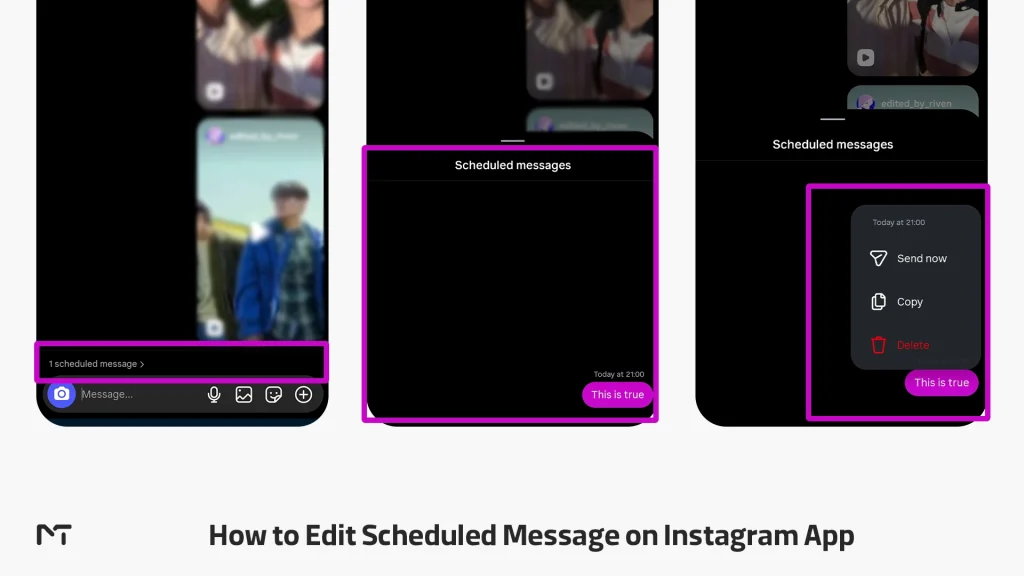
Open the specific chat thread where the message is waiting to be sent. Tap the small scheduled messages notification at the bottom of the screen to open your pending queue. Locate the text you wish to alter and tap the options menu next to it. Select the edit option, rewrite your text to perfection, and confirm the changes. The system will update the cloud file instantly without altering your original delivery time.
How to Delete Scheduled Message on Instagram
Sometimes a client updates you on a situation before your automated response goes out, making your drafted reply completely unnecessary.
To remove the pending text entirely, enter the chat conversation and access your scheduled message queue. Find the specific message you want to get rid of, tap the menu options, and select delete. Confirm your choice when the prompt asks you, and the message will vanish from the system completely, ensuring it never delivers to the client.
How to Cancel a Scheduled Message on Instagram
Canceling a message follows a very similar process to deletion, but it gives you an alternative option if you simply want to change the delivery timing rather than losing your text.
Navigate to your pending message queue inside the conversation. Tap the menu options next to the relevant text draft. Instead of choosing to delete the content, you can select the reschedule option. This effectively cancels the original delivery slot and allows you to pick a brand new date or time for the message to drop, giving you complete control over your business communication flow.
Why This Matters for International Business Growth
Data from social media engagement studies shows that business profiles who respond to customer inquiries within the first hour experience a thirty percent increase in conversion rates. Furthermore, global consumer behavior reports indicate that over seventy percent of online shoppers expect immediate or timely communication, even when ordering across international time zones. Utilizing a scheduling framework allows you to hit these crucial windows without destroying your sleep cycle.
When your audience spans across multiple continents, timing is everything. If you reply to a potential client in London while they are fast asleep, your message gets buried under a mountain of notifications by the time they wake up. By utilizing DM scheduling, you can draft replies during your regular working hours but set them to land in your client inbox at nine in the morning their time. This increases your open rates and makes your brand look highly attentive and professional without forcing you to work overnight shifts.
When you maintain a flawless messaging routine across different time zones, you establish deep trust with your clients, proving that strategic Personal Branding Boosts Your Instagram Growth by turning cold leads into loyal customers.
Practical Ways Businesses Use Instagram DM Scheduling
| Business Type | Real World Practical Application | Core Benefit |
| ECommerce Brands | Scheduling order confirmations and shipping updates for international buyers | Improves customer trust and reduces support ticket volume |
| Content Creators | Timing responses to brand collaboration pitches during their business hours while preparing key metrics from Instagram Reel Insights to close the sponsorship deal | Projects high professionalism and ensures messages land at the top of inbox |
| Service Providers | Sending appointment reminders or follow up links to clients exactly one day prior | Drastically reduces late cancellations and no shows without manual effort |
The Current Limitations You Need to Know
A truly helpful guide tells you what a feature cannot do, so let us be completely honest about the current boundaries of this tool.
First, you cannot mass schedule bulk messages to dozens of people at once through the native app interface. This is strictly a one on one conversation tool designed to keep interactions authentic. If you are looking to send updates to a massive group of followers simultaneously instead of individual DMs, utilizing Instagram Broadcast Channels remains the most effective one to many communication model.
Second, if you need to edit or delete a scheduled message before it goes out, you have to navigate to your scheduled queue within that specific chat thread to modify it. Keep an eye on your pending queue to avoid sending outdated information if your business plans change mid week.
Third, there is a strict time window limit. The native platform only allows you to schedule your direct messages up to seven days in advance. If you are trying to map out a massive marketing campaign that spans over a month, you will still need to handle those queues week by week.
Finally, keep in mind that this tool is exclusively available on the Instagram mobile app for iOS and Android. If you log into your profile via a desktop computer web browser, you will not be able to access the long press scheduling menu or view your pending message queue.
Troubleshooting Instagram DM Scheduling Issues
It is incredibly frustrating when you are ready to organize your weekly outreach only to find out that the system is not cooperating. If you are facing technical glitches, here is exactly how to fix them.
Why Is the Schedule Option Not Showing on Instagram?
If you type a message, hold down the send button, and nothing happens, your account type is almost certainly the culprit. This feature is not available for standard personal profiles.
To fix this, go to your profile, tap the menu options, navigate to settings and privacy, and look for account type and tools. Switch your profile to either a Business or Creator account. The transition is completely free and instantly unlocks professional communication features.
Another common reason is an outdated application. Meta rolls out these utility options through server side updates that require the latest software framework. Head to the Apple App Store or Google Play Store and ensure your app is fully updated to the latest version.
What to Do When Scheduled Messages Are Not Showing
Sometimes you set up a message, but when you look back at the chat window, the scheduled queue is nowhere to be found.
First, try completely closing the app and clearing your phone cache memory. Small session bugs can cause the visual interface to lag, hiding your pending queue even though the message is securely stored on the Instagram servers.
If the problem persists, verify your internet connection. A weak mobile network can prevent the app from fetching your upcoming scheduled data queue in real time.
System bugs that affect message delivery can sometimes impact other inbox triggers, leading to situations where people cannot reply to your Instagram Stories during active marketing campaigns.
Frequently Asked Questions
Can the Other Person See Scheduled Messages on Instagram?
No, the recipient will have absolutely no idea that the message was drafted or timed in advance. To them, the direct message will appear exactly like a standard, live notification the moment it delivers. There are no special badges, labels, or altered timestamps indicating that you used an automation tool. It looks completely natural.
How Do I Know if a Message Is Scheduled on Instagram?
When you successfully time a message, a small notification text indicating your upcoming queue will appear directly inside that specific chat thread. You can tap this indicator at any time to review your pending text. This is also where you can instantly delete or reschedule the draft if your business update changes before the delivery time.
Can You Schedule Images or Videos in Instagram DMs?
Currently, the native app interface only allows you to schedule standard text messages. If you try to hold the send button on an image, a video, or a disappearing media file, the scheduling menu option will not pop up. For visual media delivery, you still have to send them manually or rely on official Meta Business Suite integrations for professional catalog sharing.
What Happens to the Scheduled Message If My Phone Is Offline?
Your scheduled message will still deliver perfectly fine even if your phone is completely turned off, out of battery, or disconnected from the internet at the exact moment of delivery. Once you confirm the schedule time inside the app, the text data is securely uploaded to the Instagram cloud servers. The server handles the actual deployment, meaning your physical device does not need to be active for the message to drop.
Is There a Limit to How Many DMs You Can Schedule?
While Instagram does not publicly state an exact maximum number, there are internal spam filters you must protect your account from. Scheduling three to five messages for different clients throughout the day is perfectly safe. However, attempting to queue up dozens of automated sales pitches within a short timeframe might trigger the platform security systems and temporarily restrict your account features. Always prioritize genuine communication over bulk automation.
Instead of spamming inboxes to generate leads, presenting interactive Digital Profile Cards on Instagram offers a modern networking alternative that shares your business credentials organically.
Final Thoughts: Schedule Instagram DM
The native Instagram DM scheduling feature is a quiet revolution for anyone trying to scale their online presence without losing their sanity. It perfectly bridges the gap between smart automation and genuine human connection, giving you the power to run an international business without sacrificing your sleep. When you learn how to schedule Instagram DM threads effectively, you take complete control over your global communication strategy. Go flip your account to professional mode today, test the feature with a colleague, and start managing your inbox on your own terms.
If you followed the steps in this guide but the option is still not showing up on your profile, do not waste hours guessing the solution. Technical bugs or hidden account restrictions can sometimes block these updates. You can reach out directly to our team via Telegram at @membertelsupport for quick, hands on assistance with your account setup. Let us help you optimize your social media workflow so you can focus entirely on growing your brand.













Leave a Reply