

No single setting can fully protect paid content on Telegram. True Telegram Paywall Protection requires a stack of three layers. Restrict Saving Content limits what members can do, controlled entry through approved or paid invite links limits who gets in, and watermarks tie every leaked file back to a specific person. Each layer has a gap, and the other two cover it. This guide walks through how to set up each one, what it can and can’t stop, and what to do in the first hour after your course, signals or videos show up in a channel you don’t own.
- Restrict Saving Content blocks forwarding and saving across the whole channel, but it can’t stop a second phone from filming the screen.
- Admin approval and expiring links control who enters. Paid invite links with Telegram Stars add payment to the entry step, on a fixed 30-day billing cycle.
- Watermarks and per-member invite links won’t prevent a leak, but they tell you who caused it.
- When a leak starts, revoke old links first, switch to approval-based links second, and file a copyright report for public copies third.
- Match the setup to the product. A single clip needs far less machinery than a high-ticket mastermind.
How Telegram Content Leaks Actually Happen
Most leaks of paid Telegram content have nothing to do with hacking. They happen because nobody blocked ordinary behavior. Once you see the pattern, it’s clear which layer to build first.
Forwarding and saving
In a channel with no restrictions, any member can forward a post to another chat or save a video to their phone. A single forward into a large public group can wipe out a month of sales, and this is where most casual leaks start.
Screenshots and screen recording
A camera pointed at a screen captures everything on it, and no Telegram setting can change that. For this gap, the realistic goal is traceability rather than blocking, and that’s what Layer 3 below is for.
Unofficial clients and scripts
The restriction is a rule that Telegram’s official apps follow. Modified clients and browser scripts exist that try to ignore it, and Telegram has no control over that software. A technical member who is determined enough can sometimes get around the toggle.
Shared links and group buying
A permanent invite link posted on a forum, passed to a friend or dropped into a group chat lets anyone in. Group buying is the same problem from the other side: several people split one membership, one of them pays, and the rest ride in on a shared link.
Account sharing
When three or four people use one paid Telegram account, your member list shows a single person. You lose sales and never notice unless you run extra checks.
Layer 1: Restrict Saving Content to Protect Telegram Content
Telegram introduced this setting in December 2021, and it’s still the first switch to flip for any paid channel. Telegram’s stated goal is content that is “available only for their intended audience.”
How to turn it on
- Open your channel and tap its name.
- Tap Edit (the pencil icon), then Channel Type.
- Scroll down to Restrict Saving Content and switch it on.
Telegram describes the same path as Group or Channel Info, then Group / Channel Type, then Restrict Saving Content. Labels vary a little between Android, iPhone and desktop, so look for the setting by name.
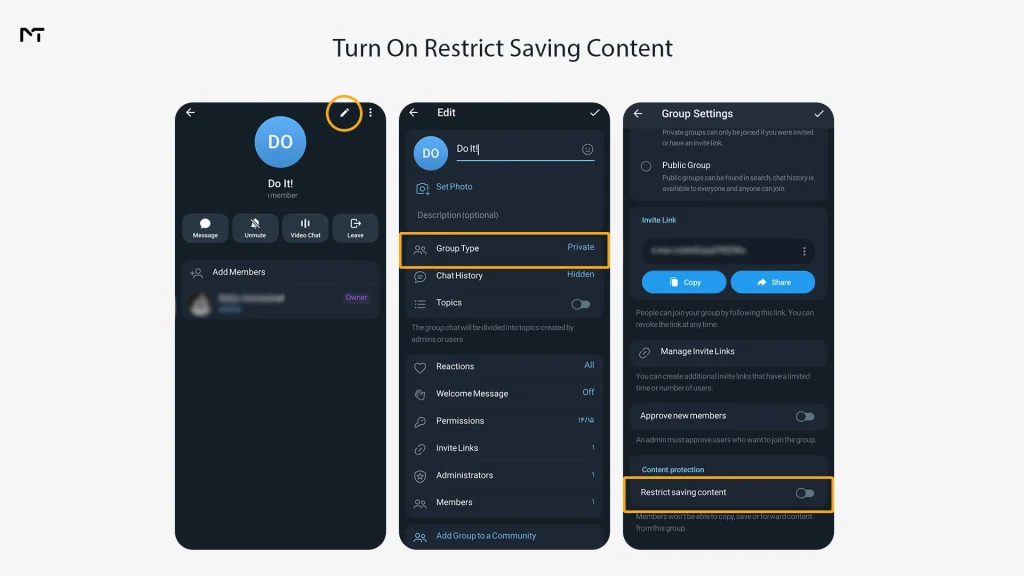
What it blocks
It stops members from forwarding messages out of the channel and limits saving media to their device. Telegram also says that restricting forwarding prevents screenshots, which holds in most cases in the official mobile apps.
What it does not block
It can’t stop a camera aimed at a screen, and it has no control over modified clients. Behavior also differs across devices and app versions, so test it with your own accounts on a phone and on desktop before you promise members anything specific.
Limits worth knowing
- It’s all or nothing for the channel. You can’t protect one post and leave another open.
- It applies to admins too. You can’t forward your own posts either, so keep master copies of everything somewhere else.
- If you deliver files through a bot, the Bot API has a protect content option on its send methods. Turn it on so the same restriction follows the file into the chat.
- Free previews and teasers belong in a separate public channel, not in the protected one.
Layer 2: Control Who Gets In
Protection settings only matter if the right people are inside. Before you add the layers below, make sure your paywall itself is live, because everything here builds on a working entry and payment setup.
The moment you start a paid subscription channel your first line of defense is keeping the group completely private and avoiding permanent invite links.
Private channel with admin approval
The most effective way to filter out bots and scrapers is to set a join request which acts as a mandatory waiting room where an admin or an automated system can verify the user before granting access.
Anyone who taps the link waits in a queue instead of walking straight in. A bot admin can message the people in that queue, even if they never started the bot, and ask them to confirm payment, accept the rules or answer a question before you approve them. That one screening step is enough to stop drive-by joins.
Expiring and limited invite links
When you create a link, you can set an expiry time and cap the number of people who can use it. For a single buyer, limit it to one person and let it expire within 24 hours. Once it’s used or expired, the link is dead, so a leaked copy opens nothing. A permanent link to a paid channel is an open door.
Paid invite links with Telegram Stars
Channel admins can create invite links that charge a monthly fee in Stars. The path is Channel Settings, Channel Type, Manage Invite Links, Create a New Link, then Require Monthly Fee. After a member pays, Telegram adds them to the channel automatically and renews the subscription on schedule, and you can see each member’s subscription end date. The billing period is fixed at 30 days, so annual plans or custom periods need a bot-based flow.
Payment and access both happen inside Telegram, so there’s no external checkout address for anyone to forward. That protects you from link sharing, but not from recording or account sharing. Stars suit simple monthly plans, while a bot-based flow makes more sense for annual plans, custom prices and payment methods outside Telegram. It’s worth deciding which one you need before you build anything. While native currency works well for basic setups many serious community builders rely on Telegram payment bots to process credit cards directly and handle complex annual billing structures without paying platform fees.
Removing members by hand gets tiresome fast once your channel grows. With Telegram Stars subscriptions, access ends on its own at the end of the paid period if a member does not renew, so there is nothing for you to clean up. If you sell through your own payment flow instead, a bot with admin rights can remove a member as soon as your payment provider reports a cancellation or a refund. Providers such as Stripe can send that signal to your server as a webhook, and your server then tells the bot to remove the account. This takes some development work, so have a developer test it with a real cancellation before you rely on it.
Paid Media for single files
Channels can post paid photos and videos that members unlock with Stars, and bots can post them too. This works well for one-off clips or a premium drop, because you’re selling individual items rather than ongoing membership.
Which entry method fits
| Entry method | Best for | What it stops | What it does not stop |
|---|---|---|---|
| Admin approval link | Memberships you verify through a bot | Drive-by joins, leaked links | Approved members who then share content |
| Expiring or limited link | One link per buyer | Links reposted on forums | A buyer who records and shares the screen |
| Paid invite link (Stars) | Monthly subscriptions | Forwarded checkout links, unpaid joins | Account sharing, screen recording |
| Paid Media | Single clips and files | Free viewing of the locked item | Recording after unlock |
Layer 3: Make Every Leak Traceable
Since recording can’t be blocked, the next best move is to make it risky. Members behave differently when they know a leak points straight back to them.
Watermarking
Telegram has no built-in watermark that changes for each member, so you have two practical options. A bot or Mini App can overlay the member’s username or ID while the media plays, or you can render a unique copy of each file for each buyer before delivery. The second option works well for PDFs and short videos, while for long courses an overlay at playback time is more realistic.
Place the mark in more than one spot and move it around, because a mark parked in one corner is easy to crop out. Tell members upfront that files are watermarked. The notice itself does half the deterrent work.
One link per member or per batch
Invite link details show who joined through each link. If every buyer, or every sales batch, gets a separate link, a leaked file narrows down to a small group very quickly. Name each link clearly when you create it, for example with the month and the sales channel, so the member list reads like a ledger later.
Mini App session checks
A Telegram Mini App is a web page that opens inside Telegram and loads from your own server. Telegram passes it signed launch data that your backend can verify, so you know exactly which Telegram account is asking for the content. That lets you hand out short-lived content links, allow one active session per member, and cut access when the same account shows up in two places.
Always state clearly in your terms what session data you track and why. Tracking user IDs requires following strict privacy laws so you must understand if Telegram is GDPR compliant before collecting data from European members.
High ticket video courses sometimes need stronger protection than a standard Telegram upload. One option is to host the videos on a secure server and play them through a DRM protected player inside a Mini App. On many devices, DRM can turn the screen black when a screen recording app is running. Support depends on the phone, the operating system and how the Mini App is opened, so test it on several devices before you promise anything to buyers. It also does nothing against a second phone filming the screen, which is why watermarks still matter.
What to Do the Moment a Leak Starts
When your content shows up somewhere it should not be, the first hour matters more than anything else. Every minute that an old invite link stays active is a minute someone else can walk in, so the goal is to close the door first and investigate second. The checklist below follows that order. Work through it from the top, and keep notes as you go, because the evidence you collect now is what you will need later for a ban or a copyright report.
Emergency checklist
- Revoke every active invite link in Manage Invite Links.
- Create new links with Request Admin Approval on, and leave no permanent link anywhere.
- Confirm that Restrict Saving Content is switched on.
- Compare the time of the leak with join times and with the link each member used. If the leaked file carries a watermark, read the ID off it.
- Remove the account responsible, and keep your evidence: direct links to the copied messages, dated screenshots and the watermark.
- If copies sit in public channels, report them.
Reporting stolen content to Telegram
Copyright complaints about public channels, groups and bots go to dmca@telegram.org, with direct links to the infringing messages. Telegram doesn’t process complaints about private chats and private groups, so the copy has to be publicly reachable. Include proof that you own the work, the exact links and your contact details.
Takedowns for public channels reportedly take roughly 5 to 25 days, so file early and follow up. Copyright rules differ by country, and this isn’t legal advice. If there’s a lot of money at stake, talk to a lawyer.
Choosing Your Telegram Paywall Protection Setup
| What you sell | Recommended layers | Why |
|---|---|---|
| Online course | Restrict Saving Content, admin approval links, per-buyer watermark | Videos are valuable and easy to record, so traceability matters most |
| Trading or signals group | Restrict Saving Content, Stars subscription or bot verification, one link per batch | Group buying is the biggest loss, and monthly access plus screening answers it |
| Ebooks and templates | Paid Media or bot delivery with protect content, watermarked PDFs | Files get passed around, and a buyer’s name in the footer discourages it |
| Private community or mastermind | Admin approval, Mini App sessions, per-member links | Small group and high price, so deeper screening pays off |
| Single premium clip | Paid Media | Lowest effort for one item |
Three Example Setups
These are illustrative builds put together from the features above. They are not client results.
A monthly signals channel at $29. The channel is private, with Restrict Saving Content on and a paid invite link in Stars, so entry and billing both live inside Telegram. Once a week, compare the member list with subscription end dates and remove anyone who has lapsed. For communities focused on financial markets using Telegram Stars for Forex signal monetization keeps everything native and prevents invite links from leaking during external checkout processes.
A video course sold at a one-time price. Buyers pay on your website, then a bot sends a link limited to one person that expires in 24 hours. Every video carries the buyer’s ID as a moving overlay, so if a clip leaks, the ID answers the question within minutes.
A mastermind with 40 members. Entry runs through an approval link and a short intake question asked by a bot. The resource library sits in a Mini App with one session per member, and you review the member list quietly every week.
Frequently Asked Questions
Does Restrict Saving Content block screenshots?
In the official mobile apps, it does in most cases. It can’t stop a camera pointed at a screen, and behavior varies by device and version. Test it on your own phone and desktop, and rely on watermarks for the gap that remains.
Can people still screen record a protected channel?
Yes. A second phone can film any screen. That’s why traceability through watermarks and per-member links matters more than trying to block every capture method.
Are Telegram Stars safer than a PayPal link?
Stars tie access to the payer’s Telegram account and leave no external checkout address to forward, so they handle link sharing better. A PayPal flow can work just as well if a bot confirms the payment and then issues a limited, expiring link. Neither option prevents recording or account sharing. Failing to remove unpaid users quietly drains your revenue so implementing proper Failing to remove unpaid users quietly drains your revenue so implementing proper dunning management for creators is essential to automatically revoke access the moment a credit card declines. is essential to automatically revoke access the moment a credit card declines.
Can I protect only some posts?
No, the restriction covers the whole channel. If you need open and protected material side by side, run a public preview channel next to a protected paid one, or sell single items through Paid Media.
How do I find out who leaked my content?
Start with the watermark ID if the file has one, then check which invite link that person joined through and when. Gather your evidence before you accuse anyone, because a clear record protects you if the member disputes the ban.
Will protection annoy paying members?
Most paying members never notice it. The one visible change is that they can’t forward or save posts, so say so upfront on your sales page and offer a watermarked download for anything members legitimately need offline.
Final Thoughts: Telegram Paywall Protection in 2026
Effective Telegram Paywall Protection starts with what costs nothing. Today, switch on Restrict Saving Content and revoke any permanent invite link. Tomorrow, audit who has admin rights and which bots can post. This week, move entry to approval links or paid invite links. After that, add watermarks to the content that earns you the most.
Protecting your content is never a single setting you set and forget. It’s a stack you keep reviewing as your audience grows, and the creators who hold on to their revenue are the ones who can trace a leak back to its source. If you’d rather not wire all this together yourself, or a leak is already underway, message our team at @membertelsupport and we’ll help you secure the channel.