
Telegram Voice Chat is a live, always-on audio room inside groups or channels that lets members drop in and talk or listen in real-time.
- How it works: It runs parallel to text chat with zero lag, allowing unlimited listeners.
- How to start it: Open your Group or Channel $\rightarrow$ Tap the profile name $\rightarrow$ Tap the three dots ($\dots$) $\rightarrow$ Select Start Voice Chat (or Start Live Stream).
If you want to host these sessions in a highly trusted environment with zero restriction risks, it is always smart to Buy Aged Telegram Groups that already hold solid authority on the platform.
- How to join: Simply tap the prominent Join bar at the top of the group or channel interface.
In this comprehensive guide, I am going to share everything I have learned about this powerful tool. We will cover how it works, how to set it up like a pro, and how to troubleshoot the most common issues so you can outshine the competition and build deep engagement with your audience.
Have you ever wanted to host a live talk show, a casual catch up with your community, or a massive global podcast without leaving your favorite messaging app? That is exactly where the telegram live Voice Chat feature comes into play. It is easily one of the most exciting tools available today, completely reimagining live audio rooms and turning standard groups and channels into dynamic, real time broadcasting hubs.
What is Telegram Voice Chat and How Does It Work?
If you are trying to understand what is Telegram Voice Chat and how does Telegram Voice Chat work the concept is beautifully simple. It is a virtual audio space that lives inside existing groups and channels. Think of it as a seamless, high quality audio layer running parallel to text conversations.
Unlike traditional phone calls, you do not need to ring anyone or wait for them to pick up. Instead, an active Telegram Group Voice Chat feature creates an open, always on room that members can join or leave whenever they please.
The technology behind it is remarkably lightweight. It offers crystal clear sound with incredibly low latency, meaning there is virtually no delay when multiple people speak. In groups, it acts as a casual office space or a digital living room. In channels, it transforms into a full scale broadcasting studio capable of hosting millions of live listeners simultaneously.
Why Industry Experts Leverage This Feature
Real world applications show that brands using live audio experience up to a 40% increase in weekly community retention. Digital marketing professionals heavily rely on this tool for launching interactive products, hosting real time AMA (Ask Me Anything) sessions, and building authentic connections. As social media strategist Sarah Jenkins notes:
“Telegram Voice Chat completely removes the barrier between a brand and its audience. It provides the intimacy of a podcast combined with the raw engagement of a live call, making it the ultimate tool for community retention in 2026.”
How to start a VC in Telegram?
If you are wondering how to start a VC in Telegram? you will be glad to know that the platform makes it incredibly simple. Launching a virtual audio room is straightforward, but the process differs slightly depending on whether you are managing a group or running a Telegram Channel Voice Chat guide event. Let us walk through both scenarios step by step.
How to start a voice chat in Telegram group?
If you are a group administrator and want to know how to start a voice chat in Telegram group to spark an instant conversation, follow these steps:
- Open your Telegram group and tap the group name or avatar at the top to access the profile page.
- Tap the three dots menu icon located in the upper right corner.
- Select Start Voice Chat from the dropdown menu.
- Choose whether you want to enter using your personal profile or as one of your channels.
- Hit the main action button to open the room instantly.
How to start a Voice Chat in Telegram Channel
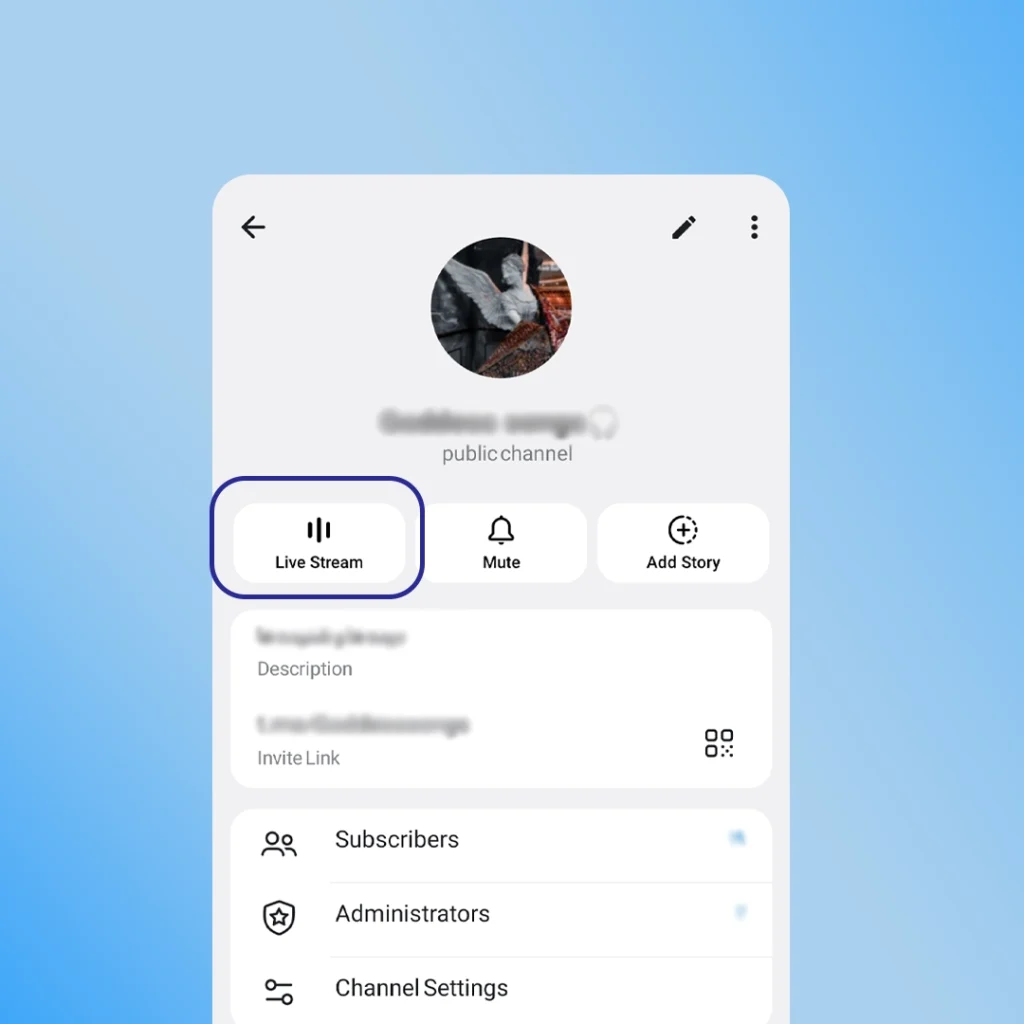
For broadcast styled audio events, launching a live stream in your channel is the perfect way to reach a massive audience.
- Navigate to your Telegram channel and tap the channel banner at the top.
- Tap the three dots option icon in the top right corner of the screen.
- Select Start Live Stream which is the specific terminology Telegram uses for channel audio events.
- You can choose to start the session immediately or select Schedule Voice Chat Telegram to pick a future date and time, allowing you to generate anticipation and share an automated countdown banner with your subscribers.
Advanced Features That Make Telegram Voice Chat Powerful
To truly leverage this feature for community growth or professional broadcasting, you need to understand the underlying mechanics. Telegram offers far more flexibility than competing audio platforms, making it an invaluable tool for modern content creators. Let us look at the core Telegram Voice Chat features 2026 updates in this comparison table.
| Feature | Group Voice Chat | Channel Voice Chat |
| Listener Limit | Unlimited | Unlimited |
| Speaker Limit | Thousands of speakers | Controlled by Admins |
| Scheduling | Yes (Up to 7 days ahead) | Yes (Up to 7 days ahead) |
| Recording Option | Available (Audio only) | Available (Audio only) |
| Join As | Personal Profile | Personal Profile or Channel |
How to Record a Telegram Voice Chat for Podcasts
One of my favorite advanced capabilities is the native recording feature. You do not need complex third party software when looking up how to record Telegram Voice Chat files for future promotional material or podcast episodes.
To record your session, simply tap the three vertical dots inside the active voice chat menu and select Start Recording. You can choose to record just the audio or include video if you are sharing screens. Once the chat concludes, the fully processed audio file is delivered instantly to your Saved Messages folder, ready for download, editing, or re sharing with subscribers who missed the live event.
Troubleshooting: How to Fix Telegram Voice Chat Not Working
Even the best platforms hit a snag occasionally. If you or your community members run into issues, here are the exact expert solutions to get things running smoothly again.
Fixing the telegram voice chat button missing issue
One of the most frustrating errors users encounter is the telegram voice chat button missing from their screen. If you cannot see the button to start or join a chat, it usually means one of two things.
First, you might not have administrator privileges in that specific group or channel, as standard members cannot initiate audio rooms. Second, you might be using an outdated version of the app. To fix this, update your Telegram app to the latest version via the official store, or clear your app cache and restart your device to make the button reappear.
Resolving the Telegram Voice Chat Not Working Errors
If the app feels unresponsive or you face a general Telegram Voice Chat not working fix scenario, check your Telegram Voice Chat admin settings. Make sure that you have not accidentally muted the entire room or restricted member permissions. Since anyone with admin access can control these live sessions, ensuring your leadership team has secured their accounts is vital. This is the perfect time to properly Protect Your telegram Channel from Hackers by enforcing strict two step verification across all administrator profiles.
Audio lagging or dropping out entirely is typically caused by unstable network protocols. Try switching from cellular data to a stable Wi-Fi connection, or toggle your device airplane mode on and off to reset the network stack. Additionally, check if an active proxy or VPN is interfering with Telegram real time audio servers.
If you join a room and find yourself unable to speak, look for the large microphone button on your screen. In larger groups and channels, administrators often mute all incoming participants by default to prevent background noise. Tap the Raise Hand button to notify the host that you would like to be unmuted and granted speaking privileges.
Telegram Voice Chat vs Video Chat: Which is Better?
When comparing Telegram Voice Chat vs Video Chat, the choice depends entirely on your content goals. A voice chat is ideal for casual conversations, community hangouts, and podcast style interviews because it consumes less data and demands less user attention. On the other hand, video chat is perfect for live presentations, product tutorials, and webinars where visual elements are critical. Fortunately, Telegram allows you to switch between them seamlessly during a live session.
Fortunately, Telegram allows you to switch between them seamlessly during a live session. However, if you ever decide to switch to visual streaming and find that your Telegram Video Call Not Working screen freezes, it usually comes down to camera permissions or app glitches that you can fix in a few quick steps.
Frequently Asked Questions (FAQs)
Can anyone start a voice chat in a Telegram group?
No, only group owners and administrators who possess the explicit permission to manage voice chats can initiate or schedule a session.
Is there a Telegram Voice Chat limits and capacity rule for listeners?
No, there are absolutely no limits on the number of listeners. A channel or group voice chat can host millions of live listeners simultaneously without any drop in performance.
Can I Join Telegram Voice Chat as Channel instead of my personal account?
Yes, Telegram gives you the option to join any voice chat using your public channel persona, which is an excellent way to protect your privacy or promote your brand during large events.
What makes a telegram live Voice Chat different from a regular phone call?
A telegram live Voice Chat runs as an open, always on virtual room parallel to your text messages. Unlike traditional calls, it does not ring individual users, allowing members of groups or channels to drop in and leave the live audio stream whenever they want without disrupting the ongoing conversation.
Can I share my screen during a Voice Chat
Yes, Telegram allows you to smoothly transition from a pure audio chat to a video presentation. This capability is deeply connected with several New Telegram Features rolled out recently, allowing you to turn on your device camera or share your desktop screen with participants at any time during the live session.
Once you get comfortable with the technical setups and settings, you will realize that hosting these live audio sessions regularly is actually one of the absolute best ways to master Telegram community management and drive organic growth for your brand without spending a fortune on ads. It builds unmatched trust with your audience.
Need Expert Help with Telegram Features?
If you are running a business, launching a brand digital presence, or managing a massive community on Telegram and facing technical glitches, you do not have to figure it out alone. My dedicated team is always ready to assist you with any advanced setup or troubleshooting. Feel free to reach out to us directly via our official support handle @membertelsupport and we will get you sorted in no time.