

To create a Telegram poll, open your group or channel. On a phone, tap the plus or paperclip icon and select Poll. On a desktop, click the paperclip icon and choose Poll. Type your question, insert your answer choices, utilize the brand new feature to paste external links into option fields, toggle your privacy settings, and press Send or Create.
While creating a basic question takes less than thirty seconds, the way we engage audiences has changed completely with the recent Mighty Polls upgrade. Running communities for over seven years has taught me that simple text questions do not cut it anymore.
Polls are no longer just static boxes. Today, they serve as advanced tools to collect real time data, drive website traffic, and keep your channel alive. Let us break down exactly how you can master this feature on any device using the latest settings.
Why Every Group Admin Needs Telegram Polls
When you manage a growing community, typing out questions and counting text replies is a nightmare. Telegram polls solve this perfectly by offering real time statistics and structured feedback.
Based on recent industry data, channels that use polls at least twice a week experience a forty percent increase in member retention. It gives your audience a voice. Whether you are choosing the next topic for your content or running a fun trivia night, polls create a sense of belonging. With recent features, they also act as massive traffic drivers for external websites.
There are many Powerful Telegram Features that help creators grow without relying on expensive tools, and native voting is definitely near the top of that list.
Over my years of auditing active digital communities, I have noticed a massive shift in how users consume content. Group members do not want to be lectured anymore. They want to participate. When you look at successful broadcast strategies, the turning point always comes down to interaction. Building a poll is not just a technical step. It is an invitation for your audience to co create the community with you. Now, with clickable links built into those choices, you are no longer just asking a question. You are opening a direct pathway to your products.
Telegram Poll Links 2026 Update: The Game Changing
Telegram recently rolled out its massive Mighty Polls overhaul, changing how we interact with voters forever. You can already do so many things with polls that Telegram could work as a standalone polling app. But is that enough? Never.
The biggest news revolves around a revolutionary telegram poll new feature that changes everything for creators. This massive update ensures that poll options can now include rich media files and clickable URLs. This allows admins to attach a unique photo or add link to telegram poll option fields directly to individual voting choices.
Imagine asking your audience which product they prefer and providing a direct hyperlink to the product page right inside the option. This adds a healthy dose of context and opens up incredible monetization opportunities for digital businesses. It turns a simple interaction tool into a high converting marketing funnel.
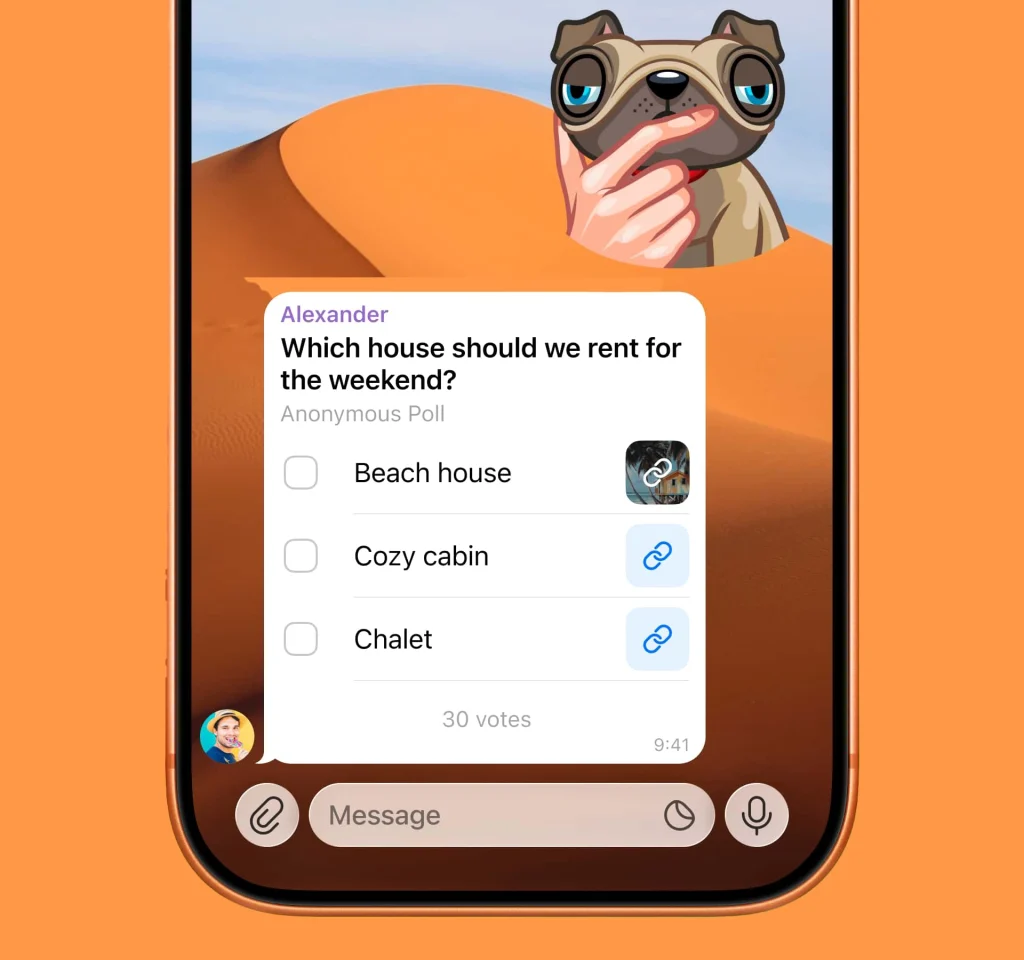
Let us look at a practical scenario from a recent digital product launch I monitored. A tech community channel wanted to sell a premium analytics spreadsheet. Instead of dropping a massive sales pitch, they created a simple poll asking members which metrics they struggled to track the most. Each answer option included a specific link to a tailored landing page addressing that exact issue. This single strategy generated an eleven percent click through rate from total channel views. It proved that contextual product placement inside a voting option beats standard promotional banners every single time.
Advanced Statistics for Polls Revealed
Managing a massive broadcast hub requires deep data analytics to understand user behavior. This is exactly why the introduction of advanced Statistics for Polls has become a crucial feature for every modern channel owner.
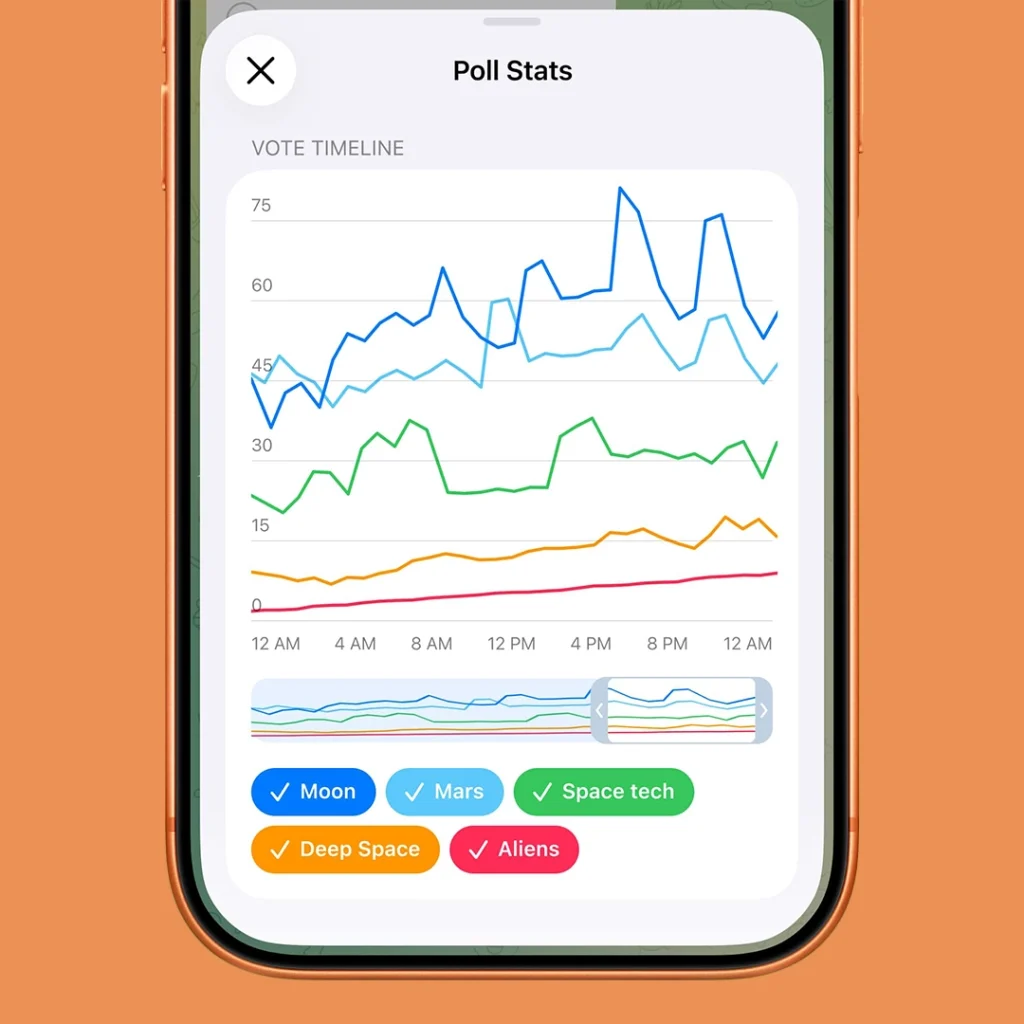
When you launch a question today, groups and channels display an interactive graph exclusively for administrators. This system tracks the exact number of votes for each individual option over time. By utilizing these new Statistics for Polls, you can easily discover when your global audience is most active during the day and witness how collective opinions shift during a live marketing campaign. It completely removes the guesswork from community interaction.
Implementing Custom Limits for Polls
Securing your feedback from automated spam and targeted manipulation is a top priority for digital businesses. The arrival of Custom Limits for Polls offers a definitive solution for creators who demand accurate and high quality data.
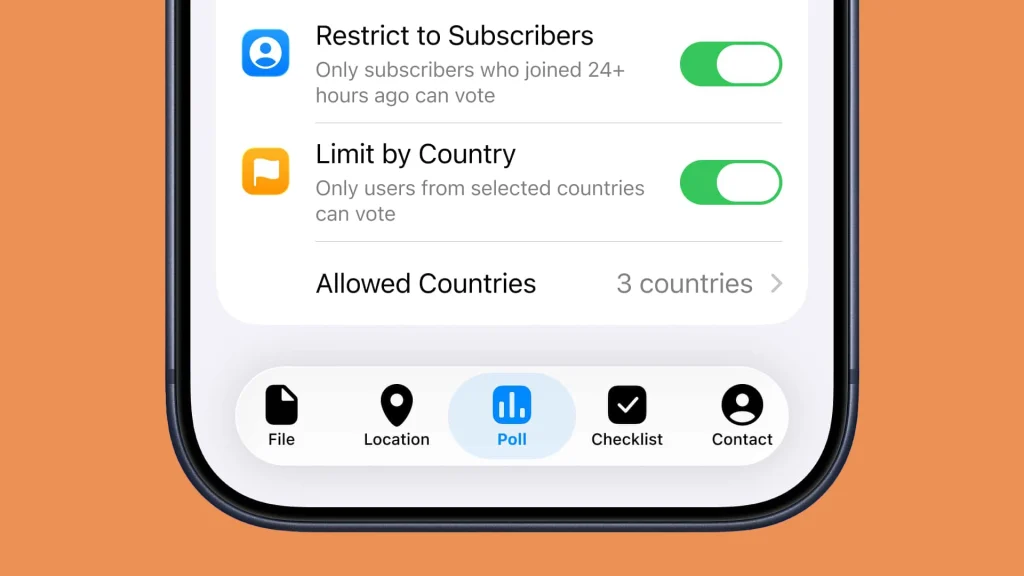
Channel administrators are now fully equipped to enforce Custom Limits for Polls depending on their specific goals. For instance, you can easily adjust your platform configurations to ensure only verified subscribers are allowed to cast a vote. Furthermore, you can restrict voting actions exclusively to users residing in specific countries. Applying these Custom Limits for Polls ensures that your community insights remain completely clean and perfectly protected from outside spam bots.
How to Make a Telegram Poll on Desktop Easily
Working from a computer is my personal preference when managing large scale projects. Utilizing native tools makes Telegram Group Management Made Easy because the desktop application provides a clean interface for content creation. Follow these exact steps to launch your first desktop poll with advanced features.
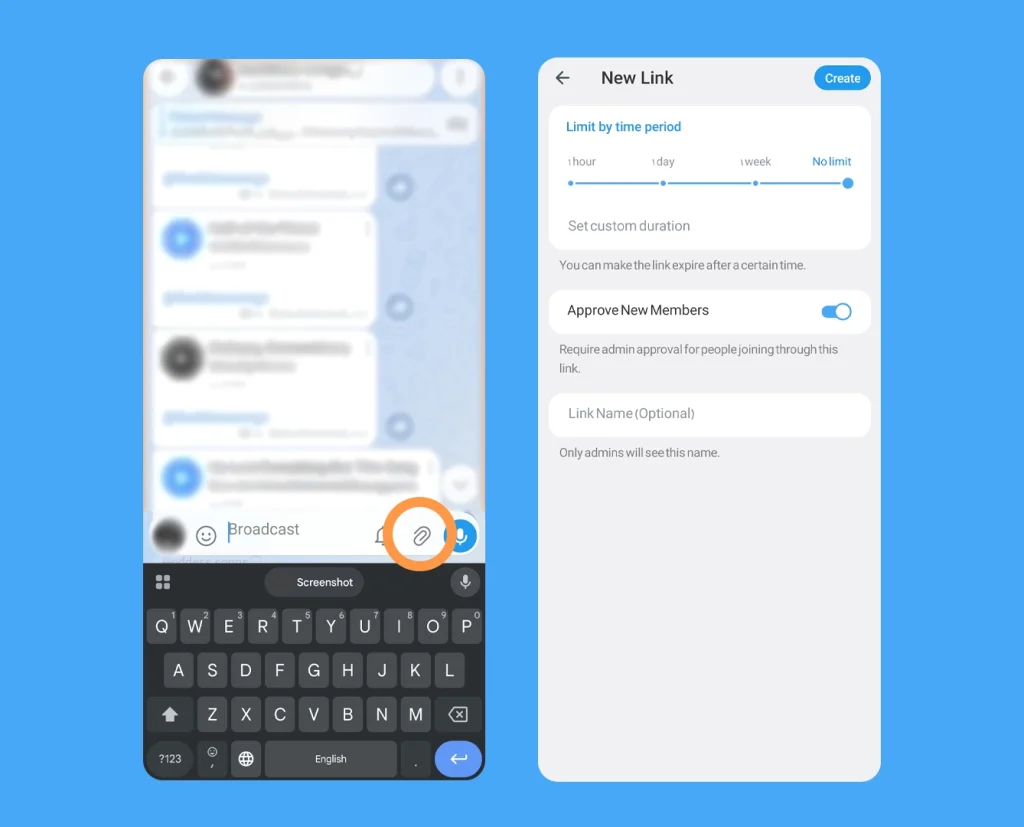
First, open the Telegram desktop application and navigate to the specific group or channel where you want to post. Look at the bottom input bar next to the text field. Click on the small attachment icon which looks like a paperclip.
A vertical menu will pop up on your screen. Select the option labeled Poll. A new dedicated window will appear immediately.
Now, type your question in the top box. Below that, you will see fields to add your multiple choice options. Telegram allows you to add up to ten options for a single question. In this screen, you can also paste your external hyperlinks directly into the option fields or add context descriptions.
Before hitting the final button, look at the settings section below the options. You can toggle anonymous voting, multiple answers, or quiz mode. Once your settings match your goals, click the Create button at the top right corner. Your poll is now live.
How to Make a Telegram Poll on Phone Easily
Managing communities on the go is unavoidable. The mobile experience is incredibly smooth and fully supports the latest features. However, the interface looks slightly different depending on whether you use an Apple device or an Android smartphone. Let us break down exactly how I navigate this feature on both operating systems to maintain perfect engagement.
Quick Mobile Setup Guide
If you are in a rush and need to publish your content instantly, here is the universal formula that works across all mobile devices.
- Step One: Open your Telegram mobile application and enter your desired group or channel.
- Step Two: Tap the attachment shortcut icon located directly inside or next to the message field.
- Step Three: Select the Poll feature from the menu overlay on your screen.
- Step Four: Write down your question and populate the choice fields, adding relevant marketing hyperlinks if needed.
- Step Five: Choose your preferred privacy and answer modes in the settings section below.
- Step Six: Tap the Send or checkmark button to launch your poll immediately.
For a deeper look into the specific visual layouts of your smartphone, follow the precise guides below.
The Step by Step Guide for Android Users
Creating interactive content on Android is incredibly intuitive. First, launch your Telegram application and open the specific group or channel where you wish to engage your audience.
Look at the bottom right corner of the screen inside the message entry bar. You will spot a small paperclip icon which serves as the universal attachment tool. Tap this icon to bring up a panel from the bottom of your screen.
Among the colorful grid of options such as Gallery, File, and Location, select the Poll icon. A dedicated creation screen will slide up instantly.
Now, start by entering your primary question in the top text field. Directly below that, begin typing your individual answer choices. Telegram allows you to add up to ten distinct choices. This is also where you can take advantage of the latest update by pasting your external links or adding rich descriptions directly into the choice fields.
Once your options are filled out, scroll down to view the poll settings section. Here, you can toggle options like anonymous voting, multiple answers, or quiz mode depending on your strategic goals. When everything is configured to perfection, simply tap the checkmark icon or the Send button at the top right corner to publish your poll to the community.
Quick Android Navigation Path: Telegram App ➔ Open Group or Channel ➔ Tap Paperclip Icon ➔ Select Poll ➔ Enter Question and Choices with Links ➔ Adjust Privacy Settings ➔ Tap Checkmark to Publish
The Step by Step Guide for iPhone and iOS Users
The iOS interface delivers a highly polished experience that aligns perfectly with Apple design standards. To begin, open the Telegram app on your iPhone and enter your preferred channel or group chat.
Navigate to the message field at the bottom. Instead of a paperclip on the right side, iOS users will see a prominent plus icon or a classic paperclip on the left side of the text box. Tap this icon to open the native iOS attachment overlay menu.
From the menu list that appears on your screen, tap on Poll. The application will immediately display the full screen poll creation interface.
Type your main question into the dedicated upper field. Move to the fields below to add your voting options, remembering that you can seamlessly include custom hyperlinks for more context or product pages.
Scroll down slightly to explore your poll settings. On iOS, you can easily use the toggle switches to activate anonymous voting, select multiple answers, or switch on quiz mode. After reviewing your content and ensuring all URLs are correct, look at the top right corner of your iPhone screen and tap the Send button to launch it live.
Quick iOS Navigation Path: Telegram App ➔ Open Group or Channel ➔ Tap Plus or Paperclip Icon ➔ Select Poll ➔ Type Question and Choices with Hyperlinks ➔ Configure Toggle Switches ➔ Tap Send to Launch
Understanding Advanced Telegram Poll Settings
To truly master this feature, you need to understand the distinct options available. Each serves a completely different community purpose.
| Poll Feature | Best Used For | Key Advantage |
| Option Hyperlinks | E commerce and traffic redirection | Direct clicks to websites |
| Anonymous Voting | Sensitive topics and honest feedback | Completely hidden identity |
| Visible Votes | Group planning and accountable decisions | Names shown to members |
| Quiz Mode | Educational content and trivia | Only one correct answer |
While native tools are great, you can also look into specialized Telegram Bots for Polls and Quizzes if you want to run complex competitions or timed automated exams in your chat.
Troubleshooting: Why Can I Not Create a Telegram Poll?
Sometimes things do not go as planned. If you find the poll option greyed out or missing, do not panic. Here are the most common reasons based on my technical troubleshooting experience.
First, check your group permissions. If you are a member and not an admin, the group owner might have disabled the Send Polls permission for regular users. To fix this long term, you can learn how to Add Admin who understands how to deploy engaging content to keep the chat active.
Second, make sure you are not trying to create a poll in a normal one on one private chat. Telegram polls are strictly designed for groups and channels. This helps creators maintain absolute authority over their digital hubs. Implementing a join request on a Telegram group is another smart way to control who enters your space, ensuring that only high quality members participate in your surveys. If unhelpful members slip through and cause quiet periods, you can always Fix Dead Groups with AI Engagement Bots to revive the daily conversation.
Advanced Tips to Double Your Poll Engagement
Creating the poll is only half the battle. Getting thousands of members to click an option requires strategy.
Keep your questions short and highly relevant to current trends. If a poll is too long, users will simply scroll past it. Use multiple choice capabilities to offer clear variations.
Another trick from my personal playbook is using quiz mode for educational rewards. You can explain the correct answer in the explanation field, which appears after a user makes a guess. This adds massive value to your community.
Frequently Asked Questions
Can I include links in both public and anonymous polls?
Yes, you can include links in both public and anonymous options. The ability to add link to telegram poll option fields works perfectly across all poll types, groups, and channel settings seamlessly.
Can I edit a Telegram poll link after publishing it?
No, you cannot edit any text, choices, or hyperlinks once a poll is live. If you make a mistake with a URL, your only option is to delete the post entirely and make a Telegram poll from scratch.
Is there a character limit when adding links to poll options?
Yes, there is a character limit. The combined length of your choice description and the pasted URL must fit within the standard platform limits for individual poll choices. Keep your text short when embedding links.
Why are my poll results not showing in real time?
Delayed voting updates usually happen due to a weak internet connection or minor server latency. Closing and refreshing your Telegram application usually syncs the telegram poll links 2026 statistics instantly.
Final Thoughts on Boosting Your Channel Power
Mastering how to make a Telegram poll on desktop and phone easily is a fundamental step in modern community management. With the addition of links in poll options, the platform has given us an unprecedented way to engage and convert users simultaneously. Try creating a link integrated poll today and watch your metrics climb.
If you encounter any technical issues while setting up your community features or need advanced optimization strategies, feel free to reach out to our dedicated team at @membertelsupport for expert guidance.













Leave a Reply