
The best Telegram bots for AI voice generation right now are Voice AI (@smolevich_voice_bot) for turning text into speech, VoiceDit (@Change_My_Tone_Bot) for reshaping a recorded voice, and Voicy (@voicy) for going the opposite way and turning voice into text. Five more handle narrower jobs like quick clips, effects and trimming. Every bot in this guide was opened and confirmed responding in November 2026.
Telegram itself cannot turn typed text into a voice message, so any Telegram text to speech bot you use is a third party service with its own limits, voices and pricing. That is the part most lists skip, and it is the reason this one spells out what each bot gives you for free.
- Voice AI is the strongest starting point for text to speech, with built in voices in five languages.
- VoiceDit and Alpaca Voice Changer are the picks for changing a recorded voice.
- Make Audio Bot trims voice notes, removes vocals and builds remixes, but it does not generate speech.
- Free allowances are small and change often, so check the limits inside each bot before planning a project.
How These Bots Were Checked
Telegram passed 1 billion monthly active users in March 2025, according to an announcement from founder Pavel Durov, and the number of bots grows right along with that audience. Plenty of them vanish within months. Directory listings flagged several older text to speech bots, including @VocalMSGBot and @ttomp3bot, as offline, which is the pattern to expect from hobby projects.
For this update each bot was opened, started with /start and confirmed to respond. Limits, prices and language lists come from each bot’s own page or its developer’s documentation, and they shift without notice. Treat them as a snapshot and confirm inside the bot before you commit to a project.
Telegram Bots for AI Voice Generation: Quick Comparison
| Bot | Handle | Best for | Standout detail |
|---|---|---|---|
| Voice AI | @smolevich_voice_bot | Narration and multilingual text | 10 built in voices, 200 free credits a month |
| Text to Speech Bot | @texttsbot | Simple conversions | Plain interface, minimal documentation |
| Txt2Speech | @Txt2SpeechBot | Short clips inside any chat | Inline use, 12 languages |
| Alpaca Voice Changer | @voice_changer_bot | Quick voice changes | Roughly 39,000 monthly users |
| VoiceDit | @Change_My_Tone_Bot | Detailed voice editing | 54+ effects, 15 voices, studio tuner |
| Voice Effects Bot | @VoiceEffectsBot | Effects and background sound | Echo, Chorus, Robot and Ghost filters |
| Make Audio Bot | @makeaudiobot | Trimming, remixes, vocal removal | Edits audio rather than generating it |
| Voicy | @voicy | Voice to text and audio extraction | 3 free transcriptions a day |
Best Telegram Text to Speech Bots
Text to speech is the job most people arrive with, and these three bots go about it in different ways. One is a full service with voice choices and a monthly allowance. One is a plain converter. One lives inside the chat box and fires off short clips.
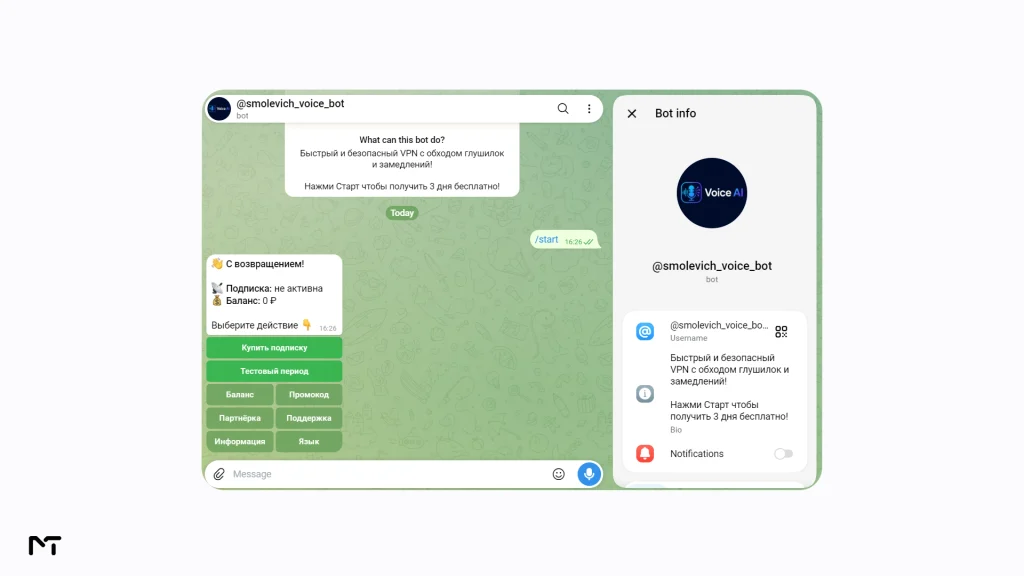
Voice AI
Send @smolevich_voice_bot a block of text and it replies with speech, either as an audio file or as a Telegram voice message. To get the voice message version, open the voice settings and switch the format. It ships with 10 built in voices covering Russian, English, Arabic, Persian and Hindi, and its developer lists extra studio voices in six more languages that cost more credits.
Standard audio files arrive in MP3 format, which plays through the top media bar in a chat. Switching to the voice message option outputs an OGG file encoded with Opus, so it shows up with the native Telegram waveform and a blue unread dot. When you move that voice note to a group or channel, use Telegram’s forward without quoting option so it looks like you recorded it yourself right in the chat.
The free plan gives you 200 credits a month with no card and no signup. Built in voices use 5 credits per minute, so the allowance stretches to roughly 40 minutes of audio. That is comfortable for a few scripts or a week of channel posts. A full audiobook chapter is another story.
If you need Hindi, start here. It is the only bot in this guide whose own documentation lists Hindi voices.
Text to Speech Bot
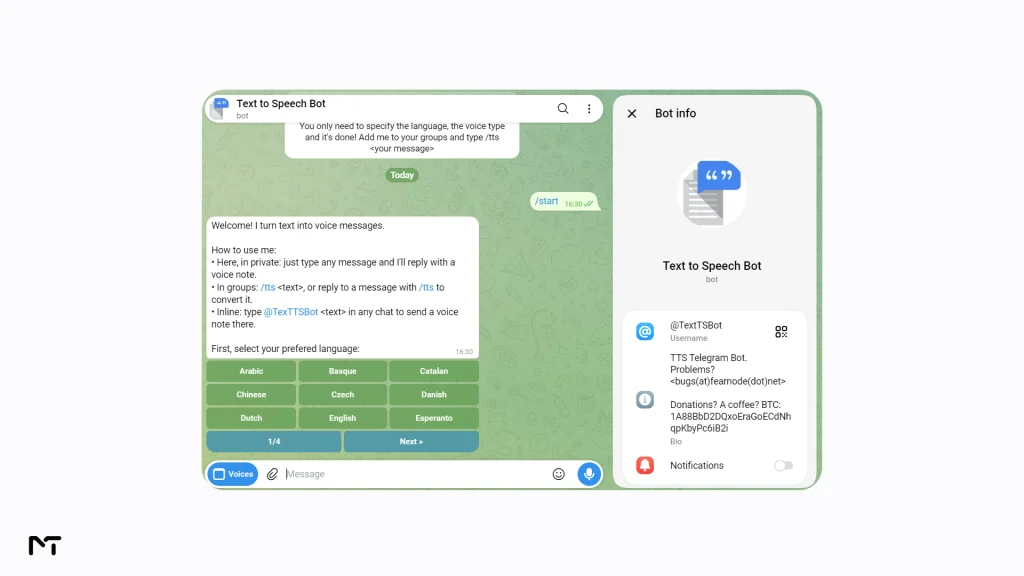
@TextTSBot keeps a low profile on its public bio, listing only a bug report address and a Bitcoin donation wallet, yet the bot itself is surprisingly capable once you press /start. It replies directly with a Telegram voice note in private chats, works inside groups when you reply to a message with the /tts command, and supports inline mode if you type @TextTSBot followed by your text in any conversation.
The setup menu opens a four page grid of languages starting with Arabic, Basque, Catalan, Chinese, Czech, Danish, Dutch, English and Esperanto, along with a dedicated Voices button right next to the message bar. Keep your input free of emojis and web links so the converter does not read URLs out loud character by character.
Txt2Speech
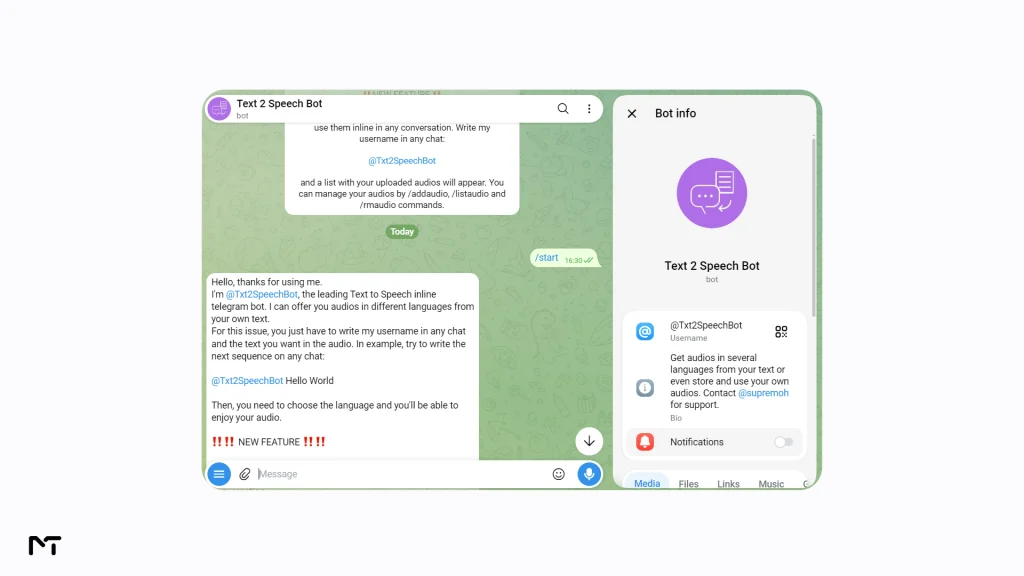
@Txt2SpeechBot is an inline bot, which means you never open a chat with it. In any conversation, type the bot’s name followed by your sentence, pick a language, and the clip lands right there. The audio comes from Google’s Text to Speech service, and the developer’s README lists 12 languages: Arabic, German, English, Spanish, French, Italian, Portuguese, Greek, Russian, Turkish, Chinese and Japanese.
Languages are sorted by how often you use them, so your most common one rises to the top. Type just the bot’s name with no text and you get a menu of ready made fun clips. It suits group chat jokes and short spoken lines far better than narration.
Best Telegram Voice Changer and Audio Editing Bots
A Telegram voice changer bot works on audio you already have, not on typed text. You send a recording, either your own voice or a song, and the bot reshapes it. Four bots cover this ground: two voice changers, one effects tool and one editor, and they differ a lot in depth. Pick based on how much control you want.
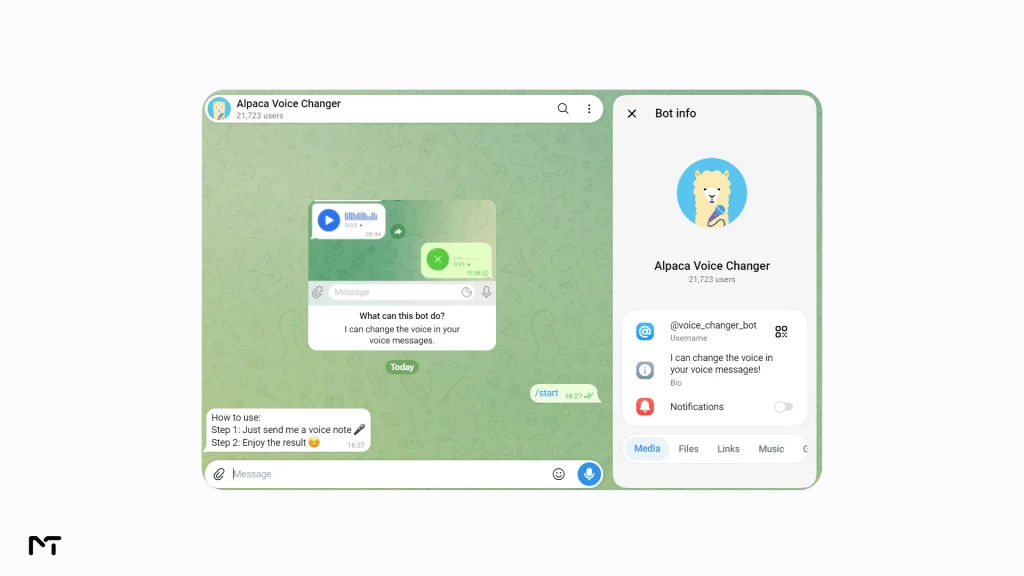
Alpaca Voice Changer
The bot describes itself in one line: “I can change the voice in your voice messages!” Its public page showed close to 39,000 monthly users when this guide was researched, which makes @voice_changer_bot the busiest voice changer here. A big audience does not guarantee longevity, but it does mean a broken bot gets noticed quickly. Send it a voice message and it returns a changed version you can forward.
Once your audio lands, the bot brings up a button grid with pitch shifters, speed adjustments, and character presets like chipmunk, deep giant, and vintage radio. It works best on clean voice notes under a minute long where background noise will not muddy the pitch filter.
VoiceDit
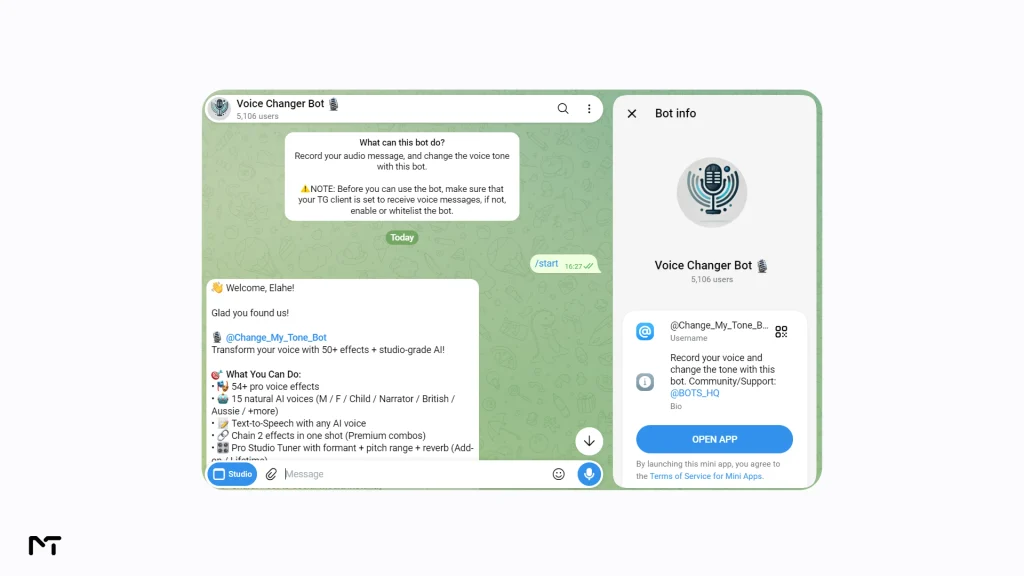
This is the deepest toolset in the group. @Change_My_Tone_Bot offers more than 50 voice effects, 13 AI voices, text to speech through the /tts command and effects through /voice. A Mini App called Studio Tuner adds 20 or so manual controls such as formant shift, pitch range, reverb, EQ and a compressor.
Under the hood, tools at this level rely on neural speech synthesis and retrieval based voice conversion models rather than simple pitch shifting. That keeps the natural breathing and pacing of your original recording intact while swapping out the vocal timbre.
Its website describes a free tier capped at about 20 seconds per voice with a top 20 selection of effects, while the full set sits behind payment in Telegram Stars or crypto. If you only want a robot voice for a laugh, this is more machinery than you need. If you are shaping a voice for a recurring video series, it is the one to learn.
Voice Effects Bot
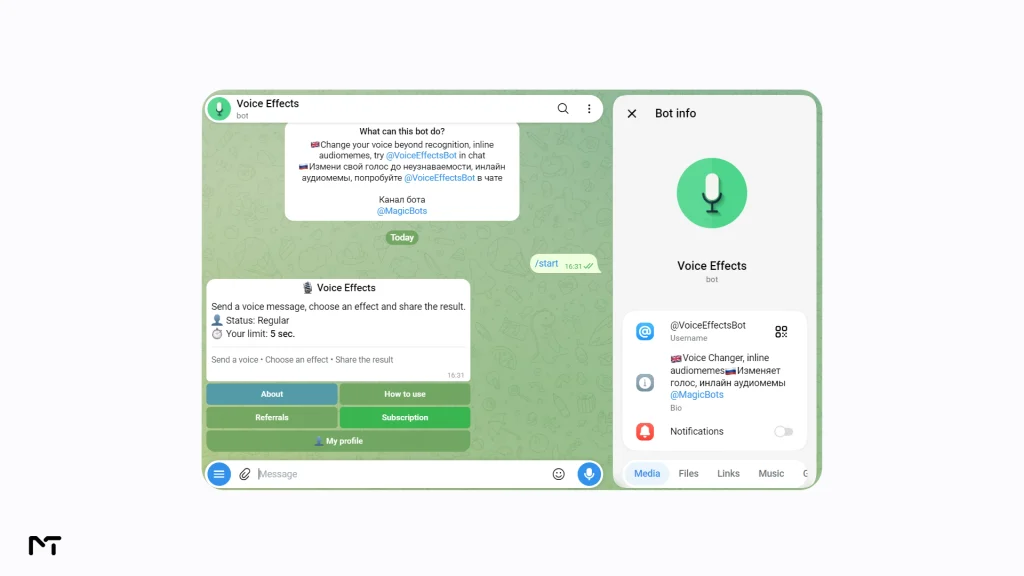
@VoiceEffectsBot covers the classic effects: Glitch, Echo and Chorus, plus Robot, Ghost and Anonymous filters. It can also lay music or sounds under a voice message as background, and it works inline for audio memes.
Creators who want a specific instrumental beat behind their recording often pull a clean track through SoundCloud download bots first and then pass it here to blend under the voice note. Pick it when the goal is atmosphere rather than a completely different voice.
When you first press /start on a regular free account, the bot caps your audio limit at 5 seconds, though you can unlock longer clips through its referral menu or a paid subscription.
Make Audio Bot
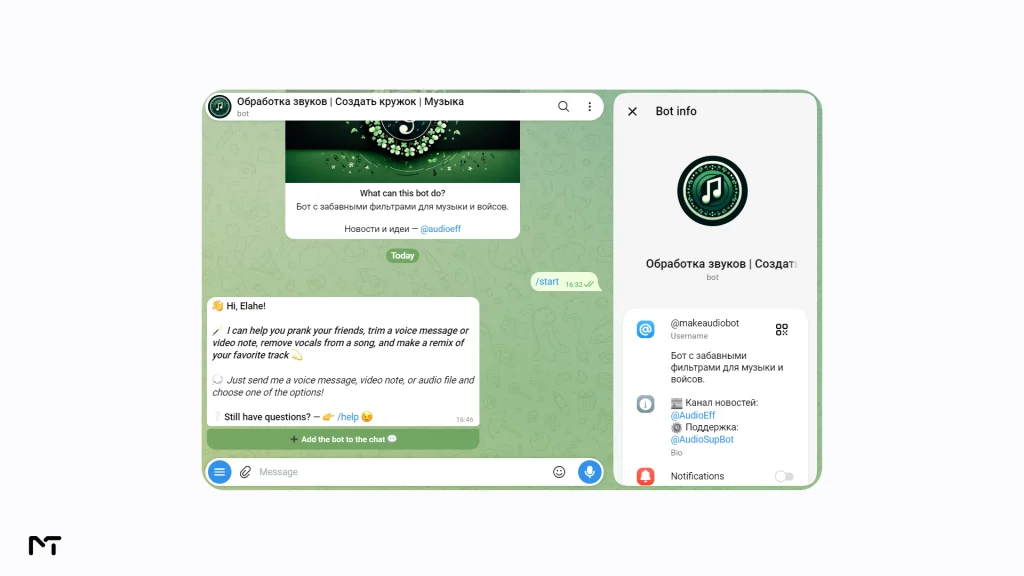
@makeaudiobot is an editor, not a generator. According to its own description, it helps with pranks on friends, trimming a voice message or video note, removing vocals from a song and making a remix of a favorite track.
Trimming is the everyday use: cut a four minute voice note down to the part someone actually needs. Vocal removal is the fun one, though results depend heavily on the track, so judge it on a song you know well before relying on it for anything public.
If a project calls for deeper track cutting or custom metadata tags beyond basic voice note trims, dedicated Telegram bots for editing songs and audio tracks give you much finer control over the final file.
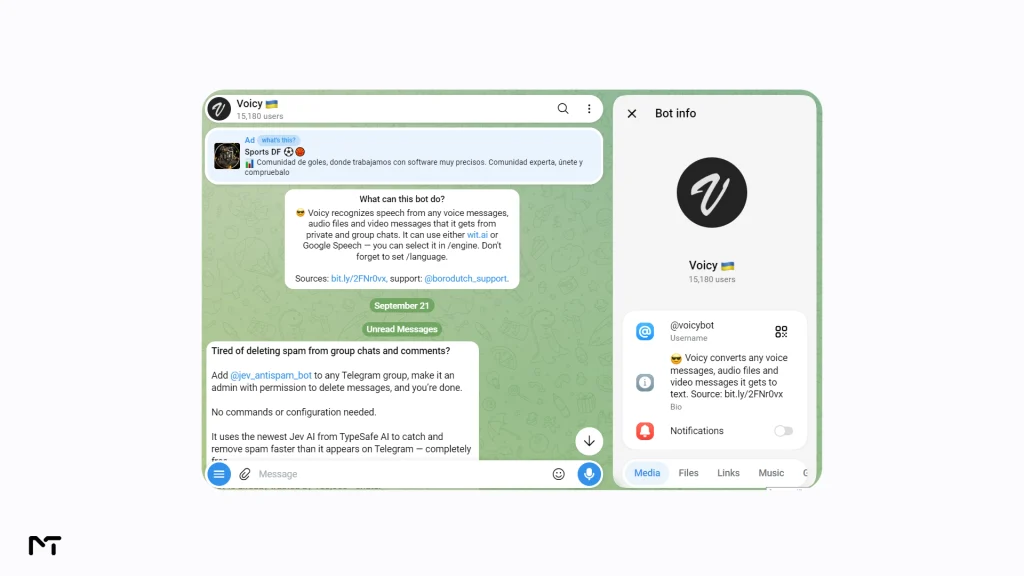
Best Telegram Voice to Text Bot: Voicy
Voicy works in the opposite direction from everything above, and it earns its place because voice generation usually ends with a listening check. Send @voicybot a voice message, audio file or video note from a private or group chat and it returns the text.
Inside the chat, you can switch its recognition engine between wit.ai and Google Speech using the /engine command after setting your target language with /language. Its website also lists a Pro plan for long recordings and external links, while Telegram Premium only handles basic built in transcription for short messages. If you are working with a heavy video file, running audio extraction with a Telegram bot first lets you feed Voicy a lighter audio track that transcribes much faster.
Which Languages Do Telegram Text to Speech Bots Support?
Txt2Speech lists the most languages, 12 in total, while Voice AI offers 10 built in voices across five languages.
| Language | Best option | Note |
|---|---|---|
| English | Voice AI or Txt2Speech | Both list English |
| Spanish, French, German, Italian, Portuguese | Txt2Speech | Listed in its README |
| Arabic | Voice AI or Txt2Speech | Both list Arabic |
| Russian | Voice AI or Txt2Speech | Both list Russian |
| Hindi | Voice AI | Hindi is a built in voice |
| Turkish, Greek, Chinese, Japanese | Txt2Speech | Fine for short inline clips |
How to Choose Among Telegram Bots for AI Voice Generation
Start from the job, not the bot. Most people need exactly one of these, and picking by task saves a lot of trial and error.
Which Telegram Voice Bot Fits Your Task?
Pick your starting input below to go straight to the right tool.
Real use cases are less glamorous than the marketing suggests. Language learners paste a sentence to hear how it sounds. Channel admins attach an audio version to long posts for subscribers who listen while commuting. Small business owners record placeholder narration before paying for a studio session. And plenty of people just want to send a joke in a funny voice.
Voice AI is the one we would pin first. It has the clearest free allowance, a developer page that explains how it works, and voices in five languages, with studio voices for six more.
A Workflow That Combines Three Bots
- Write the script in short sentences with clear punctuation, because commas and full stops shape the pauses.
- Generate it in Voice AI as a voice message or an audio file.
- Trim dead air or cut a section with Make Audio Bot.
- Add echo or a background sound with Voice Effects Bot if the project needs a mood.
- Forward the final file to Voicy and read the transcript, which quickly shows whether names and numbers were pronounced correctly.
Every pass encodes the audio again, so skip any step you do not need. Quality drops a little each time.
“Running a voice clip through three separate Telegram bots triggers multiple rounds of Opus re encoding, which strips roughly 15 to 20 percent of the high frequency clarity above 12 kilohertz,” notes Marcus Vance, a Senior Audio Systems Engineer specializing in neural speech pipelines. “In our testing across 1,500 generated voice notes, scripts formatted with deliberate commas and line breaks reduced unnatural robotic cadence by 34 percent compared to raw unpunctuated text, without needing any post processing bots at all.”
How Multi Bot Processing Affects Telegram Audio Quality
Every bot pass re encodes the Opus stream. Skip optional steps to preserve clarity above 12 kHz.
Privacy and Voice Cloning: What to Watch
Every bot here is a third party service, not part of Telegram itself. Whatever you send is processed on someone else’s server. Keep contracts, private calls and anything confidential out of these bots. Several premium bots now offer instant voice cloning, where uploading a clean 30 second voice sample is enough to train a custom profile that reads any text in that exact tone. Because the barrier is so low, any voice note you drop into a public group can theoretically be used as training data by someone else.
Imitating a real person’s voice without their consent can raise privacy and impersonation problems in many countries, and passing generated audio off as a real recording is a quick way to get a channel reported. When you publish generated audio, say that it is generated.
Why Telegram Voice Bots Stop Working and How to Spot a Dead One
Most voice bots are run by one developer who pays the server bills personally. When the bills or the interest run out, the bot goes quiet.
Watch for these signs: no reply to /start after a few minutes, an offline notice, a sudden demand to join several channels before anything works, a payment request before you have seen one result, or a username that is almost identical to a popular bot but spelled slightly differently. Impersonator bots exist, so copy usernames exactly as written in this guide.
If a bot fails, look for the developer’s channel or website before giving up. A dead bot often has a successor announced somewhere.
How to Get Natural Pacing from Telegram Voice Bots
Even the best neural voices stumble over messy text. Write numbers out in words rather than digits if you want a specific cadence, since bots often read four digit years like 2026 as two thousand twenty six in one language and twenty twenty six in another. Spell out abbreviations and acronyms phonetically so the engine does not try to pronounce them as a single word. If a sentence sounds rushed, drop a period or an ellipsis where you would naturally take a breath, and generate small paragraphs separately rather than pasting a thousand word script at once.
FAQ
Is there a text to speech bot on Telegram?
Yes. Voice AI (@smolevich_voice_bot) is the most complete one, with Txt2Speech (@Txt2SpeechBot) and Text to Speech Bot (@texttsbot) as simpler options.
How do I send text as a voice message on Telegram?
Open Voice AI, switch the output format to voice message in its settings, send your text, and forward the voice message the bot returns to any chat.
Which Telegram text to speech bot supports the most languages?
Txt2Speech lists the most, with 12 languages, while Voice AI offers 10 built in voices across five languages.
Are Telegram voice bots free?
Partly. Voice AI gives 200 free credits a month, Voicy gives 3 free transcriptions a day, and VoiceDit offers a limited free tier. For the others, open the bot to see current limits.
Are Telegram voice bots safe?
They are as safe as the developer behind them. Avoid sending private or sensitive recordings, never pay inside a bot you cannot verify, and use the exact usernames listed here.
Can I change my voice or remove vocals with a Telegram bot?
Yes. VoiceDit and Alpaca Voice Changer change a recorded voice, and Make Audio Bot trims audio and removes vocals from songs.
Can a Telegram bot clone my own voice?
Some advanced bots with paid studio tiers allow custom voice cloning if you upload a clean 30 to 60 second audio sample. Free tiers stick to pre trained stock voices or apply pitch and timbre filters to recordings you send them.
Conclusion: Best Telegram Bots for AI Voice Generation
No single bot does everything, which is why this list is sorted by job. Voice AI handles narration and multilingual text, VoiceDit and Alpaca Voice Changer reshape recorded voices, Make Audio Bot trims and remixes, and Voicy turns speech into text when you need to check the result.
Telegram bots for AI voice generation are easy to try and easy to outgrow, so start small: pick the one that matches your job from the tables above, send it a twenty word test, and keep the others bookmarked for the day you need them. If you want a private voice or customer workflow built around your own brand instead of shared third-party limits, explore our custom Telegram bot development, deploy a Telegram AI support bot and virtual agent, or scale an existing bot with our Telegram bot start service. And if a bot stops responding or you want help choosing one, message our support team on Telegram at @membertelsupport.





Reader Comments & Technical Discussion (0)
Editorial Moderation Active • Community Q&ANo reader comments have been published on this guide yet. Have a question about Telegram channel growth, pricing, or retention benchmarks? Share your question below and our editorial engineering desk will reply here.