
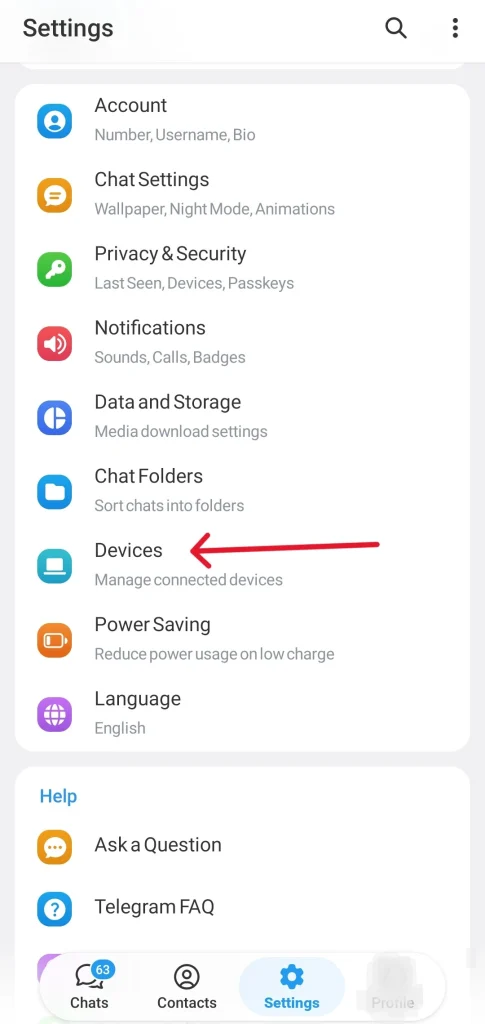
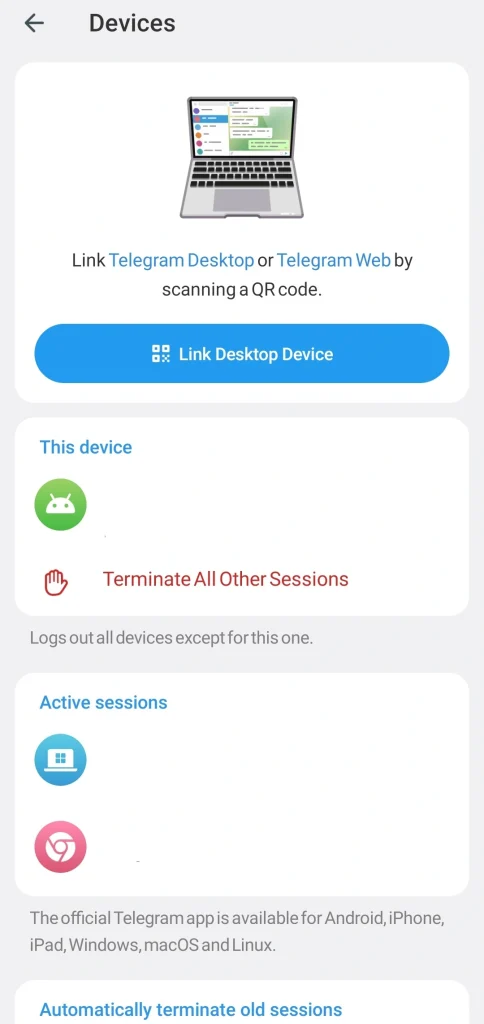
If Telegram logged you out without warning, here is what happened: your session either expired due to inactivity, was pushed out by a new login on another device, or got cleared when your app data was wiped. To get back in, open Telegram, enter your phone number, and use the SMS or voice code to verify. If you have Two-Step Verification enabled, you will need your password as well. Once you are in, go to Settings > Devices and terminate any sessions you do not recognize. Then scroll down to “If Inactive For” and set it to 6 months so this does not catch you off guard again.
Why Telegram Logged Me Out: The Real Causes
Picture this. You are right in the middle of closing a deal with a client, the conversation is flowing, and then your screen goes blank. You are staring at the login screen. I have dealt with this across my phone, desktop, and browser more times than I can count, and after troubleshooting it thoroughly, I can tell you it almost always comes down to one of the same handful of causes.
Security Session Timeouts (The Most Common Reason)
This is the most common one. Telegram automatically ends sessions that have been inactive for a while. It is a security measure, and according to Telegram’s official FAQ, sessions expire after a configurable period of inactivity to protect accounts on shared or forgotten devices. The frustrating part is that the default timeout can be as short as one week, which catches a lot of people off guard.
Accidentally Clearing Cache or App Data
I do this all the time to save space on my phone. If you go into your phone settings and clear app data for Telegram, you are essentially telling the app to forget your credentials. You will be logged out immediately because your local authentication token is wiped clean.
Reaching the Active Sessions Limit
Are you logged in on your phone, tablet, work computer, personal laptop, and multiple browser tabs? Telegram has strict limits on concurrent active sessions. If you try to log into a new device while your session limit is reached, Telegram will automatically drop your oldest active session to make room.
Technical Bugs or App Updates
Sometimes, the app just crashes. Especially right after a major version release, I have noticed background bugs that force a logout. Furthermore, incompatible app versions between your mobile and desktop devices can cause synchronization errors, resulting in the server forcing a logout to maintain session integrity.
VPN and Location Switching (Underrated Cause)
Using a VPN is another overlooked reason Telegram might log you out. When your IP address changes dramatically — say, from Germany to Japan in minutes — Telegram’s security system can interpret this as a compromised account and terminate your session.
The fix is simple:
- If you use a VPN, keep it connected to the same server before and during your Telegram session
- Avoid switching VPN locations while Telegram is active
- If you are using Telegram in a country with restrictions, use a proxy within the app itself (Settings > Data and Storage > Proxy) instead of a system-wide VPN for more stable sessions
Is Telegram Down or Just Why Telegram Logged Me Out?
Before you panic and start tweaking your device settings, consider that the issue might be completely out of your control. Telegram occasionally experiences server side hiccups or local server disruptions.
If you find yourself logged out and cannot log back in even with the correct SMS code, check a reliable service like Downdetector. This helps you see if other users in your region are reporting the same issue. If it is a global or regional outage, you simply have to wait for the official engineers to deploy a fix.
If you ever decide you are completely finished with the platform due to these issues, it is crucial to know how to deactivate Telegram safely to ensure all your personal data is permanently removed from their cloud.
How I Fixed Telegram Logouts on Every Device
Here is how I fix this problem across all devices based on my hands-on troubleshooting.
Fix for Mobile Users (Android & iOS)
If you are using the mobile app and keep getting logged out:
- Fix Battery Optimization (Android): To prevent your phone from killing the app, go to your phone Settings > Apps > Telegram > Battery and change the setting to “Unrestricted”. This ensures Telegram stays active in the background.
- Update the App: Always ensure you are running the latest version from the App Store or Google Play. Old versions are buggy.
- Reinstall: If all else fails, I delete the app entirely, restart my phone, and install it fresh.
- Set Your Auto-Logout Timer: This is the most overlooked fix. Open Telegram > Settings > Devices > scroll down to “If Inactive For.” By default this may be set to as short as 1 week. Change it to 6 months to dramatically reduce unexpected logouts on all your devices.
Fix for Desktop Users (Windows & Mac)
- Manage Active Sessions: Open Telegram on your phone, go to Settings > Devices, and click “Terminate all other sessions”. This forces a fresh login on your computer and clears any conflicted sessions.
- Avoid Closing the App: Instead of clicking the X to close the app, minimize it to the tray. Sometimes closing it completely forces a logout on the next launch.
Fix for Telegram Web Users
This was my biggest headache. Telegram Web logs out constantly if you do not know this trick:
- Disable “Clear Cookies on Close”: I found that my browser was deleting cookies automatically when I closed it. Since Telegram Web stores your session in a cookie, that caused immediate logout. I had to allowlist Telegram in my browser settings.
Analyzing: Why Telegram Logged Me Out? Technical Breakdown
| Cause | Trigger Condition | Estimated Frequency | Fix Complexity |
| Security Timeout | No activity on the device for 7-90 days (depending on user settings) | Very High | Simple (Re-login) |
| Local Data Clearing | User manually clears app cache/data in Android Settings | High | Simple (Re-login) |
| Session Limit Reached | Active sessions exceed limit, forcing oldest session to terminate | Medium | Moderate (Manage devices) |
| App Update Conflict | Major version update changes session token structure | Low | Moderate (Update/Reinstall) |
Pro Tip: Sometimes using an unstable or slow Telegram Proxy can cause the app to fail to sync with the structural server, leading to sudden session termination.
Does Telegram Premium Prevent Logouts?
You might wonder if Telegram Premium changes how sessions are managed. The short answer: not significantly.
While Premium allows more simultaneous devices and faster downloads, Telegram applies the same security timeouts to all users equally. If your account is inactive beyond the configured threshold, even as a paying subscriber, you will be logged out. That said, these are the things that actually help you stay logged in longer:
Enable Two-Step Verification: This signals to Telegram that your account is actively secured. The app trusts the device more when this is on, and it also protects you if someone gets hold of your SIM card.
Use Telegram Desktop: Far more stable than the Web version for persistent sessions. If you are constantly getting logged out on browser, switching to the desktop app alone fixes it for most people.
Set “If Inactive For” to 6 Months: Open Telegram, go to Settings, then Devices, scroll down to “If Inactive For” and pick the longest option. This one change alone cuts most unexpected logouts.
Review Active Sessions Monthly: Old browser sessions quietly pile up. Remove anything you do not recognize before it pushes out a session you actually use.
The Hidden Culprit: Third-Party Bots and API Connections
One overlooked cause of sudden logouts is connecting third-party automation tools or bots to your Telegram account. When an external service requests access through the Telegram API, the system registers it as a new active session. If you are already at your session limit or if the bot makes unusually rapid API calls Telegram may flag the activity as suspicious and terminate your session automatically.
- What to do: Review which bots have access to your account under Settings > Privacy & Security > Connected Apps – Revoke access for any app you no longer use – Avoid authorizing multiple automation tools simultaneously
Frequently Asked Questions
Why does Telegram ask for a password every time I log in?
You likely have Two-Step Verification enabled. This is a good thing! It protects your account if someone steals your SIM card.
Can someone else log into my account?
If they have access to your phone to receive the SMS code, yes. Always check your active sessions in Settings to see where you are logged in.
Why didn’t I receive the SMS code to log back in?
Sometimes carriers block automated SMS. Try selecting the “Call Me” option instead to get the code via a voice call.
What if I see a “This phone number is banned” message?
If security measures fail and you see this message, learning how to Recover a Banned Telegram Account is necessary to regain access to your conversations.
Final Thoughts on Why Telegram Logged Me Out?
Dealing with sudden logouts is annoying, but understanding why Telegram logged me out is the first step toward a permanent fix. By following the steps above, I have managed to keep my account secure and accessible. If you have tried everything and still cannot log in, the best move is to contact support directly. For issues regarding account access or bot integration, you can reach out for help at @membertelsupport to get personalized assistance.














Leave a Reply