
I’ll be honest: for a long time, I was exhausted. I was tired of spending hours on a post only to have the Instagram algorithm hide it from 90% of my followers. I felt like I was shouting into a void. But everything changed when I discovered a game-changer. What are Instagram Broadcast Channels, you might ask? To me, they were the answer to my engagement crisis. I stopped focusing only on the “Feed” and started focusing on the “Inbox,” and that’s when my connection with my audience truly exploded.
In this guide, I’m going to share exactly how to master Instagram Broadcast Channels based on my months of trial and error. This isn’t just a manual; it’s my personal blueprint for how I turned a ghost-town following into a buzzing, loyal community.
What Are Instagram Broadcast Channels, Really? (My “Aha!” Moment)
I used to think Instagram Broadcast Channels were just another attempt to copy Telegram, but I couldn’t have been more wrong. The moment I sent my first voice note and watched hundreds of heart reactions pour in within seconds, I realized this is truly the VIP Green Room of social media.
Essentially, it’s a direct line where I hold the mic. I can share text, photos, or polls with my most dedicated followers while they receive a notification right in their DMs. This space is powerful because it’s free from distracting ads and suggested posts from strangers. It’s just a real, unfiltered connection between me and my inner circle.
Top Features of Instagram Broadcast Channels for Real Engagement
I’ve experimented with every bell and whistle. Here is my “honesty report” on the features:
- The Power of the Poll: Whenever I’m stuck on a business decision, I let my channel decide. It’s not just a feature; it’s a crowdsourcing genius.
- Voice Notes (The Intimacy Hack): I’ve found that a 10-second “Good morning” voice note creates more trust than a 1080p polished video. It sounds like a friend talking, not a brand selling.
- Exclusive “Behind-the-Scenes” Links: I often share links to my new content 30 minutes before I post it publicly. It makes my channel members feel like “insiders.”
Sometimes I have the perfect update but struggle with the right words. I’ve started using AI Caption Generators for Instagram to polish my thoughts before hitting send in the channel. It keeps my tone consistent and saves me a ton of brainstorming time.
Why This is Better Than a Regular Post (The Benefits)
I stopped guessing and started looking at the numbers. While the standard Instagram feed is becoming more crowded and harder to reach, broadcast channels offer a direct and noise free lane to your audience. The difference in visibility and engagement is not just slight because it is a total game changer for anyone serious about building a community in 2026.”
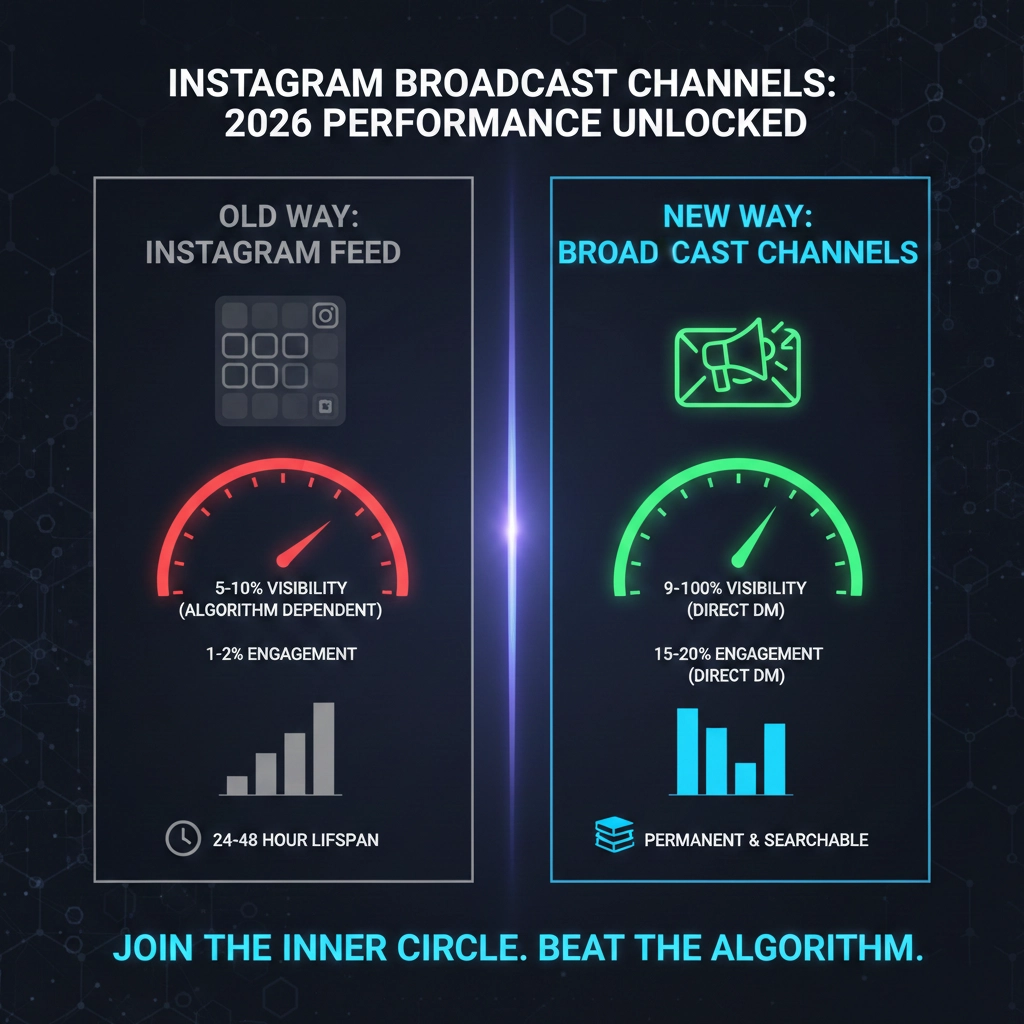
| Metric | Instagram Feed | My Broadcast Channel |
| Visibility | 5-10% (Algorithm dependent) | 90-100% (Direct Notification) |
| Average Engagement | 1-2% (Likes/Comments) | 15-20% (Active Poll/Reaction) |
| Content Life | 24-48 Hours | Permanent & Searchable |
Step-by-Step: How to Use Instagram Broadcast Channels to Build Authority
If I were starting from scratch today, here is exactly how I would set up and use my Instagram Broadcast Channels:
- Don’t Be Boring with the Name: I didn’t name mine “Update Channel.” I named it “The [My Name] Secret Lab.” Give it a personality.
- The “Stories” Bridge: I always use the “Join Channel” sticker on my Stories at least twice a week. It’s the only way people find you! One thing I learned the hard way is that you can’t just post the link once. I started creating ‘Teaser Stories’ where I show a blurred screenshot of a secret tip I shared in my channel. This curiousity-gap strategy alone increased my channel members by 25% in a single week.”
- The 80/20 Rule: I give 80% value (tips, jokes, insights) and only 20% “selling.” If you only post links to your products, people will mute you faster than a spam call.
I’ll let you in on a secret: I don’t just upload raw photos. To give my channel that ‘exclusive’ aesthetic, I’ve been playing around with Instagram’s ‘Edits’ App to tweak my behind-the-scenes shots. It’s a quick way to make my broadcast content look polished and intentional, which keeps my followers coming back for that premium vibe.
The “Curiosity Gap”: How I Stop Followers from Leaving
One of the biggest hurdles I faced wasn’t creating the channel; it was convincing people to join it. I realized that if I just asked them to “Join for updates,” they would ignore me. I had to master what I call the Exit Intent Strategy.
Now, whenever I’m about to share something truly valuable, I post a “Teaser Story” first. I’ll show a blurred screenshot of a secret tip or a result I’ve achieved and say, “The full breakdown is only available for my inner circle in the channel.” This creates a curiosity gap that people can’t resist. Since I started doing this, my conversion rate from “profile visitor” to “channel member” has skyrocketed. It’s not about begging for followers; it’s about making your broadcast channel the only place where the real magic happens.
Expert Take: Why the “DM-First” Strategy Wins in 2026
“The future of social media is moving away from the town square and into the living room. Broadcast channels are that living room.” Analyst Insight on 2026 Social Trends.
Answers to the Questions I Get All the Time (FAQs)
- “Can everyone see my messages?” Only those who join. But anyone can find the channel if your profile is public.
- “Will it annoy my followers?” Not if you provide value. I always tell my members: “Mute me if you’re busy, but don’t leave, because the best stuff is here.”
- “How many channels can I have?” You can have multiple, but I’ve found that having one “Main Home” works best for focus.
A common question is: ‘When should I post?’ To be honest, I don’t guess. I’ve learned to Read and Use Instagram Insights to track when my community is actually online. Sending a broadcast message right when my followers are most active has been a total game-changer for my reach.
My Final Verdict: Stop Waiting for the Algorithm
If you’re waiting for Instagram to magically start showing your posts to everyone, you’re losing the game. Using Instagram Broadcast Channels has been the single best decision I’ve made for my digital sanity. It’s quiet, it’s direct, and it’s real.
I’ve shared my secrets, but I know that navigating these features can still feel a bit overwhelming, especially when you’re trying to scale your presence or bypass those pesky digital paywalls.
If you’re feeling stuck with the setup or need a specific growth strategy to scale faster, just ping my team at @membertelsupport. We’ve helped hundreds of creators navigate these features, and we can help you get your channel running in minutes.












Leave a Reply