

I’ve always felt that birthdays on social media are a bit of a double-edged sword. One year, I woke up to forty notifications from people I hadn’t spoken to since high school, all because a tiny cake icon popped up next to my name. It felt performative and, honestly, a bit intrusive. That’s when I went on a mission to figure out How to Hide Your Birthday on Telegram, not just to stop the pings, but to keep my personal data where it belongs—with me.
In this guide, I’m not just giving you a manual; I’m sharing how I reclaimed my digital birthday-peace so you can do the same.
The “Why” Behind My Privacy Pivot
Most tech blogs will tell you “it’s for security.” Sure, that’s true—your birth year is a goldmine for identity thieves. But for me, it was about social boundaries. I don’t need a random person from a crypto group knowing I just turned another year older. Knowing How to Hide Your Birthday on Telegram gave me back that “filter” we all desperately need online.
But let’s be real—once you start tightening your privacy, your mind naturally goes to the other side of the coin. You realize how many strangers might be lurking on your page, and you probably start wondering: can you see who viewed your telegram profile? Trust me, I’ve been there too.
“Privacy isn’t about having something to hide; it’s about having something to protect. Your birth date is your own story.” — My Digital Motto.
My Quick Walkthrough: How to Hide Your Birthday on Telegram
I promise this won’t take more than 30 seconds. Here is the path I took through the app:
1. The Gateway (Settings)
I opened my Telegram and tapped that familiar Settings gear. It’s the starting point for any digital cleanup.
2. Privacy & Security (The Shield Icon)
Inside settings, I headed to Privacy and Security. This is where Telegram keeps all the “who-sees-what” toggles.3. The Birthday Toggle & Audience
Scroll down to find the Birthday section. When I first looked, it was set to “Everybody.” Big mistake. Here you can choose:
- Everybody: (The loud party where everyone’s invited).
- My Contacts: (The family dinner—nice, but still not perfect).
- Nobody: (The quiet night in—My Personal Choice).
💡 Pro Tip: Taking It a Step Further (Turn Off Contact Syncing)
While learning How to Hide Your Birthday on Telegram, I stumbled upon another privacy loophole. If you’re like me and you don’t want Telegram constantly matching your phone book with its database—maybe to keep your “work life” and “private life” separate—you should consider Turning Off Telegram Contact Syncing.
If you’ve set your birthday to “My Contacts” but your phone book is full of old clients or random acquaintances, they’ll still see your info! To stop this, go to Settings > Privacy and Security > Data Settings and toggle off Sync Contacts. It’s the ultimate way to ensure only the people you choose get to see your profile details.
4. The “Age” Secret (How I Specifically Hid My Birth Year)
This is the part most people miss! Even if you let people see your birthday, you can still hide your age. Once you’re in the birthday menu, look for the “Show My Birthday” setting:
Hide Entirely: Total stealth mode.
Show Full Date: Everyone sees your day, month, and year (and calculates your age).
Show Day and Month Only: This is what I use. People see it’s my birthday, but my age remains a mystery.
The Shortcut: Quick Steps on How to Hide Your Birthday on Telegram
If you’re in a rush and want the “fast track” guide, here is the exact sequence I used to secure my profile. This is the simplest way to master How to Hide Your Birthday on Telegram in seconds:
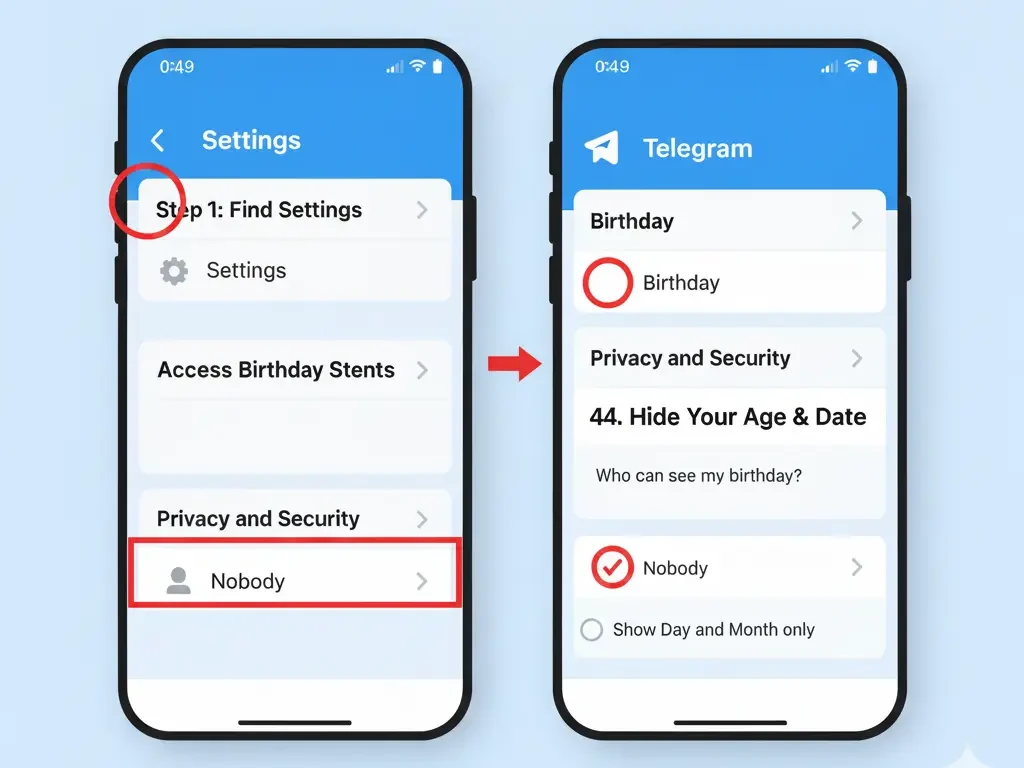
Open Telegram ➔ Settings ➔ Privacy and Security ➔ Birthday ➔ Select Nobody
- To Hide Only Your Age: Set “Show My Birthday” to ➔ “Day and Month only”.
- To Hide Your Entire Identity: Set “Who can see my birthday” to ➔ “Nobody”.
- To Keep Close Friends: Use the ➔ “Add Exceptions” feature at the bottom.
My Personal Privacy Comparison
| Level of Privacy | Social Vibe | Who Sees You? |
|---|---|---|
| High | 🥷 Stealth | Nobody (My choice for peace). |
| Medium | 🏠 Cozy | My Contacts (Just friends/family). |
| Low | 📢 Megaphone | Everybody (Strangers & Bots). |
The “Secret Sauce”: Using Exceptions
What I love most about the process of How to Hide Your Birthday on Telegram is the “Add Exceptions” feature. I chose “Nobody,” but then I manually added my mom and my partner to the “Always Share” list. It’s the best of both worlds: complete privacy from the public, but a warm celebration with the people who actually know me.
The “Full Ghost” Mode: Can You Hide Your Telegram Account Entirely?
After mastering How to Hide Your Birthday on Telegram, you might start feeling like a digital ninja. You might even ask yourself: “Wait, can I just hide my entire Telegram account from the world?” Maybe you’re trying to avoid that one distant relative who sends “Good Morning” stickers every single day, or you’ve just decided to live that mysterious stealth life. Well, if you’re wondering Can You Hide Telegram Account to the point of becoming a total ghost—it’s actually possible to disappear without deleting the app
FAQ: Things I Was Worried About
Q: Will hiding it affect my account age?
A: Not at all. Telegram still knows you’re an adult (or whatever age you are), it just stops shouting it to the world.
Q: Can I just hide the year but show the day?
A: Yes! When I was exploring How to Hide Your Birthday on Telegram, I noticed you can toggle “Show Day and Month only.” It’s great if you want the “Happy Birthday” messages without revealing exactly how old you’re turning.
Q: Does this stop the “cake” icon?
A: Yes, the cake disappears for everyone who isn’t on your “Always Share” list.
Q: Can I hide just my age but keep my birthday visible?
A: Yes! That’s exactly what I did. Inside the birthday settings, you can select the option to show only the “Day and Month.” This hides the year you were born, effectively hiding your age from everyone while still letting your friends know when to send a cake emoji.
Final Thought: How to Hide Your Birthday on Telegram
At the end of the day, we spend so much time online that we forget we can actually control the narrative. Learning How to Hide Your Birthday on Telegram was more than just a settings tweak for me—it was one of those small “life-hacks” that made my digital life feel like it finally belonged to me again.
Now I’m curious: Are you a “cake icon” person, or are you joining me in the shadows? Have you ever had one of those awkward “Happy Birthday” moments with someone you haven’t talked to in years? Drop your stories in the comments—I’d love to hear them!
Also, if you run into any trouble while trying to go off the radar, or if you have a privacy question I didn’t cover, don’t be a stranger. You can reach out to our @membertelsupport directly. My team and I are here to make sure your ninja transition is as smooth as possible! 😉







Leave a Reply