
I still remember the cold shiver down my spine back in 2024. My main crypto channel was being flooded with phishing links at 4 AM, and I was fast asleep. By the time I woke up, I’d lost 200 members and a chunk of my reputation. That was my wake-up call. Knowing how to add admin to Telegram channel and group isn’t just a technical necessity; it’s about survival in the 2026 digital landscape. I don’t want you to learn the hard way like I did. Let me walk you through my personal playbook for delegating power without losing your sanity.
If you are serious about Mastering Telegram 2026, you must understand that your admin strategy is just one piece of the puzzle in this evolving ecosystem.
The Strategy Behind the Search: Why Modern Admins Matter
The way we search for help has changed. You aren’t just looking for “which button to click.” You are looking for a way to trust someone else with your hard work. In my seven years of managing global Telegram communities, I’ve realized that a silent channel is a dead channel. You need a team. But a team without boundaries is a liability. If your community has surpassed 500 members, you are officially in the “danger zone” if you’re still flying solo.
Many creators struggle with How to Overcome the Empty Channel Syndrome on Telegram early on, and bringing in a dedicated admin is often the best way to keep content flowing and members engaged.
Mastering the Art: How to Add Admin to Telegram Channel
When I invite someone into my channel’s backend, I treat it like a security clearance. It’s a surgical process, and here is exactly how I do it to ensure zero leaks.
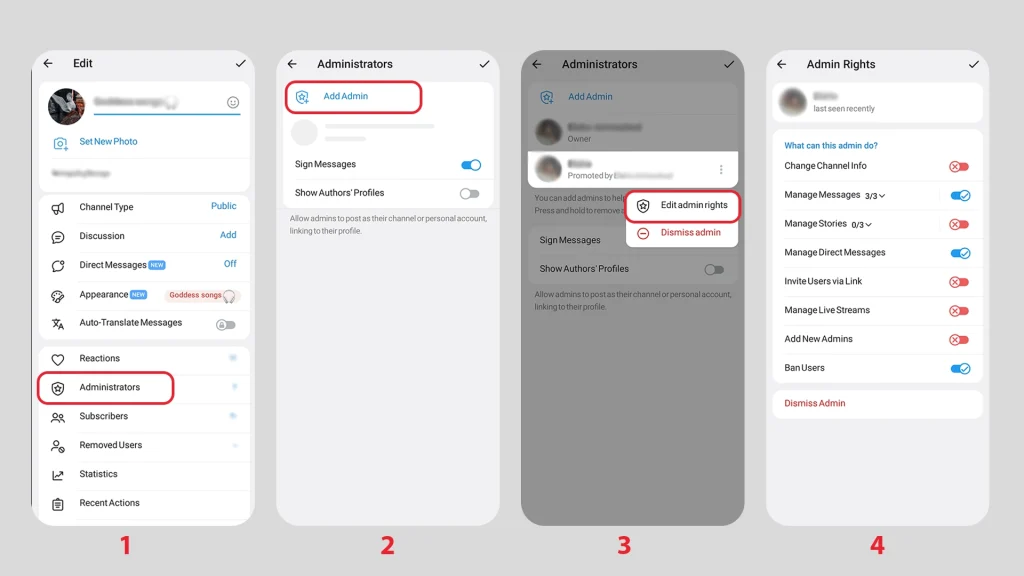
- Step 1: Open your channel profile and tap that Edit pencil icon in the top right corner.
- Step 2: Locate the ‘Administrators’ tab. It’s the heart of your operation.
- Step 3: Select ‘Add Admin’ and search for your trusted partner by their handle.
- Step 4: The Permission Deep Dive. This is where most people get lazy, and that’s where the trouble starts.
My Personal Safety Blueprint for Channel Permissions
Telegram 2026 gives us incredible granular control. Setting these up correctly is the difference between a secure channel and a compromised one.
- Change Channel Info: Keep this OFF. You don’t want an admin suddenly changing your logo or link on a whim.
- Post Messages: Content teams definitely need this toggle turned ON.
- Edit Messages of Others: Granting this only to senior editors prevents junior staff from “fixing” things they shouldn’t touch.
- Delete Messages: This is your primary shield. Keep it ON so they can wipe out spam.
- Invite Users via Link: Marketing admins will find this useful for tracking growth.
- Manage Video Chats: Essential if you host live Q&A sessions.
Security starts with you, so always ensure your own account is locked down with Two-Step Verification before you begin delegating power to others.
Admins managing these live sessions should also be familiar with How to Use Comments and Reactions in Telegram Group Calls to maintain a high level of audience interaction.
Building a Fort: How to Add Admin to Telegram Group
Groups are vibrant, noisy, and chaotic. Unlike the controlled environment of a channel, group admins are your frontline soldiers.
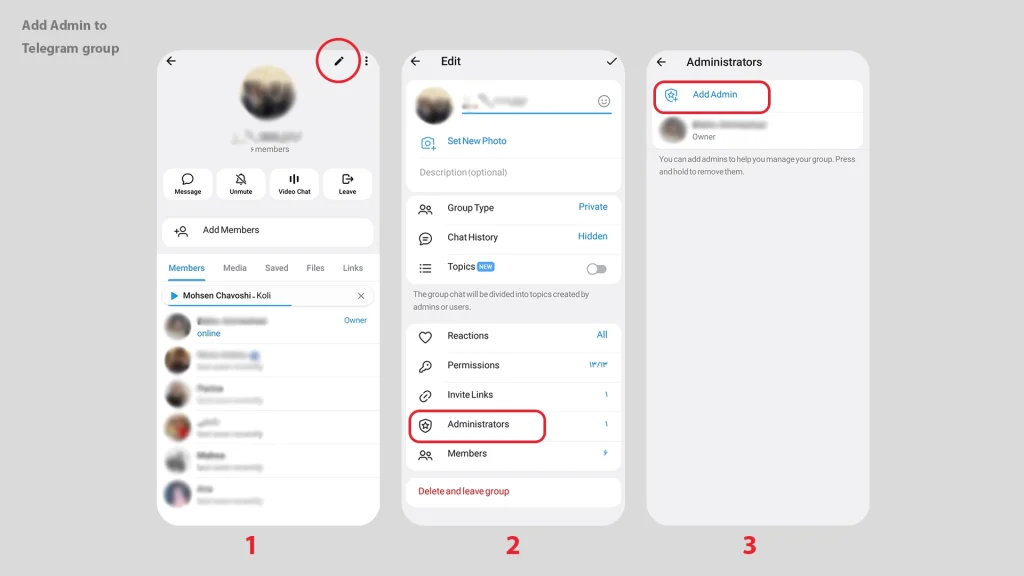
- Go to the group settings and find the ‘Administrators’ section.
- Hit ‘Add Admin‘ and pick your moderator.
- The Vibe Check: Before saving, customize their permissions based on their role.
Fine-Tuning Group Admin Permissions for 2026
I’ve managed groups with 100k+ members, and this setup has never failed me:
- Delete Messages: Total priority. Spam bots are fast, but a good admin is faster.
For those managing massive traffic, it is often wise to Use a Telegram Bot for Anti-Spam Protection in Your Group alongside your human moderators to catch every malicious link instantly.
- Ban Users: Give this to your most level-headed people. You don’t want an admin “rage-banning” your loyal fans.
- Pin Messages: Perfect for keeping the latest rules or announcements at the top.
- Manage Topics: If you use the 2026 Topics feature, your admins need this to keep the “General” chat from becoming a mess.
- Add New Admins: Most staff members should have this OFF. Power stays centralized with the creator this way.
Expert Quote
“In the 2026 Telegram ecosystem, the ‘Recent Actions’ log is your best friend. It provides a 48-hour audit trail of every move an admin makes, ensuring accountability and preventing internal sabotage.” Sarah Jenkins, Community Security Architect.
The Admin Role Comparison Table
| Role Category | Recommended For | Core Permission | Risk Level |
| The Content Editor | Channels | Post/Edit Messages | Low |
| The Moderator | Groups | Delete/Ban Power | Medium |
| The Growth Lead | Both | Invite Links/Management | Medium |
| The Successor | Handover | Ownership Transfer | Critical |
Real-World Application: The “Trial Period” Strategy
Trust is earned, not given. I start new admins with just “Delete Messages” for two weeks. Watching their “Recent Actions” like a hawk tells me everything I need to know about their judgment. If they stay active during the “night shifts,” I slowly unlock more features. It builds a culture of accountability.
FAQs: My Direct Answers to Your Concerns
Can an admin kick me out of my own channel?
No. As the Owner, you are at the top of the food chain. No admin can remove you or change your status.
While an admin has limited powers, only the owner can trigger a Telegram Ownership Transfer or permanently delete the entire community.
What happens to my private data during an ownership transfer?
Only the ownership of the channel/group moves. Your personal chat history and account stay private. However, the new owner will see who created the channel originally.
How do I manage admins on Telegram Desktop?
The process is identical. Right-click the channel/group name, go to ‘Manage’, and select ‘Administrators’. I actually prefer doing my permission setups on Desktop for better visibility.
Final Thoughts: How to Add Admin to Telegram Channel and group
Learning how to add admin to Telegram channel and group is the bridge between being a “hobbyist” and being a “pro.” Successfully managing your team is the ultimate secret to Mastering Telegram 2026 and staying ahead of the competition in an increasingly crowded market. Protect your community by setting boundaries, audit your admins regularly, and always keep your 2FA password secret.
Want to Dominate Telegram in 2026?
Growing a massive channel is one thing; managing it without losing your mind is another. If you need expert moderation, high-quality member growth, or a customized management strategy, my team has your back.
🚀 Let’s build your empire together on Telegram: @membertelsupport







Leave a Reply