
Imagine spending seventy two hours crafting the perfect market analysis or a Imagine spending seventy two hours crafting the perfect market analysis or a unique creative guide only to watch it vanish into a rival group within seconds. You see the view count on their post exploding while your own channel remains silent. It is a digital heartbreak that every serious creator faces in 2026. The culprit is not a complex hacker but a simple button that allows anyone to strip your authority with one tap. If you do not learn how to control message forwarding in Telegram channels, you are essentially building a house with no front door. I remember the exact night I saw my premium strategy being auctioned off by a copycat who did not even bother to fix my spelling mistakes. That was the day I stopped being a victim and started mastering the art of content lockdown. Today, I am handing you the keys to my personal vault so you can protect your hard work and force your audience to respect your ownership.
Hidden Risks When You Do Not Control Message Forwarding in Telegram Channels
Most creators fall for the myth that every share is good for business. In reality, when someone forwards your post, the recipient stays inside their own chat instead of visiting your channel. Even worse, many people use third party apps to strip your name away entirely. What you end up with is ghost content that builds someone else’s brand while your own member count stays flat. By taking control of your distribution, you stop being a public library and start being an exclusive destination. This shift in access is what separates struggling admins from the professionals who actually monetize their influence.
A Complete Guide to Control Message Forwarding in Telegram Channels Instantly
If you want to secure your digital assets effectively, you need to know exactly where the master switch is hidden. I want you to open your Telegram app right now and follow this flow to safeguard your work in less than a minute.
Accessing Your Channel Settings
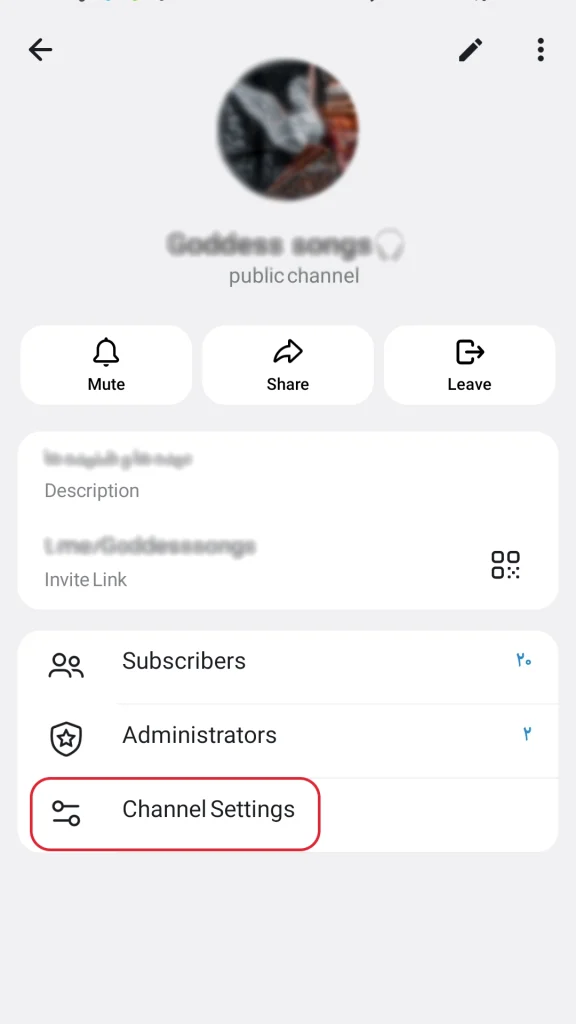
Start by tapping your channel name at the very top of the screen to enter your profile. From there, look for the pencil icon in the upper right corner which opens your administrative menu.
Finding the Privacy Controls
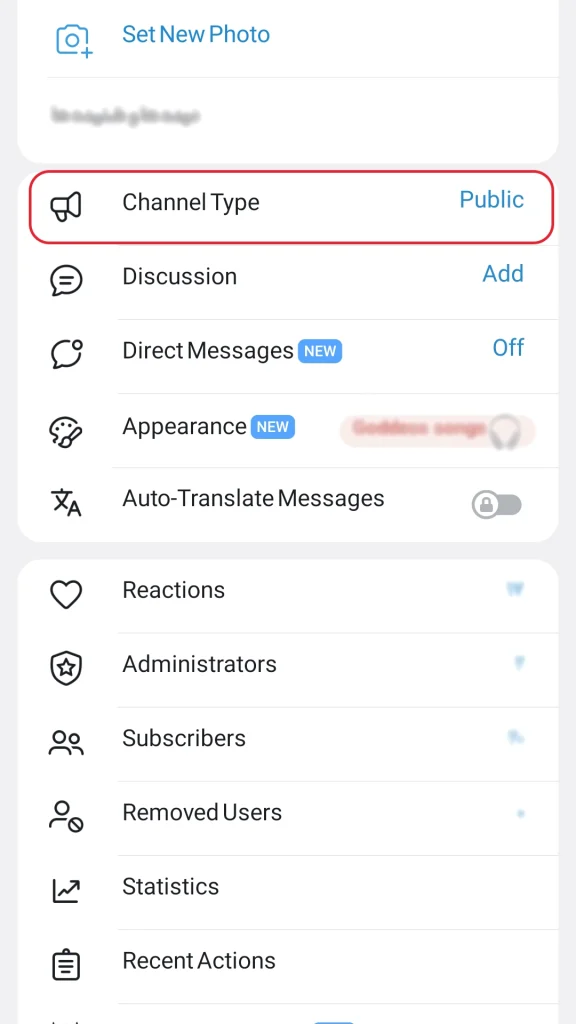
Once you are inside the settings, find the section labeled Channel Type. This is usually near the top. Click on it to see the deeper configuration of your community.
Restricting forwards is a major win for privacy but remember that true digital safety starts with your account integrity. It is essential to Protect Your Telegram Channel from Hackers by securing your personal login and using cloud passwords alongside these content locks.
Enabling the Protection
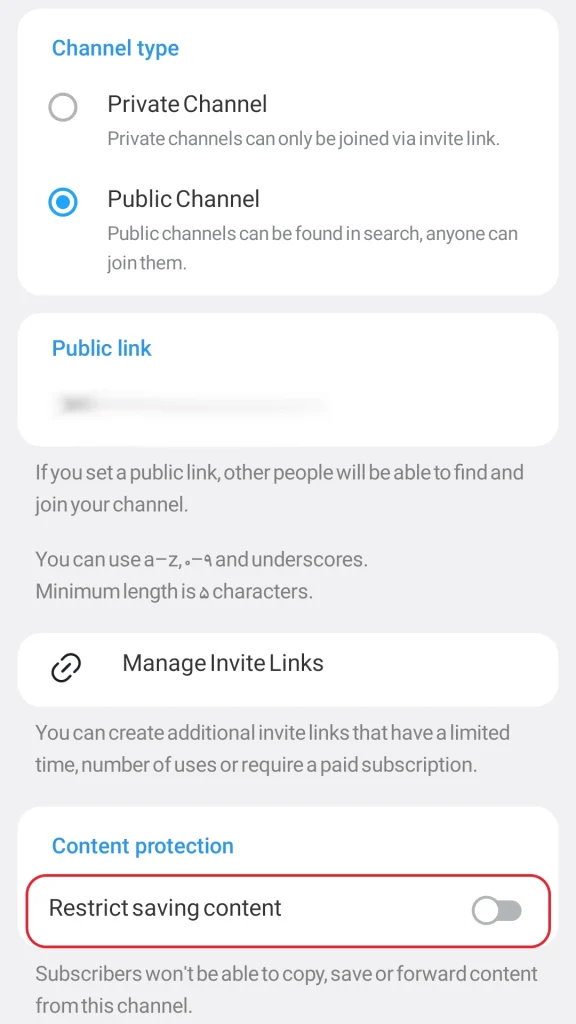
Scroll all the way down to the bottom of the Channel Type page until you find the header for Content Protection. You will see a specific toggle named Restrict Saving Content. To stop people from stealing your posts, turn this switch to the ON position. If you ever need to allow viral sharing again for a specific campaign, simply return to this spot and turn it OFF.
Once you hit save, the change is instant. Your subscribers will find that the forward icon has vanished. They cannot copy your text or save your photos.
On Android devices, the screen will even go black if they try to take a screenshot.
While iPhone users might still see the screen, Telegram prevents the actual saving of the media, making your content significantly harder to steal.
Expert Perspective on Ownership
Keeping your assets exclusive is the only real shield in the age of AI scraping. When you allow your unique work to travel without control you risk losing your legal claim to the material. Many creators find themselves dealing with complex Telegram Channel Copyright Strikes & Restrictions simply because they did not establish their ownership early enough through content locking. A true professional understands that privacy is a product in itself.
Security Models to Control Message Forwarding and Distribution
I have managed hundreds of high traffic channels and I have learned that one size does not fit all. Here is how I choose my strategy.
| Strategy Choice | Public Reach Model | Secure Vault Model |
| Forwarding Status | Allowed for everyone | Completely disabled |
| Main Goal | Viral discovery | High scarcity and sales |
| Media Access | Save to gallery ON | Save to gallery BLOCKED |
| Screenshot Security | Not active | Active on most devices |
The Psychology of the Locked Door
There is a powerful psychological shift that happens when a visitor realizes they cannot just save your post for later. It creates immediate urgency and increases the perceived value of your insights. Smart creators know that high conversion rates are just as important as high visibility. While your Telegram SEO strategy brings new eyes to your profile your content protection strategy ensures those visitors turn into permanent members rather than casual observers who just save and leave.
Pro Tips for the 2026 Admin
Beyond the basic settings, you should know these three industry secrets. First, locking your channel increases your Join Request rate because people realize they cannot get the info anywhere else. Second, always use an invisible watermark in the center of your videos. If someone records their screen with another camera, your brand is still there. Third, use self destructing timers for sensitive links. This ensures your most valuable data disappears after it is consumed.
Real World Case Study
I recently consulted for a trading group that saw their paid subscriptions drop because their signals were being leaked to free groups instantly. We implemented the forward restriction and the results were staggering. Their join requests tripled in thirty days because the leakers could no longer copy the data easily. Furthermore, keeping your content restricted prevents accidental reports that could trigger platform warnings. Following these safety protocols helps you avoid the technical errors required to Fix ‘This Channel Cannot Be Displayed’ on Telegram due to sensitive content flags.
Please note that while these settings provide high level security software updates can occasionally change menu layouts. Always ensure your Telegram app is updated to the latest version to access the most recent content protection features.
Frequently Asked Questions
Does this setting affect my older messages?
It absolutely does. The moment you enable the restriction, it applies to your entire channel history immediately.
Is this available on Telegram Desktop?
Yes. The desktop application will disable the right click menu and prevent text selection as soon as you save the settings.
Can I restrict forwarding for just one post?
Currently, the native setting applies to the whole channel. For single posts, you should use a specialized bot or a self destructing photo timer.
My Personal Rules for Success
I always tell my peers to stay sharp. Do check your Recent Actions log daily to see who is trying to bypass your rules. Do use a clear pinned message to explain that your content is protected because it is high value. However, do not lock your Join Link or your About section because you still want new users to find you.
Balancing security with engagement is a delicate dance for any professional. I often decide to Enable or Disable Comments in Telegram Channels depending on the sensitivity of the post which allows me to maintain a safe discussion space without compromising my protected content.
Final Strategy to Control Message Forwarding in Telegram Channels
Your hard work is your most valuable asset and your time is precious. Do not let a simple shared post allow others to build their empire on your back while you stay in the shadows. Taking the final step to secure your distribution is the most professional move you can make for your brand security in 2026.
If you feel overwhelmed by these complex privacy settings or need a professional security audit for your growing business, my team is standing by to assist. We specialize in advanced protection systems that ensure your digital assets stay in your hands while your community continues to grow safely. Connect with our expert team at @membertelsupport to turn your channel into a digital fortress today. Let us help you master the tools needed to control message forwarding in Telegram channels so your content stays exactly where it belongs: with you.













Leave a Reply